


Turinys
Buffer tebėra vienas lengviausiai suprantamų socialinių tinklų planuoklių. Prijungiate kanalą, įtraukiate įrašą į eilę ir leidžiate platformai paskelbti jį pasirinktu laiku. Kūrėjams ir mažoms įmonėms, kurios jau turi paruošto turinio, toks paprastumas tebėra vertingas.
Tačiau planavimas yra tik viena socialinių tinklų valdymo dalis. Daugelis komandų dabar daugiau laiko praleidžia svarstydamos, ką publikuoti, kurdamos firminius vizualus, derindamos patvirtinimus, atsakinėdamos į žinutes, valdydamos kelis klientus ir aiškindamos rezultatus, nei pridėdamos įrašus į kalendorių. Todėl ieškantys Buffer alternatyvų dažniausiai ieško ne šiek tiek kitokio planuoklio. Jie ieško įrankio, kuris pašalintų konkrečią kliūtį, kurios Buffer visiškai neišsprendžia.
Šiame gide palyginame septynias galimybes būtent šiuo požiūriu. Užuot kartoję bendrus funkcijų sąrašus, kiekviename skyriuje atsakome į keturis praktinius klausimus: kodėl kas nors norėtų keisti įrankį, ką alternatyva daro geriau, kur Buffer vis dar yra stipresnis pasirinkimas ir kam iš tiesų verta pereiti prie kito įrankio.
Redakcijos pastaba: Overvisual yra mūsų produktas, todėl jo darbo eigą pažįstame geriau nei kitų šiame sąraše esančių platformų. Aiškiai paaiškinome, kur jis stipriausias, kur geriau tiktų kitas įrankis ir kam jo rinktis nereikėtų.
Pagrindinės išvados
- Geriausia alternatyva priklauso nuo kliūties, o ne nuo funkcijų skaičiaus: turinio kūrimas, patvirtinimai, pranešimų srautas, paskyrų skaičius ar ataskaitos – kiekvienas atvejis veda prie kito įrankio.
- Overvisual (nuo €39/mėn.) yra pirmiausia į turinį orientuotas pasirinkimas: jis sugeneruoja firminius įrašus, Stories ir karuseles dar prieš jiems patenkant į kalendorių.
- Planable (nuo $33/darbo sritį per mėnesį, mokant už metus) skirtas patvirtinimo grandinėms; SocialPilot (nuo $25,50/mėn., mokant už metus) – agentūroms, valdančioms daug paskyrų už nuspėjamą kainą.
- Agorapulse ir Sprout Social pirmiausia yra įsitraukimo valdymo platformos – rinkitės jas, kai komentarai, žinutės ir ataskaitos svarbesni už skelbimą.
- Hootsuite ir Dash Social yra įrankių konsolidavimo ir didelių įmonių sprendimai, kainuojantys atitinkamai nuo maždaug $99/mėn. ir $999/mėn.
- Likti su Buffer yra visiškai pagrįstas sprendimas. Jei skelbimas iš tiesų yra vienintelis darbas, keitimas padidina išlaidas ir mokymo poreikį, bet nepašalina jokios problemos.
Buffer alternatyvos: greito pasirinkimo gidas
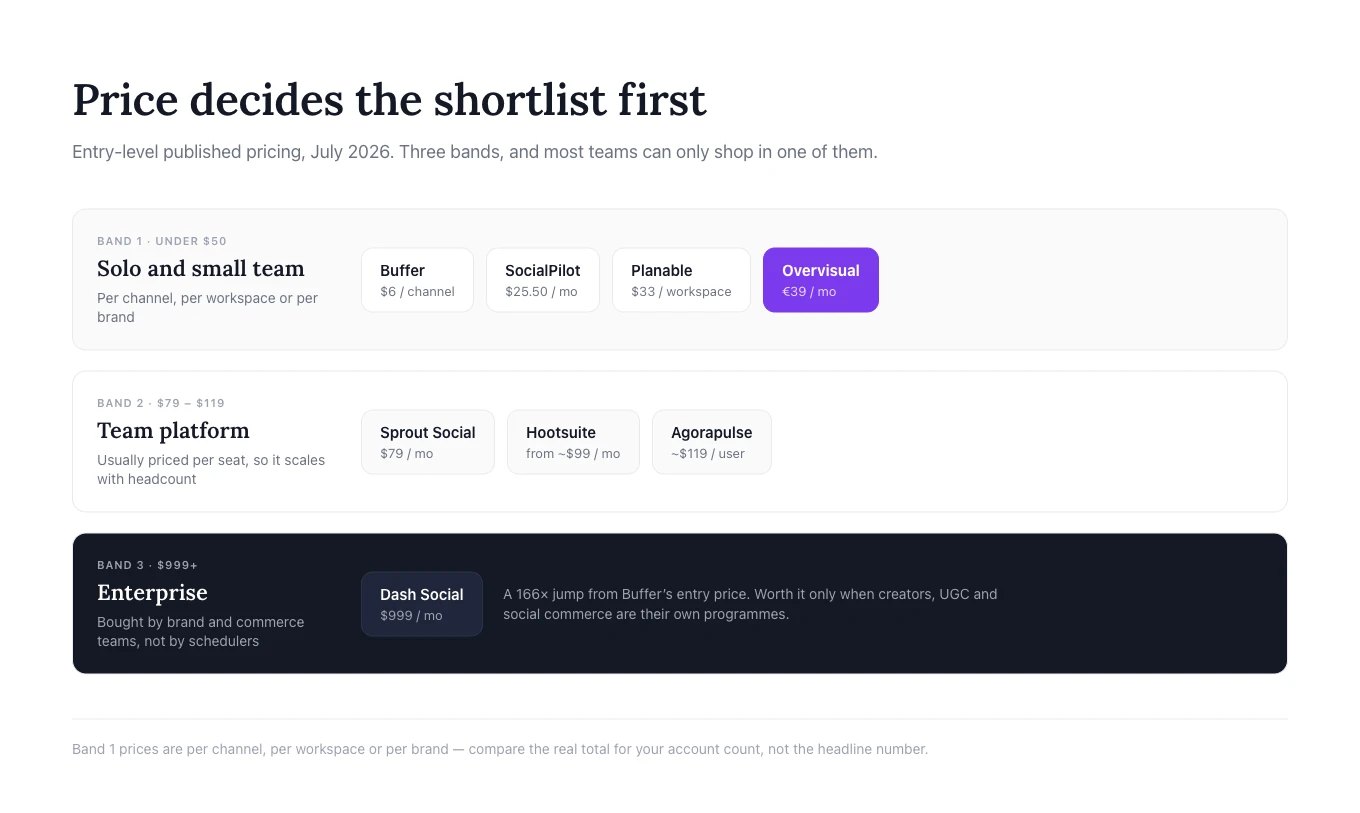
| Įrankis | Keiskite, kai reikia | Pranašumas prieš Buffer | Likite su Buffer, jei | Pradinė kaina* |
|---|---|---|---|---|
| Overvisual | AI, kuris kuria firminį turinį, o ne tik jį skelbia | Generavimas, dizainas, prekės ženklo rinkiniai, planavimas | Tekstai ir vizualai jau paruošti | €39 /mėn. |
| Dash Social | Išsamių kūrėjų, UGC ir socialinės prekybos įrankių | Prekės ženklui pritaikyta AI ir prekybos duomenys | Norite paprasto, pigaus skelbimo | $999 /mėn. |
| Planable | Klientų atsiliepimų ir daugiapakopių patvirtinimų | Peržiūra ir patvirtinimas vyksta prie paties įrašo | Vienas žmogus kuria ir tvirtina | $33 /darbo sritį |
| Hootsuite | Pranešimų dėžutės, stebėsenos ir valdymo vienoje sistemoje | Apima daugiau kasdienio darbo | Norite lengvo, nebrangaus įrankio | ~$99 /mėn. |
| Sprout Social | Klientų aptarnavimo ir ataskaitų vadovybei | Įsitraukimas ir verslo lygio įžvalgos | Daugiausia planuojate kelis kanalus | $79 /mėn. |
| SocialPilot | Daug paskyrų ir white-label ataskaitų | Daugiau profilių nuspėjamo dydžio plane | Valdote tik kelis kanalus | $25,50 /mėn. |
| Agorapulse | Bendros pranešimų dėžutės ir ROI ataskaitų | Didesnė kontrolė po paskelbimo | Skelbimas yra visas jūsų darbas | ~$119 /naudotoją |
*Kainos patikrintos oficialiuose produktų puslapiuose 2026 m. liepos mėn. Planai, valiutos, atsiskaitymo sąlygos, profilių limitai ir papildomos paslaugos dažnai keičiasi, todėl prieš pirkdami patikrinkite galutinę kainą.
Kodėl įmonės ieško Buffer alternatyvų
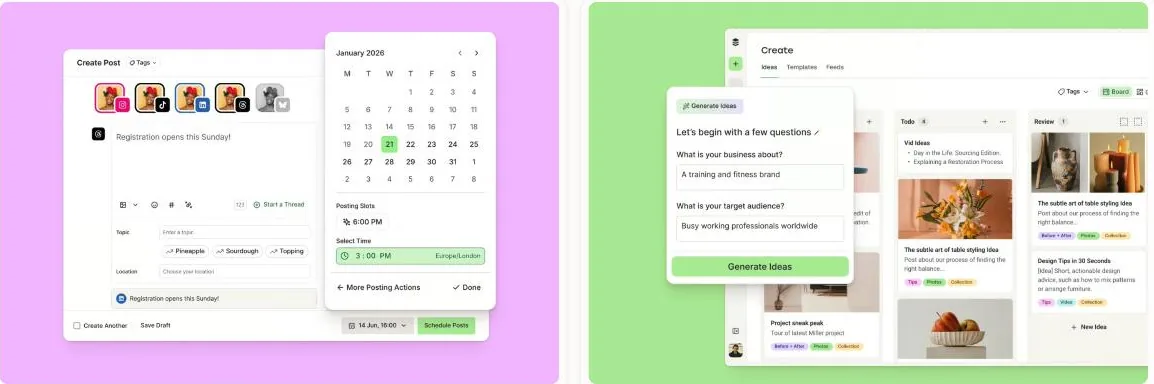
Buffer nėra silpnas produktas. Jo nemokamas planas šiuo metu palaiko iki trijų kanalų, kiekviename – po dešimt suplanuotų įrašų, o mokami planai prasideda nuo $6 per kanalą per mėnesį ir apima neribotą suplanuotų įrašų skaičių, taikant sąžiningo naudojimo apribojimus. Atitinkamuose planuose taip pat siūloma analitika, AI asistentas, įsitraukimo funkcijos ir komandos įrankiai.
Kūrėjams ir mažoms įmonėms, kurios jau turi paruošto turinio, toks aiškiai apibrėžtas darbo procesas gali puikiai tikti. Alternatyvos poreikis dažniausiai atsiranda tada, kai turinio rengimas ir derinimas reikalauja daugiau pastangų nei pats skelbimas.
Jums reikia pagalbos kuriant turinį
Daugelis įmonių vis dar ieško temų vienoje vietoje, rašo tekstus kitoje, atskirai kuria vizualus, o Buffer naudoja tik paskutiniam planavimo žingsniui. Į turinį orientuota alternatyva naudingesnė, kai tikroji kliūtis yra pakankamo kiekio firminių įrašų, Stories ir karuselių sukūrimas kalendoriui užpildyti.
Jūsų patvirtinimo procesas tapo chaotiškas
Eilė paprasta, kai paskyrą valdo vienas žmogus. Agentūroms ir didesnėms komandoms reikia komentarų, versijų kontrolės, klientų prieigos ir kelių patvirtinimo etapų. Tokiu atveju į bendradarbiavimą orientuota platforma pašalina daugiau darbo kliūčių nei dar vienas planuoklis.
Socialiniai tinklai tapo klientų aptarnavimo kanalu
Kai svarbūs tampa komentarai, žinutės, atsiliepimai, užduočių priskyrimas, moderavimas ir atsakymo laikas, stipresnė bendra pranešimų dėžutė yra vertingesnė už skelbimo kalendorių.
Valdote daug prekės ženklų arba reikia išsamesnių ataskaitų
Agentūros ir keliose vietovėse veikiančios įmonės dažnai renkasi planus, kuriuose sujungtos paskyros, naudotojai, klientų patvirtinimai ir white-label ataskaitos. Didelėms įmonėms taip pat gali prireikti stebėsenos, konkurentų duomenų, individualių skydelių ar ataskaitų, siejančių socialinių tinklų veiklą su platesniais verslo rezultatais.
Prieš keisdami įrankį nustatykite tris užduotis, kurios dabartiniame procese atima daugiausia laiko. Lyginkite įrankius pagal tas užduotis, o ne pagal ilgiausią funkcijų sąrašą.
Kada verta likti su Buffer
Lyginamuosiuose straipsniuose lengva sudaryti įspūdį, kad pakeitus įrankį darbas savaime pagerės. Taip nėra. Perėjimas prie didesnės platformos gali atnešti nereikalingų išlaidų, mokymų ir sudėtingumo.
Likite su Buffer, kai dabartinė darbo eiga veikia, o pagrindinis poreikis yra patikimas skelbimas. Buffer ir toliau tinka, kai:
- turinį valdo vienas žmogus;
- prekės ženklas naudoja tik kelis socialinių tinklų kanalus;
- įrašai parašomi ir sukuriami dar prieš patekdami į planuoklį;
- klientų patvirtinimų nereikia;
- komentarai ir tiesioginės žinutės tvarkomi pačiuose tinkluose;
- pažangi stebėsena ir klientų aptarnavimo užklausų nukreipimas nereikalingi;
- komanda vertina naudojimo paprastumą labiau nei funkcijų gausą.
Didesnis įrankis nėra geresnis, jei dauguma jo funkcijų lieka nenaudojamos. Tikslas – ne pakeisti Buffer platforma su ilgiausiu funkcijų sąrašu. Tikslas – nustatyti, kur darbas sulėtėja, ir pasirinkti būtent tai problemai sukurtą įrankį.
1. Overvisual: rinkitės, kai turinio kūrimas yra kliūtis
Geriausiai tinka: užimtiems steigėjams, mažoms rinkodaros komandoms, kūrėjams ir agentūroms, kurioms reikia pagalbos kuriant firminį socialinių tinklų turinį prieš jį suplanuojant.
Overvisual agentas yra AI socialinių tinklų vadybininkas, kuris planuoja, kuria, suplanuoja ir publikuoja turinį. Pagrindinis skirtumas nuo Buffer – kur prasideda darbo eiga.
Buffer geriausiai veikia, kai jau turite idėją, tekstą ir paruoštą vizualą. Overvisual agentas sukurtas padėti sukurti šiuos elementus. Jis gali generuoti turinį pagal prekės ženklą ar nišą, paversti idėjas įrašais, Stories ir karuselėmis, pritaikyti išsaugotas firmines spalvas ir šriftus, kurti dizaino variantus ir perkelti patvirtintą turinį į skelbimo kalendorių.
Kodėl verta pereiti nuo Buffer prie Overvisual?
Keiskite įrankį, kai jūsų komandai nepavyksta skelbti reguliariai, nes turinio kūrimas trunka per ilgai. Problema gali būti temų paieška, viso mėnesio tekstų rašymas, vizualinių formatų kūrimas ar nuoseklaus prekės ženklo stiliaus išlaikymas.
Overvisual sujungia darbo eigą į vieną sistemą:
- Išanalizuojamas prekės ženklas, niša ar turinio kryptis.
- Sugeneruojamas turinio planas ir įrašų idėjos.
- Sukuriami tekstai ir firminiai vizualai.
- Redaguojamas maketas, tekstas, spalvos, vaizdai ar šablonas.
- Patvirtintas rezultatas suplanuojamas ir paskelbiamas.
Platforma palaiko individualius prekės ženklo rinkinius, daugiau nei 200 šablonų variantų, įrašus, Stories ir karuselių skaidres. Dirbtinio intelekto padedamas teksto išdėstymas padeda neuždengti veidų ar svarbių objektų. Vizualų pavyzdį rasite Overvisual karuselių darbo eigoje.

Kur Overvisual stipresnis už Buffer
Overvisual stipresnis, kai norite, kad platforma sukurtų didesnę galutinio turinio dalį. Jis sumažina poreikį nuolat pereidinėti tarp pokalbių roboto, dizaino programos, planavimo dokumento ir planuoklio.
Jis ypač aktualus steigėjams, kurie nežino, ką skelbti, rinkodaros specialistams, kuriantiems pasikartojančias karuseles, agentūroms, gaminančioms turinį keliems prekės ženklams, ir komandoms, kurioms reikia kelių kampanijos variantų ar kalbų.
Kur Buffer stipresnis
Buffer geresnis, kai turinys jau yra, o jums reikia tik aiškios ir nebrangios skelbimo eilės. Jis siūlo brandžią sąsają, prieinamą nemokamą planą ir potencialiai mažesnes išlaidas kelių kanalų atveju.
Overvisual taip pat nėra skirtas pakeisti didelių įmonių stebėsenos, sudėtingo klientų aptarnavimo užklausų nukreipimo ar didelio masto reputacijos stebėjimo sprendimų.
Kaina ir išvada
Overvisual kainos prasideda nuo €39 per mėnesį. Planai daugiausia skiriasi mėnesio vizualų kreditų skaičiumi ir palaikomų prekės ženklų kiekiu.
Rinkitės Overvisual vietoj Buffer, kai: norite, kad AI sukurtų išbaigtą, prekės ženklo stilių atitinkantį socialinių tinklų turinį, o ne tik suplanuotų kitur sukurtus elementus.
Likite su Buffer, kai: jūsų kūrimo procesas jau efektyvus, o skelbimas yra vienintelė tikroji kliūtis.
2. Dash Social: rinkitės vizualinėms įžvalgoms didelėse įmonėse
Geriausiai tinka: įsitvirtinusiems grožio, mados, mažmeninės prekybos, gyvenimo būdo, svetingumo ir vartotojų prekių ženklams, turintiems didelias kūrėjų, UGC, vizualinės analitikos ir socialinės prekybos programas.
Dash Social yra didelėms įmonėms skirta socialinių tinklų valdymo platforma, paremta konkrečiam prekės ženklui pritaikyta AI. Ji sujungia planavimą ir skelbimą su turinio matavimu, kūrėjų valdymu, bendruomenės darbo eigomis, UGC, prognozuojamomis įžvalgomis ir prekybos įrankiais.
Tai nėra tiesioginis pigus Buffer pakaitalas. Tai kitokios kategorijos pirkinys organizacijoms, kurios socialinius tinklus laiko svarbiu prekės ženklo ir pajamų kanalu.

Kodėl verta pereiti nuo Buffer prie Dash Social?
Keiskite įrankį, kai komandai nebeužtenka skelbimo rodiklių ir reikia suprasti visą vizualinio turinio ekosistemą. Didelis vartotojų prekių ženklas gali norėti žinoti:
- kurios vizualinės koncepcijos greičiausiai veiks gerai;
- kaip skiriasi paties prekės ženklo ir kūrėjų turinio rezultatai;
- kurie kūrėjai duoda realių rezultatų;
- kaip UGC galima pakartotinai naudoti kampanijose ir prekybos patirtyse;
- kaip socialinių tinklų veikla veikia lankomumą ir pardavimus;
- kaip prekės ženklas atrodo palyginti su konkurentais.
Buffer gali paskirstyti turinį, tačiau Dash Social sukurtas padėti didelių įmonių komandoms valdyti ir matuoti aplink jį veikiančią sistemą.
Kur Dash Social stipresnis už Buffer
Dash Social stipresnis prekės ženklui pritaikytoje analizėje, kūrėjų valdyme, UGC ir socialinėje prekyboje. Jis padeda pereiti nuo klausimo „ar šis įrašas sulaukė įsitraukimo?“ prie platesnių klausimų apie kūrybinių elementų rezultatus, kampanijos poveikį ir turinio sukeltas konversijas.
Pagal kainodaros medžiagą, jo planuose taip pat yra neribotas naudotojų skaičius. Tai naudinga organizacijoms, į socialinių tinklų darbą įtraukiančioms kelis padalinius, nors bendra platformos kaina vis tiek gerokai viršija Buffer kainą.
Aiškiausi naudojimo atvejai:
- formalios influencerių ar kūrėjų programos valdymas;
- naudotojų sukurto turinio, kuriam gauti naudojimo leidimai, tvarkymas;
- vizualinių dėsningumų matavimas dideliame turinio archyve;
- socialinių įrašų susiejimas su prekių galerijomis ir profilio nuorodų puslapiais;
- didelės prekės ženklo komandos veiksmų derinimas remiantis rezultatų duomenimis.
Kur Buffer stipresnis
Buffer gerokai lengviau pagrįsti kūrėjams, vietinėms įmonėms ir mažoms rinkodaros komandoms. Jis siūlo skaidrų pigų startą, nemokamą planą ir mažesnę mokymosi laiką.
Įmonė, kuri nori tik planuoti turinį ir peržiūrėti pagrindinę analitiką, naudotų menką Dash Social dalį. Tokiu atveju didelių įmonių platforma padidina išlaidas, bet nepašalina tikros kliūties.
Kaina ir išvada
Dash Social kainos prasideda nuo $999 per mėnesį. Priklausomai nuo paketo, galima pridėti Creator Management, Premium Analytics ir Social Listening.
Rinkitės Dash Social vietoj Buffer, kai: socialiniai tinklai yra svarbus komercinis kanalas, o jums reikia didelių įmonių lygio vizualinių įžvalgų, kūrėjų valdymo, UGC ir prekybos darbo eigų.
Likite su Buffer, kai: ieškote paprasto skelbimo, o ne didelių įmonių veiklos sistemos.
3. Planable: rinkitės, kai patvirtinimai viską sulėtina
Geriausiai tinka: agentūroms, keliose vietovėse veikiančioms įmonėms, skirtingose vietose dirbančioms komandoms ir prekių ženklams, kuriuose keli žmonės peržiūri turinį prieš jį publikuojant.
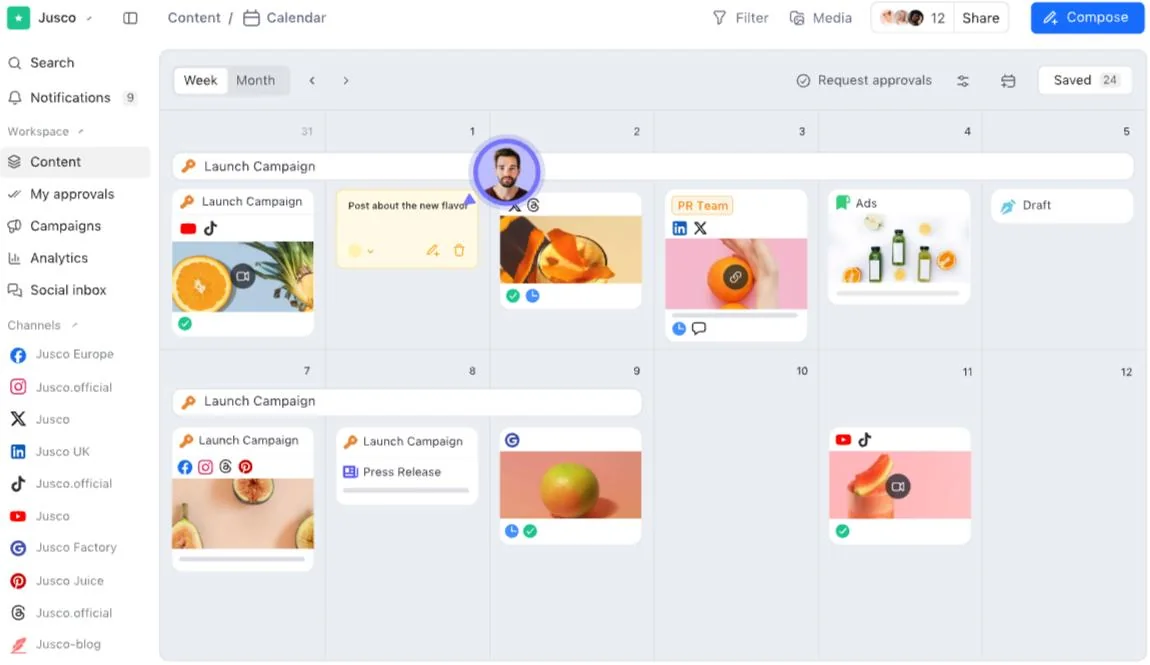
Planable yra į bendradarbiavimą orientuota socialinių tinklų valdymo programinė įranga. Ji leidžia komandoms bendrose darbo srityse kurti, aptarinėti, peržiūrėti, tvirtinti, publikuoti turinį, bendrauti su auditorija ir analizuoti rezultatus.
Stipriausias produkto skirtumas nuo Buffer yra ne AI generavimas ar stebėsena didelėms įmonėms. Tai patogus turinio peržiūros procesas.
Kodėl verta pereiti nuo Buffer prie Planable?
Keiskite įrankį, kai tikroji problema yra ne įrašo kūrimas ar planavimas, o jo patvirtinimas. Daugelis komandų vis dar tvarko atsiliepimus per el. paštą, pokalbius, dokumentus, ekrano nuotraukas ir skaičiuokles. Tai sukuria nuspėjamų problemų:
- komentarai nurodo pasenusią versiją;
- vidiniai atsiliepimai netyčia parodomi klientui;
- niekas nežino, ar galutinis tekstas buvo patvirtintas;
- turinys lieka nepaskelbtas, kol laukiama sprendimo;
- vietinės komandos redaguoja nenuosekliai;
- planuoklyje yra kita versija nei patvirtinimo dokumente.
Planable sutelkia šį pokalbį aplink patį įrašą.
Kur Planable stipresnis už Buffer
Planable siūlo srauto, tinklelio, kalendoriaus ir sąrašo rodinius. Komandos nariai ir klientai gali komentuoti tiesiai šalia turinio, siūlyti pakeitimus ir patvirtinti galutinę versiją. Klientams, prekių ženklams, vietovėms ar skyriams galima sukurti atskiras darbo sritis.
Mokami planai apima neribotą naudotojų skaičių, o tai svarbu agentūroms, norinčioms įtraukti klientų atstovus nepirkdamos atskiros prieigos su visomis publikavimo teisėmis kiekvienam peržiūrėtojui. Aukštesni planai palaiko daugiau patvirtinimo konfigūracijų, įskaitant daugiapakopius patvirtinimo procesus.
Planable stipresnis, kai:
- agentūrai reikia kliento pritarimo;
- įrašus peržiūri keli skyriai;
- reikalingas teisinis ar atitikties žingsnis;
- vietiniai padaliniai pritaiko centrines kampanijas;
- svarbus Instagram tinklelio kontekstas;
- patvirtinimų istorija turi būti matoma.
Kur Buffer stipresnis
Buffer labiau tinka pavieniams naudotojams ir mažoms komandoms be formalios patvirtinimo grandinės. Jo sąsaja lengvesnė, o kaina mažesnė, kai reikia prijungti tik kelis kanalus.
Planable kaina skaičiuojama pagal darbo sritį, todėl agentūroms reikia apskaičiuoti išlaidas visiems klientams. Analitikos ir socialinių tinklų pranešimų dėžutės poreikiai taip pat gali paveikti galutinį paketą. Komandai, pirmiausia ieškančiai AI sugeneruotų firminių vizualų, vis tiek prireiks atskiro turinio kūrimo įrankio.
Kaina ir išvada
Planable kainos prasideda nuo $33 už darbo sritį per mėnesį, mokant už metus. Pro planas kainuoja $49 už darbo sritį per mėnesį ir išplečia limitus bei patvirtinimo galimybes.
Rinkitės Planable vietoj Buffer, kai: atsiliepimai, klientų peržiūra ir patvirtinimo etapai vėlina skelbimą labiau nei turinio kūrimas.
Likite su Buffer, kai: vienas žmogus savarankiškai kuria, tvirtina ir planuoja turinį.
4. Hootsuite: rinkitės, kai reikia platesnio veiklos rinkinio
Geriausiai tinka: rinkodaros ir klientų aptarnavimo komandoms, norinčioms brandžioje platformoje turėti skelbimą, stebėseną, pranešimų dėžutės valdymą, ataskaitas, patvirtinimus ir valdymo kontrolę.
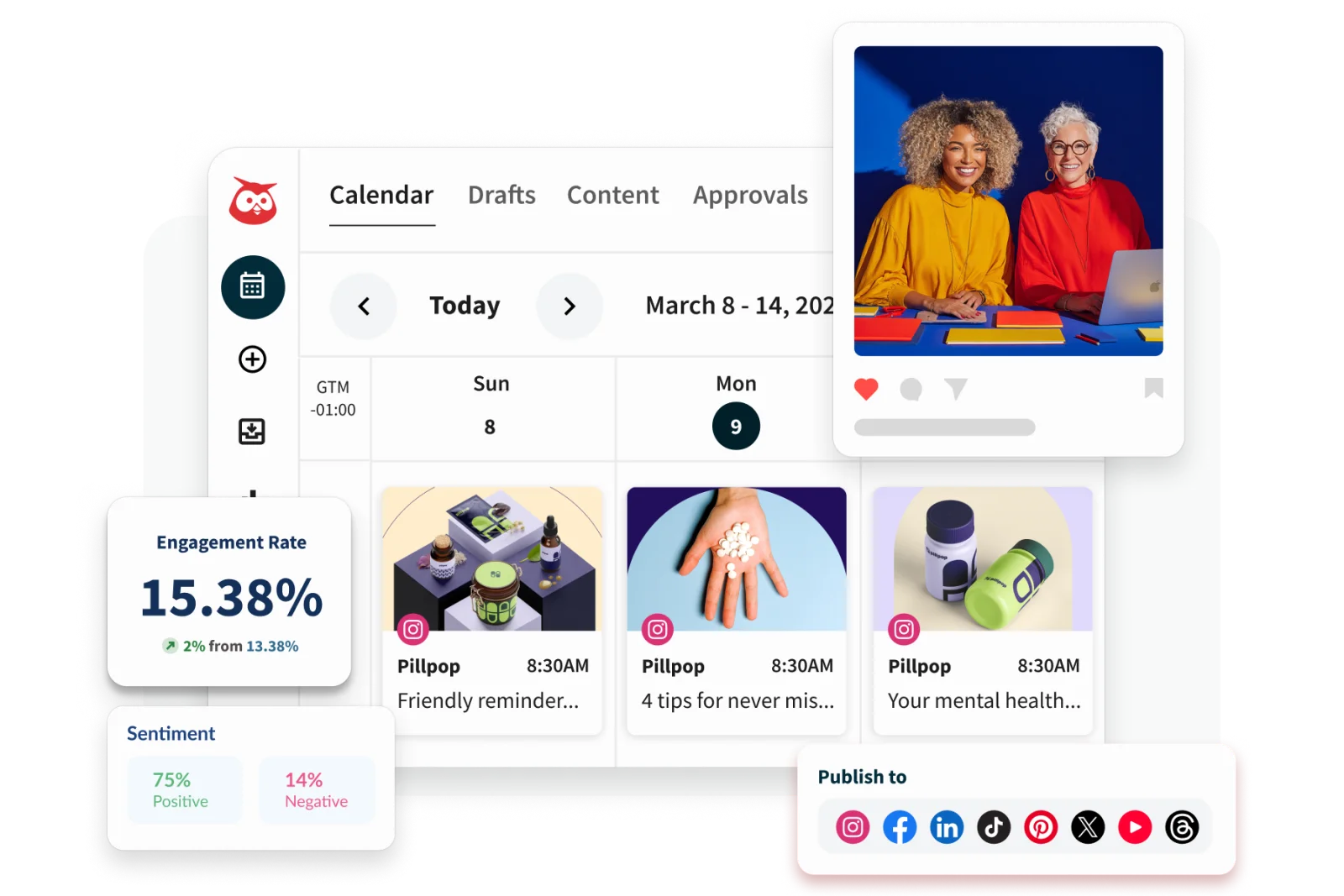
Hootsuite toli pranoko vien planavimą. Jo rinkinį sudaro skelbimas, AI padedamas turinio kūrimas, bendra pranešimų dėžutė, stebėsena, analitika, klausymasis, komandos darbo eigos ir didelių įmonių valdikliai.
Komandai, sukaupusiai kelis atskirus socialinių tinklų įrankius, Hootsuite gali būti konsolidavimo galimybė.
Kodėl verta pereiti nuo Buffer prie Hootsuite?
Keiskite įrankį, kai su socialiniais tinklais dirba keli skyriai, o skelbimo kalendorius yra tik viena veiklos dalis. Augančioje įmonėje rinkodara gali planuoti kampanijas, klientų aptarnavimas – atsakinėti į žinutes, komunikacija – stebėti prekės ženklo paminėjimus, o vadovybė – prašyti rezultatų ataskaitų.
Buffer vis dar gali atlikti dalį šių užduočių, tačiau Hootsuite suteikia platesnį koordinavimą ir valdymą.
Kur Hootsuite stipresnis už Buffer
Hootsuite stipresnis stebėsenos, pranešimų dėžutės valdymo, darbo eigos automatizavimo, patvirtinimų, individualių ataskaitų ir didelių įmonių administravimo srityse. Aukštesni planai palaiko turinio užduočių priskyrimą, žinučių nukreipimą, pažangią stebėseną ir saugumo reikalavimus.
Tai naudinga, kai įmonei reikia:
- priskirti žinutes tinkamam žmogui;
- stebėti prekės ženklo ar konkurentų pokalbius;
- koordinuoti skelbimą didesnėje komandoje;
- išlaikyti patvirtinimo ir leidimų kontrolę;
- rengti individualias ataskaitas keliems suinteresuotiesiems asmenims;
- tvarkyti bendravimą su klientais toje pačioje sistemoje, kuri naudojama skelbimui.
Hootsuite taip pat gali pakeisti keletą siauresnių įrankių, todėl didesnę kainą lengviau pagrįsti komandoms, jau mokančioms už atskirus pranešimų dėžutės, stebėsenos ir ataskaitų produktus.
Kur Buffer stipresnis
Buffer lengviau išmokti ir jis daug pigesnis nedideliam kanalų skaičiui. Kūrėjas ar maža įmonė gali pradėti nuo nemokamo plano arba mokėti už kiekvieną prijungtą kanalą, nesinaudodami didelių įmonių darbo eigomis.
Hootsuite atrodo pernelyg sudėtingas, kai komandai iš esmės reikia tik kalendoriaus. Kainodara pagal naudotoją taip pat gali greitai augti, kai prieigos reikia daugiau kolegų. Prieš keisdami apskaičiuokite kainą pagal reikiamą naudotojų skaičių ir nustatykite, kurios Hootsuite funkcijos iš tiesų pakeis esamą programinę įrangą.
Kaina ir išvada
Viešoje Hootsuite 2026 m. medžiagoje nurodyti planai prasideda maždaug nuo $99 per mėnesį, o aukštesni paketai prideda platesnį automatizavimą, analitiką, bendradarbiavimą ir valdymą. Kainos ir paskyrų limitai skiriasi priklausomai nuo paketo ir atsiskaitymo regiono, todėl dabartinį pasiūlymą patvirtinkite oficialiame planų puslapyje.
Rinkitės Hootsuite vietoj Buffer, kai: jums reikia platesnio socialinių tinklų veiklos rinkinio, o ne lengvo planuoklio.
Likite su Buffer, kai: skelbimas yra pagrindinis darbas, o komandai nereikia sudėtingų pranešimų dėžutės, stebėsenos ar valdymo darbo eigų.
5. Sprout Social: rinkitės klientų aptarnavimui ir socialinėms įžvalgoms
Geriausiai tinka: organizacijoms, kurios naudoja socialinius tinklus klientų aptarnavimui, reputacijos valdymui, analitikai, tyrimams ir tarpfunkcinėms verslo įžvalgoms.
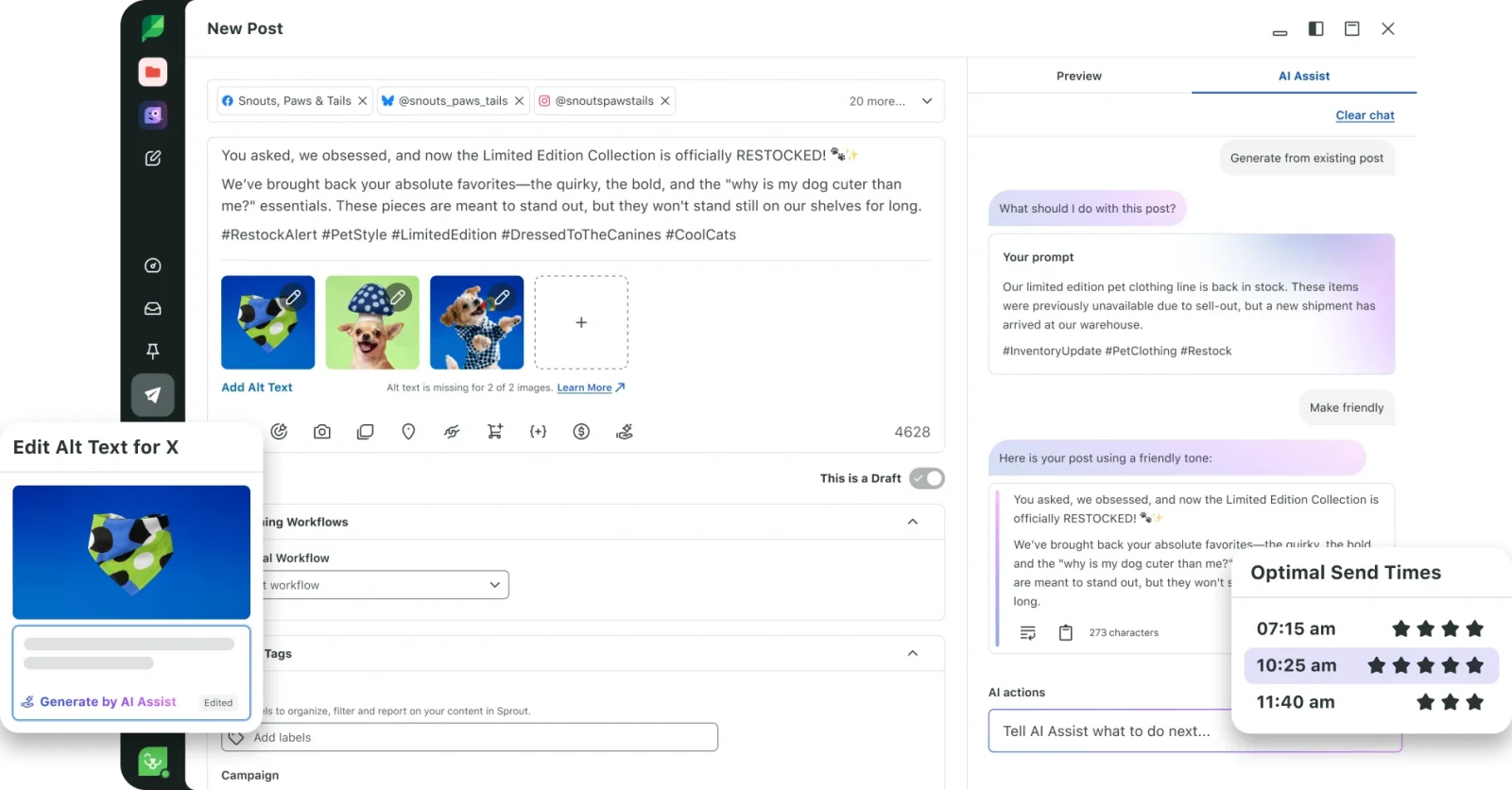
Sprout Social socialinių tinklų duomenis pristato kaip verslo įžvalgų šaltinį. Jo platforma sujungia skelbimą su įsitraukimu, klientų aptarnavimu, analitika, socialine stebėsena, konkurentų įžvalgomis ir komandos darbo eigomis.
Skirtumas nuo Buffer tampa aiškus, kai iš socialinių tinklų tikimasi daugiau nei turinio kalendoriaus.
Kodėl verta pereiti nuo Buffer prie Sprout Social?
Keiskite įrankį, kai organizacijai reikia suprasti pokalbius ir sistemingai pagal juos veikti: klientų aptarnavimo komandai, matuojančiai atsakymų rezultatus, prekės ženklo komandai, stebinčiai nuotaikas, produkto komandai, besimokančiai iš klientų atsiliepimų, ar vadovybei, prašančiai nuoseklių ataskaitų keliose rinkose.
Tokioje aplinkoje socialinių tinklų pranešimų dėžutė ir įžvalgų sluoksnis svarbesni už eilės valdymą.
Kur Sprout Social stipresnis už Buffer
Sprout Social stipresnis įsitraukimo darbo eigose, klientų aptarnavime, stebėsenoje, analitikoje ir tarpfunkcinėse ataskaitose. Jo įrankiai padeda komandoms nukreipti darbą, sekti atsakymų veiklą, analizuoti tendencijas ir susieti socialinius duomenis su platesniais verslo sprendimais.
Platforma tinka, kai socialinių tinklų komandoms reikia:
- valdyti didelį gaunamų žinučių kiekį;
- priskirti ir sekti bendravimą su klientais;
- stebėti prekės ženklo ar kampanijų pokalbių pokyčius;
- lyginti konkurentus ir rinkos temas;
- rengti pasikartojančias ataskaitas vadovybei;
- dalytis socialinėmis įžvalgomis su klientų aptarnavimo, produkto ar vadovybės komandomis.
Sprout taip pat palaiko AI padedamą tekstų kūrimą ir skelbimą, tačiau svarbiausia priežastis juo pakeisti Buffer yra ne pagrindinis turinio generavimas. Tai įsitraukimo ir įžvalgų sistemos gylis.
Kur Buffer stipresnis
Buffer gerokai prieinamesnis asmenims ir mažoms komandoms. Jis siūlo paprastesnę patirtį, nemokamą pradžią ir mažas kainas už kanalą.
Sprout Social vargu ar atsipirks, kai įmonė skelbia keletą kartų per savaitę ir sulaukia nedaug komentarų ir žinučių. Platforma labiau apsimoka, kai speciali komanda nuosekliai naudos jos ataskaitų, klientų aptarnavimo ir įžvalgų funkcijas.
Kaina ir išvada
Sprout Social kainos šiuo metu prasideda nuo $79 per mėnesį. Bendra kaina priklauso nuo plano, naudotojų skaičiaus ir reikalingų papildomų galimybių.
Rinkitės Sprout Social vietoj Buffer, kai: socialiniai pokalbiai, klientų aptarnavimas, analitika ir įžvalgos verslui yra strategiškai svarbūs.
Likite su Buffer, kai: jums daugiausia reikia paprasto planavimo ir neturite komandos, skirtos įsitraukimui ar ataskaitoms.
6. SocialPilot: rinkitės agentūrų mastui už mažesnę kainą
Geriausiai tinka: agentūroms, konsultantams, keliose vietovėse veikiančioms įmonėms ir komandoms, valdančioms daug profilių ir stebinčioms programinės įrangos išlaidas.
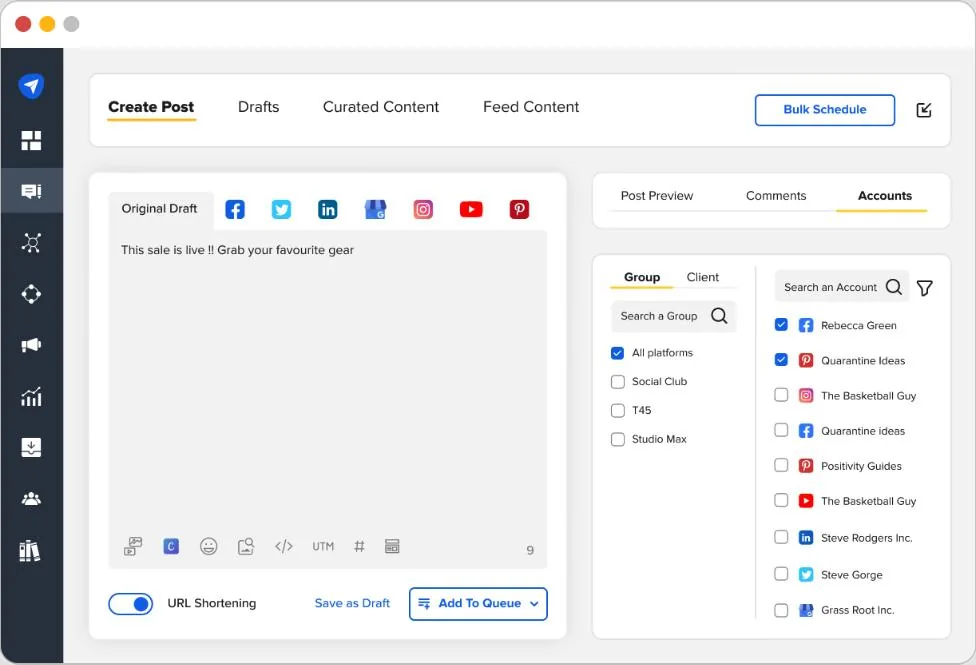
SocialPilot sujungia skelbimą, masinį planavimą, patvirtinimus, analitiką, socialinių tinklų pranešimų dėžutę, AI pagalbą, atsiliepimų valdymą ir agentūroms skirtas funkcijas. Stipriausia jo pozicija prieš Buffer – paketų sudarymas: planai apima daugiau paskyrų, naudotojų, patvirtinimų ir white-label galimybių už nuspėjamą plano kainą.
Kodėl verta pereiti nuo Buffer prie SocialPilot?
Keiskite įrankį, kai paskyrų ir klientų skaičius auga greičiau nei darbo eiga. Buffer kainodara pagal kanalą patraukli nedideliu mastu, tačiau agentūrai taip pat gali prireikti:
- klientų patvirtinimų;
- kelių komandos narių;
- masinio planavimo;
- white-label ataskaitų;
- atskiro klientų valdymo;
- socialinių tinklų pranešimų dėžutės;
- atsiliepimų valdymo;
- pagalbos diegiant ir perkeliant paskyras.
SocialPilot sugrupuoja šias galimybes į planus, skirtus profesionalams, mažų ir vidutinių įmonių komandoms, augančioms agentūroms ir keliose vietovėse veikiančioms organizacijoms.
Kur SocialPilot stipresnis už Buffer
SocialPilot stipresnis apimties ir agentūrų veiklos srityse. Jo Premium plane yra 25 socialinės paskyros, šeši naudotojai, masinis planavimas, pažangi analitika, klientų patvirtinimai ir white-label ataskaitos. Ultimate planas leidžia valdyti iki 50 paskyrų ir įtraukti neribotą naudotojų skaičių, taip pat prideda saugumo, diegimo ir paskyrų valdymo funkcijas.
Platforma patraukli komandoms, norinčioms valdyti daug paskyrų nemokant atskirai už kiekvieną papildomą prieigą. Masinis planavimas taip pat naudingas agentūroms, ruošiančioms didelius turinio paketus.
Papildomi naudojimo atvejai:
- dalijimasis prekės ženklo stiliumi parengtomis rezultatų ataskaitomis su klientais;
- atsiliepimų valdymas kartu su socialiniu bendravimu;
- turinio patvirtinimas viduje ir išorėje;
- kelių vietovių įtraukimas;
- prieigos suteikimas keliems kolegoms be didelių įmonių kainodaros už vietą.
Kur Buffer stipresnis
Buffer gali likti pigesnis ir lengvesnis kūrėjui ar mažai įmonei, valdančiai tik kelis kanalus. Dėl kainodaros pagal kanalą naudotojams nereikia pirkti didesnio paskyrų paketo anksčiau nei jo prireikia.
Aiški Buffer sąsaja taip pat paprastesnė kasdieniame darbe. SocialPilot tampa vertingesnis augant paskyrų skaičiui, komandos dydžiui ir agentūros poreikiams.
Kaina ir išvada
SocialPilot kainos prasideda nuo $25,50 per mėnesį mokant už metus už septynias paskyras ir vieną naudotoją. Standard planas šiuo metu kainuoja $42,50 per mėnesį mokant už metus, Premium – $85, o Ultimate – $170, o planai skiriasi paskyrų, naudotojų, patvirtinimų, analitikos, AI kreditų ir agentūrų funkcijų kiekiu.
Rinkitės SocialPilot vietoj Buffer, kai: valdote daug socialinių profilių ar klientų ir jums reikia agentūrų darbo eigų be perėjimo prie didelių įmonių kainodaros.
Likite su Buffer, kai: turite tik kelis kanalus ir norite kuo paprastesnės skelbimo sistemos.
7. Agorapulse: rinkitės, kai svarbiausias įsitraukimo valdymas
Geriausiai tinka: rinkodaros ir bendruomenės komandoms, kurioms reikia struktūruotos pranešimų dėžutės, moderavimo, socialinės stebėsenos, ataskaitų ir geresnio socialinių tinklų rezultatų matomumo.
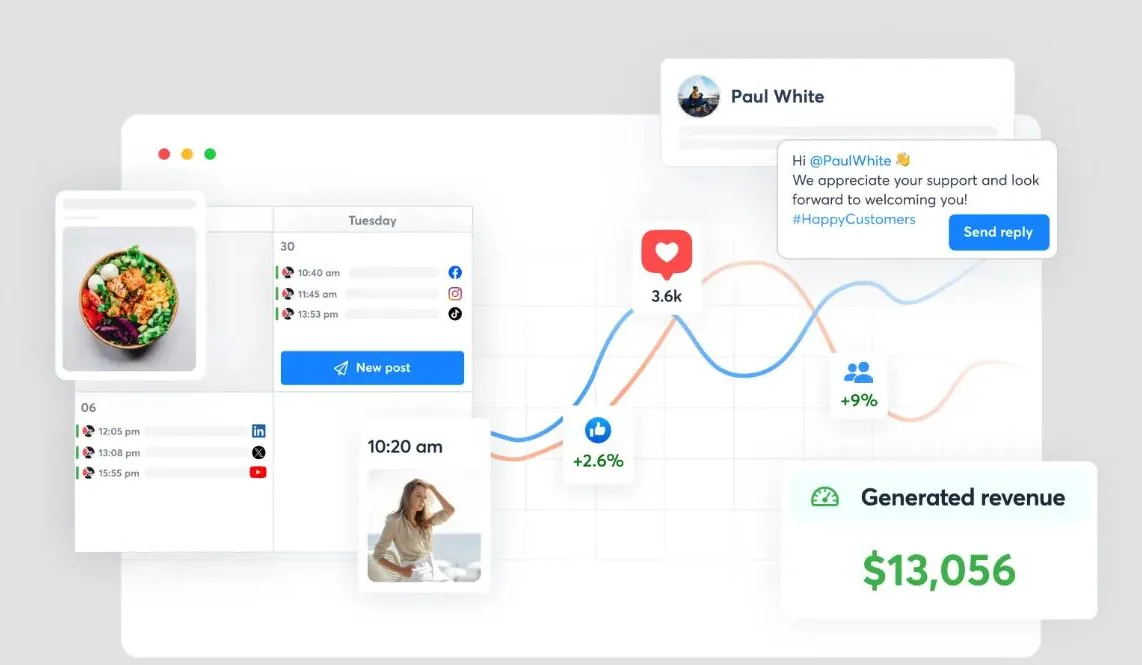
Agorapulse sujungia skelbimą su bendra socialinių tinklų pranešimų dėžute, stebėsena, ataskaitomis, bendradarbiavimu ir į ROI orientuotomis darbo eigomis.
Tai praktiška alternatyva, kai turinys skelbiamas sėkmingai, bet komanda praranda pokalbių ir po jų einančių ataskaitų kontrolę.
Kodėl verta pereiti nuo Buffer prie Agorapulse?
Keiskite įrankį, kai gaunamų žinučių ir komentarų tvarkymas tapo atskiru kasdieniu darbu. Prekės ženklas gali gauti žinučių, komentarų, paminėjimų, atsiliepimų ir atsakymų į kampanijas keliuose profiliuose. Tvarkant juos tiesiogiai kiekviename tinkle, sunku priskirti atsakomybę, sekti, kas atsakyta, ir išlaikyti nuoseklų aptarnavimą.
Agorapulse sutelkia šį bendravimą vienoje vietoje ir suteikia komandoms aiškesnį peržiūros bei atsakymo procesą.
Kur Agorapulse stipresnis už Buffer
Agorapulse stipresnis pranešimų dėžutės organizavimo, moderavimo, komandos užduočių, stebėsenos ir išsamių ataskaitų srityse. Jis sukurtas padėti komandoms valdyti socialinį bendravimą, o ne vien skelbti turinį.
Platforma naudinga:
- komentarams ir žinutėms sutelkti vienoje vietoje;
- pokalbiams priskirti konkretiems komandos nariams;
- moderavimo taisyklėms taikyti;
- atsakymų veiklai sekti;
- pasirinktiems prekės ženklo ir konkurentų terminams stebėti;
- klientų ar vadovybės ataskaitoms rengti;
- socialinei veiklai susieti su svetainės ar kampanijų rezultatais, kai tai leidžia nustatymai.
Agentūroms skelbimo, pranešimų dėžutės, bendradarbiavimo ir ataskaitų derinys sumažina atskirų sistemų, naudojamų kasdieniam darbui su klientais, skaičių.
Kur Buffer stipresnis
Buffer išlieka geresnio kainos ir naudos santykio pasirinkimas, kai gaunama nedaug komentarų ir žinučių, o komandai daugiausia reikia skelbimo. Jo nemokami ir nebrangūs planai prieinamesni, o sąsaja lengvesnė paprastai darbo eigai.
Agorapulse kaina paprastai skaičiuojama už naudotoją, todėl išlaidos auga, kai dalyvauja daugiau žmonių. Komandos taip pat turėtų patvirtinti, kurie profiliai, ataskaitų galimybės ir stebėsenos funkcijos įtraukti į pasirinktą paketą.
Kaina ir išvada
Agorapulse kainos šiuo metu rodo, kad mokami planai prasideda maždaug nuo $119 už naudotoją per mėnesį mokant už metus, o aukštesni planai suteikia daugiau galimybių ir didesnius limitus.
Rinkitės Agorapulse vietoj Buffer, kai: komentarų, žinučių, moderavimo, stebėsenos ir ataskaitų valdymas dabar yra toks pat svarbus kaip skelbimas.
Likite su Buffer, kai: bendravimą su auditorija galima tvarkyti pačiose socialinių tinklų programėlėse, o skelbimo eilė tebėra pagrindinis poreikis.
Geriausios Buffer alternatyvos pagal perėjimo priežastį
Teisingas atsakymas tampa aiškesnis, kai pradedate nuo priežasties, kodėl Buffer nebetinka.
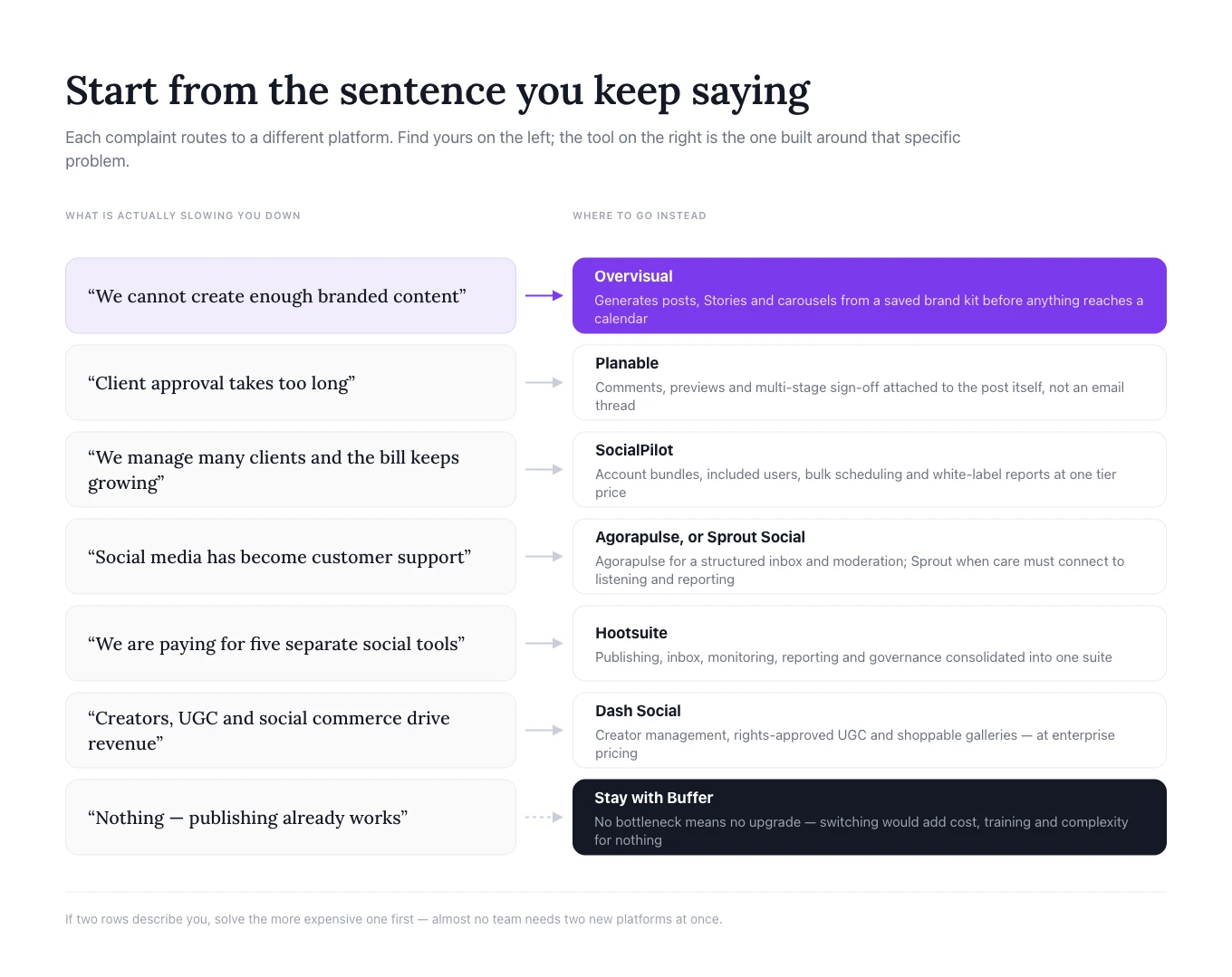
„Nespėjame sukurti pakankamai firminio turinio“
Rinkitės Overvisual. Jis atlieka darbus, reikalingus prieš suplanuojant publikavimą: generuoja idėjas, tekstus, įrašus, Stories ir karuseles pagal išsaugotą prekės ženklo tapatybę.
Daugiau patarimų, kaip sukurti nuoseklią skelbimo sistemą, rasite mūsų straipsnyje kaip augti Instagram.
„Klientų patvirtinimas trunka per ilgai“
Rinkitės Planable. Jo darbo sritys, vizualios peržiūros, komentarai ir patvirtinimo etapai sukurti būtent šiai kliūčiai.
„Valdome daug klientų ir reikia geresnės kainos dideliu mastu“
Rinkitės SocialPilot. Jo paskyrų paketai, įtraukti naudotojai, masinis planavimas, patvirtinimai ir white-label ataskaitos ypač aktualūs agentūroms.
„Socialiniai tinklai yra mūsų klientų aptarnavimo dalis“
Rinkitės Agorapulse, jei reikia struktūruotos pranešimų dėžutės ir praktiško įsitraukimo valdymo, arba Sprout Social, kai klientų aptarnavimas turi būti susietas su gilesnėmis įžvalgomis ir visos organizacijos ataskaitomis.
„Norime vienos plačios platformos didelei įmonei“
Rinkitės Hootsuite, kai tikslas – sujungti skelbimą, stebėseną, pranešimų dėžutę, analitiką, darbo eigas ir valdymą.
„Mūsų augimą lemia kūrėjai, UGC ir socialinė prekyba“
Rinkitės Dash Social, kai organizacija gali pagrįsti didelių įmonių kainodarą ir jai reikia prekės ženklui pritaikytų vizualinių įžvalgų, kūrėjų valdymo ir prekybos galimybių.
„Mums reikia tik patikimo planavimo“
Likite su Buffer. Perėjimas padidintų išlaidas ir sudėtingumą neišsprendęs tikros problemos.
Kaip pereiti nuo Buffer nesutrikdant skelbimo
Traktuokite pokytį kaip darbo proceso perkėlimą, o ne paprastą prisijungimo pakeitimą. Kitaip komandos sukuria pasikartojančius įrašus, praleidžia patvirtinimus arba praranda esamų ataskaitų kontekstą.
1. Dokumentuokite dabartinę sąranką
Surašykite kiekvieną prijungtą kanalą, eilę, komandos narį, patvirtinimo žingsnį, pasikartojančią kampaniją, rezultatų sekimo taisykles ir ataskaitą. Įtraukite ir darbą, vykstantį už Buffer ribų, pavyzdžiui, dizaino failus, užduotis ir klientų patvirtinimus.
2. Apibrėžkite, ką turi pakeisti nauja platforma
Užrašykite tikslų norimą perėjimo rezultatą: greitesnį firminio turinio kūrimą, mažiau patvirtinimo vėlavimų, vieną bendrą pranešimų dėžutę, mažesnes išlaidas daugeliui klientų profilių, socialinę stebėseną ar geresnes ataskaitas. Tai taps migracijos vertinimo standartu.
3. Pirmiausia išbandykite vieną prekės ženklą
Prijunkite mažesnės rizikos paskyrą ir išbandykite leidimus, įrašų formatavimą, nuorodas, paminėjimus, laiko juostas, patvirtinimus, pranešimų dėžutės sinchronizavimą, analitiką ir prieigą mobiliuoju įrenginiu. Prieš perkeldami visas paskyras paskelbkite kelis tikrus įrašus.
4. Perkurkite darbo eigą aplink naują įrankį
Nekopijuokite senojo proceso neįvertinę, kas jame turėtų keistis. Apibrėžkite prekės ženklo rinkinius Overvisual, perkelkite klientų atsiliepimus į Planable, sukonfigūruokite patvirtinimus SocialPilot, priskirkite pranešimų dėžutės atsakomybę Agorapulse ar Sprout Social arba nustatykite stebėseną ir leidimus Hootsuite. Mūsų teksto išdėstymo darbo eiga yra vienas iš pavyzdžių, kaip žingsnis visiškai išnyksta, kai jį perima įrankis.
5. Išsaugokite bazinius rodiklius ir užbaikite perėjimą
Prieš palikdami Buffer užfiksuokite naujausią aprėptį, įsitraukimą, paspaudimus, skelbimo dažnį ir atsakymų rodiklius. Numatykite trumpą, aiškiai atskirtą persidengimo laikotarpį ir įsitikinkite, kad tie patys įrašai nesuplanuoti abiejose sistemose. Atsisakykite Buffer tik tada, kai patvirtinsite, kad skelbimas, leidimai, patvirtinimai, pranešimų dėžutės ir ataskaitos veikia tinkamai.
Dažnai užduodami klausimai
Kokia geriausia Buffer alternatyva 2026 m.?
Tai priklauso nuo to, kodėl keičiate įrankį. Overvisual geriausias, kai kliūtis yra firminio turinio kūrimas; Planable – patvirtinimams; SocialPilot – agentūrų mastui; Agorapulse – pranešimų dėžutės valdymui; Sprout Social – klientų aptarnavimui ir įžvalgoms; Hootsuite – plačiam rinkiniui; o Dash Social – didelių įmonių kūrėjų, UGC ir prekybos darbo eigoms.
Ar Buffer 2026 m. vis dar verta naudoti?
Taip. Buffer tebėra tvirtas pasirinkimas kūrėjams ir mažoms komandoms, kurioms pirmiausia reikia paprasto planavimo, pagrindinės analitikos ir prieinamos kainodaros pagal kanalą. Keisti verta tik tada, kai kita darbo eigos dalis tapo reikšminga kliūtimi.
Kuri Buffer alternatyva sukuria patį turinį?
Overvisual šiame sąraše labiausiai orientuotas į paties turinio kūrimą. Jis gali planuoti temas ir generuoti firminius įrašus, Stories ir karuseles prieš juos suplanuodamas. Keletas kitų platformų siūlo AI pagalbą rašant, bet daugiau dėmesio skiria skelbimui, įsitraukimui ar analitikai.
Kuri Buffer alternatyva geriausia agentūroms?
Planable stiprus klientų atsiliepimų ir patvirtinimų srityje. SocialPilot patrauklus dėl daugelio paskyrų, įtrauktų naudotojų ir white-label ataskaitų. Agorapulse naudingas, kai agentūra taip pat valdo bendruomenės įsitraukimą ir ataskaitas.
Ar Hootsuite geresnis už Buffer?
Hootsuite yra platesnis, bet ne visuotinai geresnis. Jis tinka komandoms, kurioms reikia stebėsenos, pranešimų dėžutės valdymo, bendradarbiavimo, analitikos ir valdymo. Buffer gali būti geresnis naudotojams, kurie teikia pirmenybę paprastumui ir mažesnei kainai.
Ar suplanuotus Buffer įrašus galima perkelti automatiškai?
Nėra vieno perkėlimo proceso, kuris tiktų visoms alternatyvoms. Komandoms dažnai tenka rankiniu būdu perkurti būsimus suplanuotus įrašus arba naudoti naujos platformos masinio įkėlimo ir migracijos pagalbą. Prieš apsispręsdami pasitikslinkite su tiekėju, kokios perkėlimo galimybės siūlomos.
Ar įrankių keitimas pagerins įsitraukimą?
Ne automatiškai. Programinė įranga pagerina nuoseklumą, greitį, atsakymų valdymą ir prieigą prie įžvalgų. Įsitraukimas vis tiek priklauso nuo auditorijos supratimo, kūrybinės kokybės, pozicionavimo, pasiūlymų ir nuolatinės sąveikos.
Galutinė išvada
Geriausios Buffer alternatyvos yra ne šiaip įrankiai su daugiau planavimo funkcijų. Kiekviena šio gido galimybė atspindi skirtingą priežastį palikti Buffer.
Rinkitės Overvisual, kai turinio kūrimas ir firminis dizainas trukdo nuosekliai skelbti. Rinkitės Planable, kai atsiliepimai ir patvirtinimai sukelia vėlavimų. Rinkitės SocialPilot, kai agentūrai reikia daug paskyrų ir stipresnių klientų funkcijų už prognozuojamą kainą. Rinkitės Agorapulse, kai pranešimų dėžutė ir ataskaitos svarbios tiek pat, kiek kalendorius. Rinkitės Sprout Social, kai socialinių tinklų duomenys padeda aptarnauti klientus ir priimti verslo sprendimus. Rinkitės Hootsuite, kai didesnei komandai reikia plataus veiklos rinkinio. Rinkitės Dash Social, kai vizualiai orientuotam didelės įmonės prekės ženklui reikia kūrėjų, UGC, prognozavimo ir prekybos darbo eigų.
Ir likite su Buffer, kai problema jau išspręsta. Jo sutelktas požiūris išlieka vertingas naudotojams, kurie turinį kuria kitur ir nori paprastos, patikimos skelbimo sistemos.
Teisingas sprendimas prasideda nuo vieno klausimo: kuri jūsų dabartinės socialinių tinklų darbo eigos dalis atima daugiausia laiko arba kelia didžiausią riziką? Rinkitės platformą, sukurtą būtent šiai problemai spręsti, o ne tą, kuri turi ilgiausią funkcijų sąrašą.

Su Overvisual agentu per kelias minutes sukurkite viso mėnesio turinį, pritaikytą jūsų prekės ženklui.
Išbandyk 3 dienas už 1 €

