


Sisukord
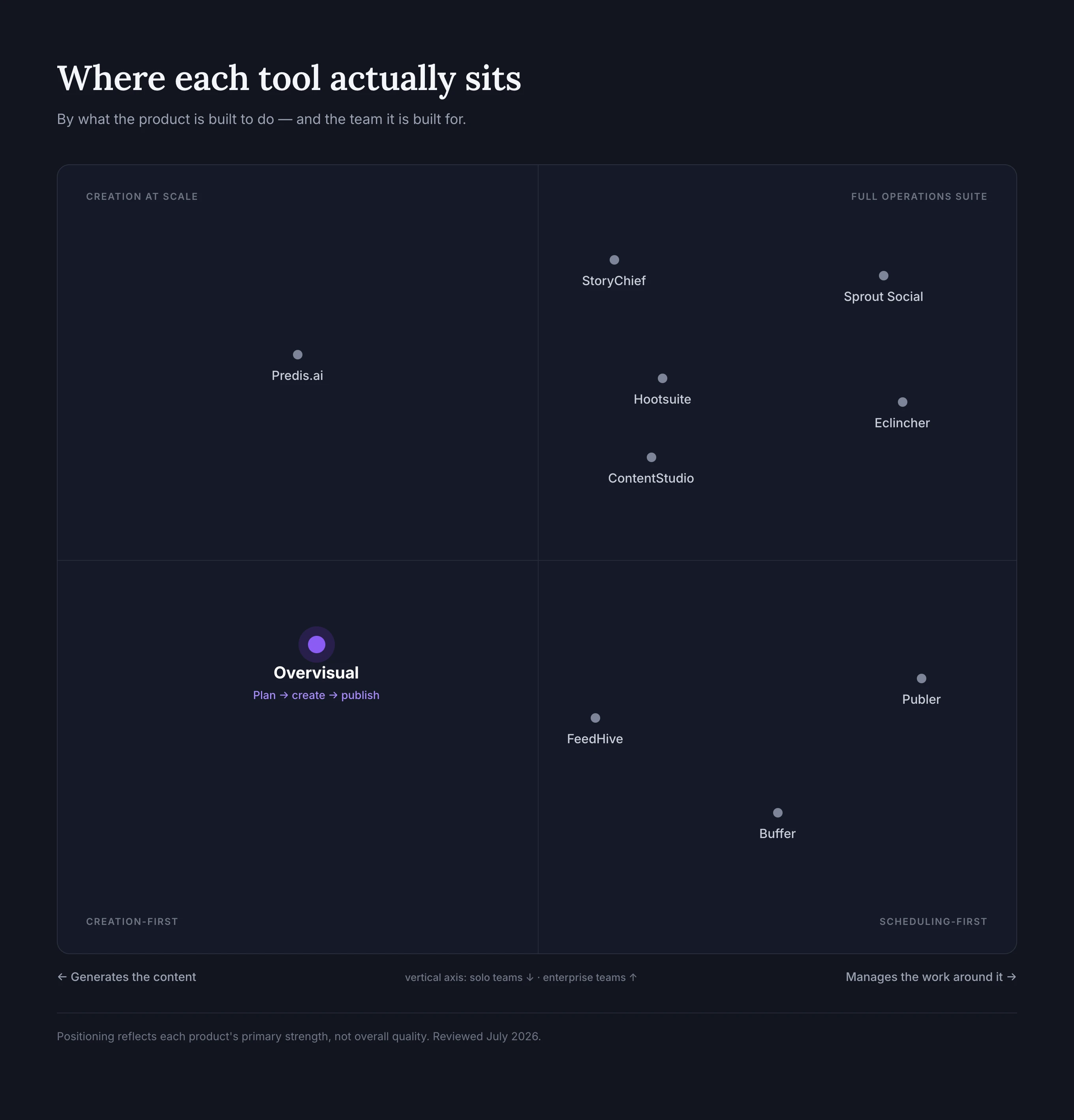
Parimad AI-põhised sotsiaalmeedia haldustööriistad teevad rohkem kui lihtsalt kirjutavad postituste tekste. Need aitavad otsustada, mida avaldada, muudavad ideed brändipõhisteks postitusteks, ajastavad sisu eri kanalites, korraldavad kinnitusprotsesse ja aitavad mõista, mis töötab.
Probleem on selles, et need tooted lahendavad väga erinevaid ülesandeid. Mõned on peamiselt ajastajad, millel on AI-kirjutusassistent. Teised keskenduvad analüütikale, sotsiaalmeedia seirele või meeskonnatööle. Väiksem rühm suudab luua nii teksti kui ka visuaalse sisu ning selle seejärel sinu eest avaldada.
Vaatasime üle 2026. aasta 10 parimat AI-põhist sotsiaalmeedia haldustööriista ning võrdlesime nende sisuloomet, visuaalide loomist, ajastamist, analüütikat, koostööd, toetatud töövooge ja hinnastruktuuri. Eesmärk ei ole kuulutada üht universaalset võitjat. Eesmärk on aidata sul valida tööriist, mis sobib sellega, kuidas sinu ettevõte sotsiaalmeedia sisu tegelikult loob.
Toimetuse märkus: Overvisual on meie toode, seega tunneme selle töövoogu sügavamalt kui selle nimekirja teisi platvorme. Oleme selgelt selgitanud, kus see on kõige tugevam, kus võib teine tööriist paremini sobida ja kes ei tohiks seda valida.
10 parimat AI-põhist sotsiaalmeedia haldustööriista ühe pilguga
| Tööriist | Parim kellele | Peamine AI tugevus | Avaldamine ja haldamine | Algushind* |
|---|---|---|---|---|
| Overvisual | Hõivatud asutajad ja väikesed meeskonnad, kes soovivad sisuloomet autopiloodil | Loob brändipõhiseid postitusi, lugusid ja karusselle ettevõtte või niši põhjal | Sisuplaneerimine, redigeerimine, ajastamine ja avaldamine | Alates €39/kuu |
| Buffer | Väikeettevõtted, kes soovivad lihtsat ajastajat | Tekstiideed, ümberkirjutamine ja taaskasutamine | Tugev ajastamine ja lihtsasti kasutatav analüütika | Tasuta pakett; tasulised alates ca $5/kanal/kuu aastamaksega |
| Sprout Social | Suuremad meeskonnad, kes vajavad analüütikat, kuulamist ja suhtlustöövooge | AI tugi avaldamisel, ülevaadetes ja klienditeeninduses | Täiustatud postkast, aruandlus, kinnitused ja kuulamine | Alates $79/kuu |
| Hootsuite | Väljakujunenud meeskonnad, kes haldavad palju kanaleid | Wisdom AI ideede, mustandite ja optimeerimise jaoks | Ajastamine, jälgimine, analüütika ja koostöö | Alates ca $99/kasutaja/kuu |
| Predis.ai | Brändid, kes toodavad palju visuaalseid postitusi ja reklaame | Loob pilte, videoid, karusselle, tekste ja reklaamikreatiive | Automaatpostitamine ja konkurentide analüüs | Tasuliste pakettide hinnad varieeruvad; Core algab tavaliselt ca $32/kuu |
| ContentStudio | Agentuurid ja meeskonnad, kes ühendavad sisu leidmise, avaldamise ja aruandluse | AI-põhine tekstiloome, soovitused ja tulemuslikkuse ülevaated | Kalender, kinnitused, analüütika ja konkurentide jälgimine | Alates $19/kuu |
| Publer | Kulutundlikud kasutajad ja hulgiajastajad | AI tekstid, ideed, teemaviited ja vastused | Hulgiajastamine, taaskasutus, kalender ja analüütika | Tasuta pakett; tasulised alates ca $4/kuu aastamaksega |
| FeedHive | Sisuloojad ja väikesed meeskonnad, kes keskenduvad automatiseerimisele | AI-põhine tekstiloome ja sisu parandamine | Nutikas ajastamine, kinnitused, koostöö ja postkast | Alates $22/kuu aastamaksega |
| StoryChief | Meeskonnad, kes avaldavad sotsiaalmeedia ja pikemat sisu koos | AI-toega kampaaniate ja toimetuse sisu loomine | Sotsiaalmeedia avaldamine, kinnitused, analüütika ja CMS-i levitus | Alates €29/kasutajakoht/kuu aastamaksega |
| Eclincher | Agentuurid, kes haldavad suhtlust ja brändi jälgimist | AI avaldamine ja vastuste automatiseerimine | Ühtne postkast, kuulamine, aruandlus ja kinnitused | Alates $149/kuu |
*Hinnad muutuvad sageli ning võivad sõltuda arveldustsüklist, kasutajakohtadest, kanalitest, kasutusmahust ja piirkonnast. Hindu vaadati üle 31. juulil 2026. Kontrolli enne ostmist alati kehtivaid pakette.
Kuidas me parimaid AI-põhiseid sotsiaalmeedia haldustööriistu hindasime
Hindasime iga platvormi kuue praktilise küsimuse alusel.
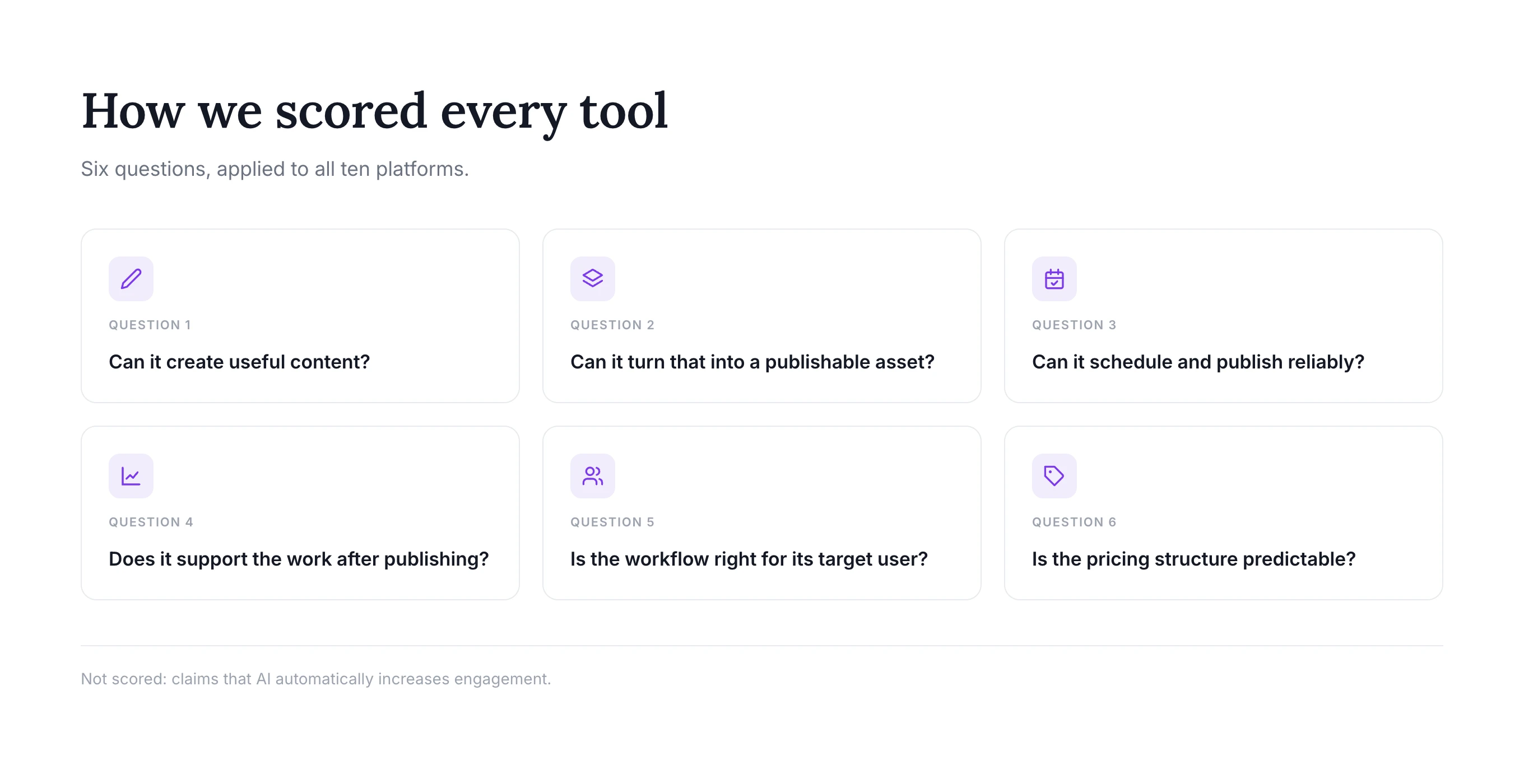
1. Kas see suudab luua kasulikku sisu?
Kasulik AI-põhine sotsiaalmeediahaldur peaks aitama rohkem kui lause lõpetamisel. Otsisime ideede genereerimist, tekstide kirjutamist, taaskasutamist, brändihääle seadeid, visuaalide loomist ja võimet kohandada sisu eri platvormidele.
2. Kas see suudab muuta sisu avaldatavateks materjalideks?
Teksti genereerimise ja valmis sotsiaalmeedia postituse tegemise vahel on suur erinevus. Tööriistad said kõrgema hinde, kui nad suutsid luua või korrastada visuaale, rakendada brändi stiili, muuta materjalide suurust, koostada karusselle või valmistada ette kanalispetsiifilisi formaate.
3. Kas see suudab usaldusväärselt ajastada ja avaldada?
Ajastamine on sotsiaalmeedia halduse alus. Arvestasime toetatud võrgustikke, kalendri kvaliteeti, järjekordi, hulgiavaldamist, korduvaid postitusi, kinnitusi ning seda, kas tööriist suudab avaldada otse või vajab eraldi ajastajat.
4. Kas see toetab tööd pärast avaldamist?
Analüütika, suhtluse haldamine, sotsiaalmeedia seire, aruandlus ja sisu taaskasutus muutuvad brändi kasvades olulisemaks. Üksi tegutsev asutaja ei pruugi täna ettevõtte tasemel postkasti vajada, aga 20 klienti haldav agentuur ilmselt vajab.
5. Kas töövoog sobib sihtkasutajale?
Rohkem funktsioone ei tee toodet automaatselt paremaks. Kohalik ettevõtja võib eelistada juhendatud igakuist sisutöövoogu, samas kui ettevõtte meeskond võib vajada õigusi, auditijälgi, sentimendianalüüsi ja kohandatud aruandeid.
6. Kas hinnastruktuur on prognoositav?
Mõned tooted arveldavad kanali, mõned kasutaja, mõned tööruumi ja teised AI-krediitide alusel. Hindasime, kas hinnamudel püsib mõistlik, kui kasutajad lisavad brände, profiile, meeskonnaliikmeid või suurendavad sisumahtu.
Me ei järjestanud tööriistu ebamääraste väidete põhjal, et AI suurendab automaatselt kaasatust. Uuringud AI-toega sotsiaalmeedia sisu kohta on nüansirikkamad: AI võib suurendada osalust ja sisumahtu, kuid üldsõnaline AI loodud sisu võib vähendada ka tajutavat kvaliteeti ja autentsust. Praktiline eelis tuleb kiiremast töövoost, tugevamast järjepidevusest ja parematest otsustest, mitte automaatsest algoritmilisest tõukest.
1. Overvisual — parim kuu aja brändipõhise sisu loomiseks ja avaldamiseks
Overvisual on AI-põhine sotsiaalmeediahaldur, mis on loodud asutajatele, ettevõtjatele, sotsiaalmeedia haldajatele ja agentuuridele, kes soovivad vähendada oma sisutöövoo jaoks vajalike eraldi tööriistade arvu.
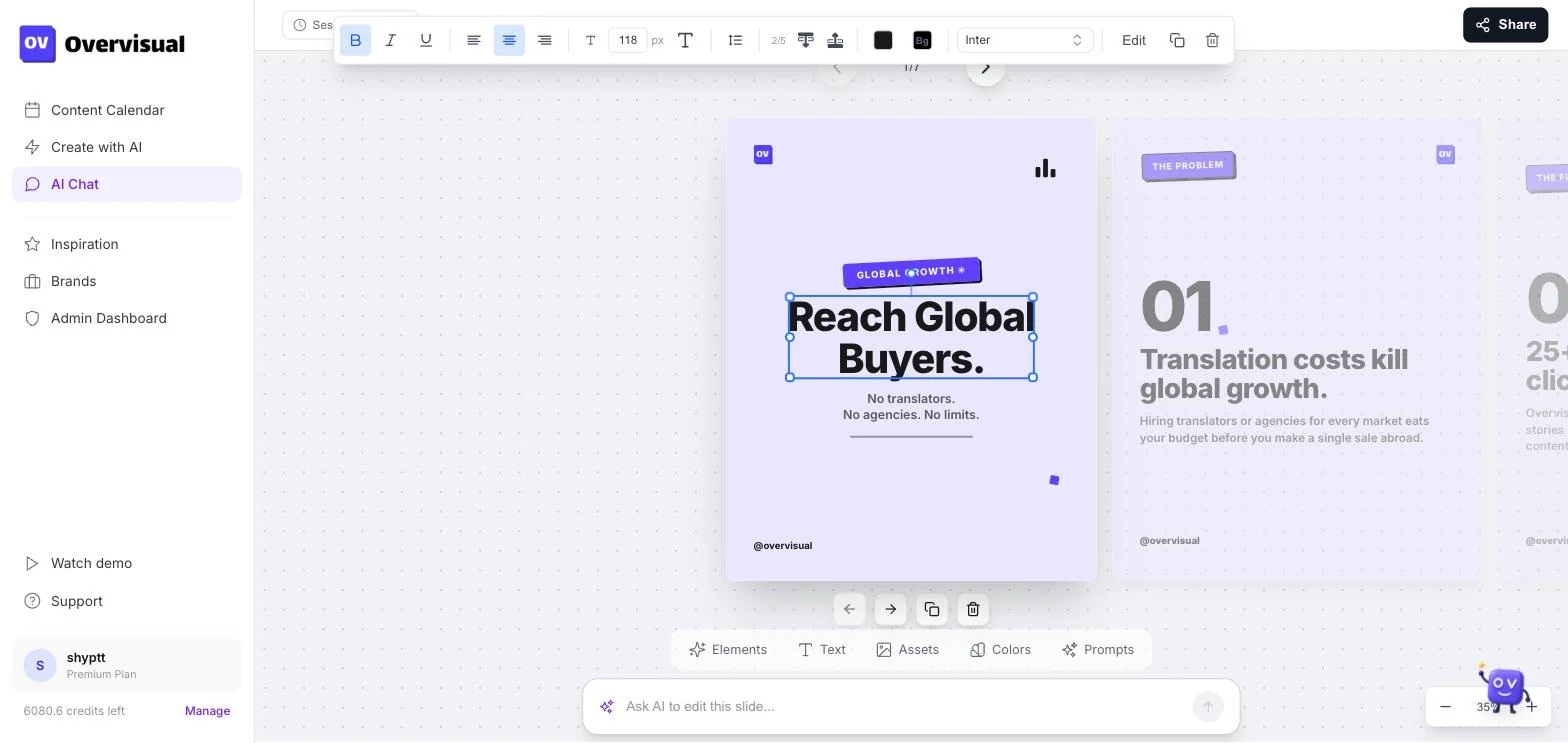
Paljud selle nimekirja platvormid algavad pärast seda, kui oled postituse juba kirjutanud ja disaini loonud. Overvisual alustab varem. See analüüsib sinu ettevõtet ja nišši, aitab tuvastada sisusuundi, loob postitusi, lugusid ja karusselle, rakendab sinu brändikomplekti ning laseb kõik üle vaadata enne ajastamist ja avaldamist.
See teeb selle eriti kasulikuks väikesele meeskonnale, kes hüppab praegu ideede jaoks ChatGPT, disainide jaoks Canva, materjalide jaoks pilvekaustade ja avaldamise jaoks ajastaja vahel.
Overvisuali põhifunktsioonid
- AI niši analüüs ja sisuplaneerimine
- Brändipõhiste postituste, lugude ja karussellide loomine
- Kohandatud värvid, fondid, toon ja korduvkasutatavad brändikomplektid
- Teksti, piltide, paigutuste ja ajastuse redigeerimisvahendid
- Avaldamine Instagramis, Facebookis, TikTokis ja LinkedInis
- Kogu sisuplaani automaatne ajastamine
- Tõestatud karusselli struktuuride ja disainide raamatukogu
- Mitu brändi ja suured sisumahud Pro-paketis
Kogu töövoogu näed Overvisuali funktsioonide lehel, ideid saad sirvida viraalsete karussellide galeriis ja kehtivat hinnastust vaadata Overvisuali hinnalehelt.
Mille poolest Overvisual erineb?
Peamine erinevus on sisuloome ja visuaalse teostuse kombinatsioon. Traditsioonilised ajastamistööriistad võivad soovitada teksti, kuid kasutaja peab postituse siiski disainitööriistas looma. Puhtad pildigeneraatorid võivad luua visuaali, kuid ei mõista tingimata kuu pikkust sisuplaani, ei hoia korduvkasutatavat brändisüsteemi ega avalda tulemust.
Overvisual on loodud kogu korduva töö ümber: otsusta, mida postitada, loo see brändi stiilis, kinnita see ja avalda. See sisaldab ka muudetavaid malle, mitte ei sunni kasutajaid leppima ühe AI-ga loodud pildiga.

Karussellikesksete strateegiate puhul saab Overvisual rakendada järjepidevat stiili mitmel slaidil, paigutada teksti oluliste visuaalsete elementide ümber ja kohandada tõestatud struktuuri uuele nišile. Spetsiaalne AI Instagrami karusselli looja näitab, kuidas see töövoog erineb iga slaidi käsitsi disainimisest.

Overvisuali plussid
- Katab strateegia, teksti, disaini, ajastamise ja avaldamise ühes töövoos
- Tugev valik ettevõtetele, kellel on raskusi järjepidevusega, mitte analüütika sügavusega
- Loob valmis visuaalseid formaate, mitte ainult tekstisoovitusi
- Hoiab brändi värvid, fondid ja stiili sisus järjepidevana
- Kasulik nii ettevõtjatele kui ka mitut brändi haldavatele agentuuridele
- Võimaldab inimlikku ülevaatust ja redigeerimist enne, kui miski avaldatakse
Overvisuali piirangud
- See keskendub orgaanilisele sotsiaalmeedia sisule, mitte ettevõtte tasemel sotsiaalmeedia seirele
- Meeskonnad, kes vajavad peamiselt klienditeeninduse postkasti haldust, võivad eelistada Sprout Socialit või Eclincherit
- Suure sisemise loomemeeskonnaga ettevõtetel võib juba olla väljakujunenud disainitöövoog, mida nad ei soovi asendada
- Krediidipõhiseid visuaalide piiranguid tuleks võrrelda oma eeldatava avaldamismahuga
Kes peaks Overvisuali valima?
Vali Overvisual, kui sinu suurim kitsaskoht on piisavalt hea brändipõhise sisu loomine igal kuul. See on eriti asjakohane asutajatele, kohalikele ettevõtetele, e-kaubanduse brändidele, konsultantidele ja agentuuridele, kes soovivad asendada killustatud ChatGPT + Canva + ajastaja protsessi.
Ettevõtjatele mõeldud töövoog on loodud kasutajatele, kes soovivad, et sotsiaalmeedia liiguks edasi ilma, et sellest saaks teine täiskohaga töö. Agentuurid saavad tutvuda eraldi Overvisuali agentuuri töövooga.
Kes peaks Overvisuali vahele jätma?
Jäta see vahele, kui sinu peamine vajadus on ettevõtte taseme kuulamine, suure mahuga tugipostkast, mõjutajatega suhete haldus või väga kohandatud analüütika suures organisatsioonis. Sellistel juhtudel võivad Sprout Social, Hootsuite või Eclincher olla operatiivselt paremad.
2. Buffer — parim lihtne AI ajastaja väikeettevõtetele
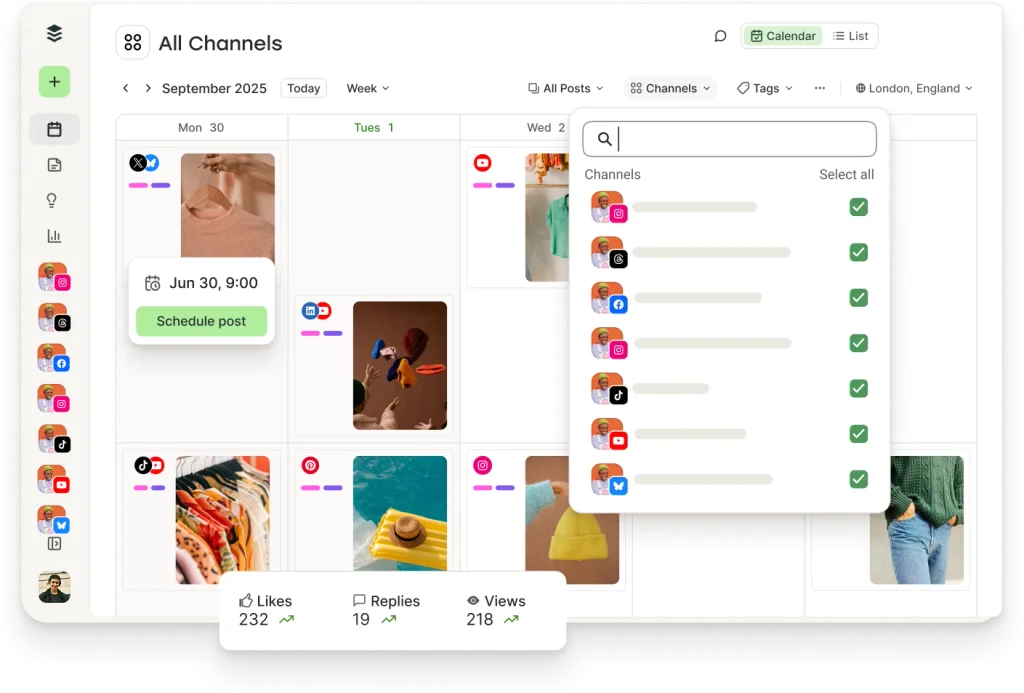
Buffer on endiselt üks lihtsamaid sisenemispunkte sotsiaalmeedia haldusesse. Selle põhikogemus on selge avaldamisjärjekord ja kalender, mida toetab AI Assistant ideede genereerimiseks, teksti ümberkirjutamiseks, tooni muutmiseks ja olemasoleva sisu taaskasutamiseks.
Buffer toetab laia valikut võrgustikke, sealhulgas Instagram, Facebook, TikTok, LinkedIn, Threads, Bluesky, YouTube Shorts, Pinterest, Google Business Profile, Mastodon ja X. Kanalipõhine hinnastus muudab selle atraktiivseks väikeettevõttele, kes haldab vaid mõnda profiili, kuigi kogusumma võib kanalite lisamisel kasvada.
Bufferi põhifunktsioonid
- Mitmeplatvormiline ajastamine ja avaldamine
- AI Assistant ideede genereerimiseks, ümberkirjutamiseks ja taaskasutamiseks
- Kalendri- ja järjekorrapõhine planeerimine
- Analüütika tasulistes pakettides
- Kogukonna postkast ja suhtlusfunktsioonid
- Meeskonnatöö ja kinnitusvalikud
- Tasuta pakett väikese töövoo proovimiseks
Bufferi plussid
- Üks lihtsamaid kasutajaliideseid algajatele
- Paindlik sisuloojatele, asutajatele ja väikestele meeskondadele
- Toetab paljusid uusi ja väljakujunenud sotsiaalvõrgustikke
- Kasulik õppesisu ja sisseelamisjuhised
- Madal sisenemishind, kui vaja on vaid mõnda kanalit
Bufferi piirangud
- AI aitab peamiselt tekstiga, mitte ei loo täielikke brändipõhiseid visuaalseid kampaaniaid
- Kanalipõhine hinnastus võib muutuda agentuuridele või paljude brändide portfellidele vähem soodsaks
- Sotsiaalmeedia kuulamine ja ettevõtte tasemel aruandlus ei ole nii sügavad kui Sprout Socialil
- Kasutajad võivad siiski vajada Canvat, Adobet või muud disainitööriista
Kellele see kõige paremini sobib
Buffer on tugev valik, kui tead juba, mida soovid postitada, ning vajad peamiselt intuitiivset kohta kirjutamiseks, järjekorda panekuks, avaldamiseks ja tulemuste ülevaatamiseks. See sobib vähem siis, kui sinu töövoo raskeim osa on visuaalsete materjalide enda loomine.
3. Sprout Social — parim ettevõtte analüütikaks, kuulamiseks ja suhtluseks
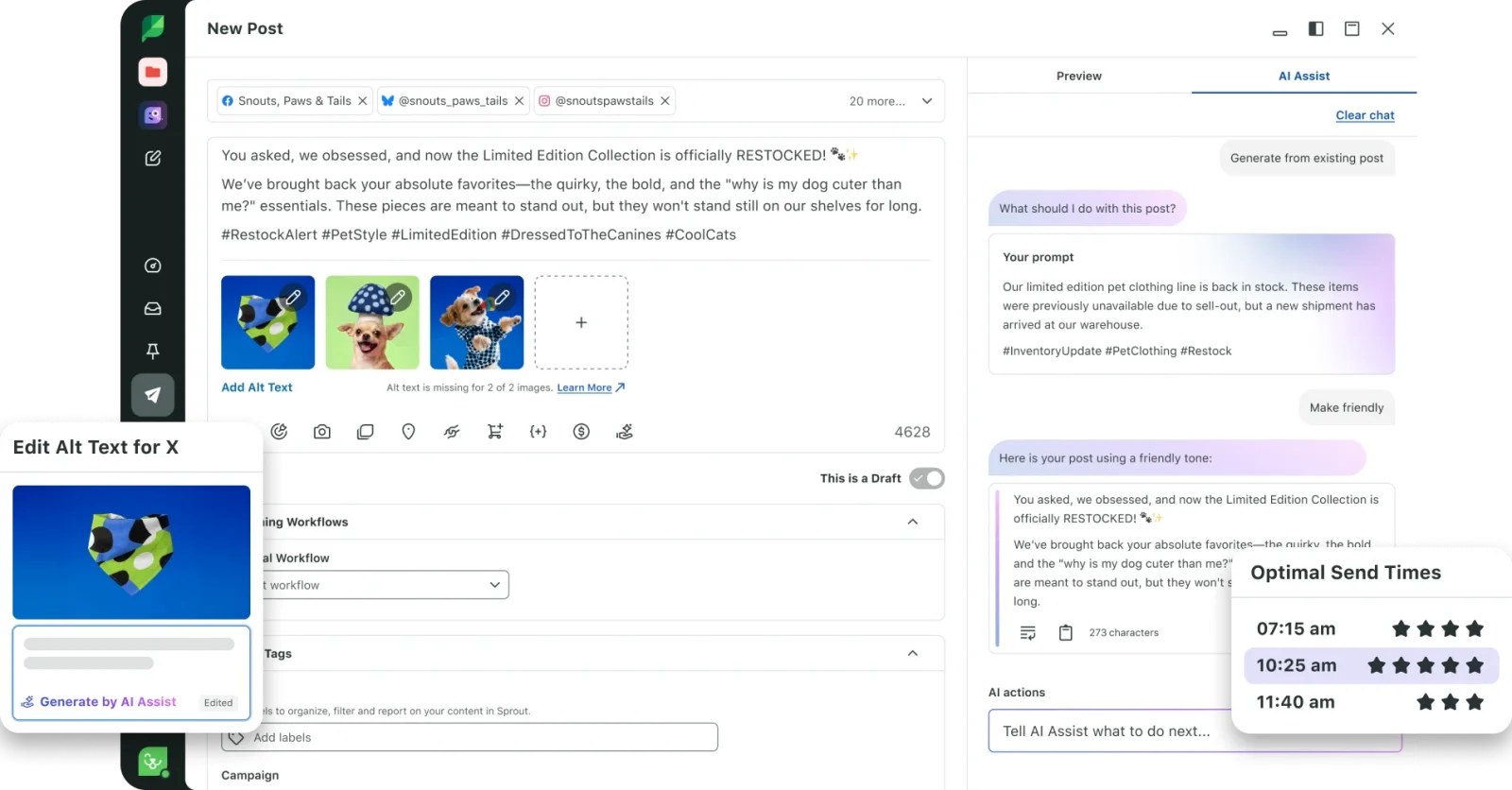
Sprout Social on loodud organisatsioonidele, kes suhtuvad sotsiaalmeediasse kui valdkondadevahelisse tegevusse, mis hõlmab avaldamist, klienditeenindust, aruandlust, brändi jälgimist ja mitut sidusrühma.
Selle AI-võimalused toetavad avaldamist ja analüüsi, kuid Sprouti suurim eelis on sotsiaalmeedia tegevuse ümber olev haldustasand. Meeskonnad saavad koondada sõnumeid, korraldada kinnitusi, jälgida vestlusi, mõõta tulemuslikkust ja koostada aruandeid eri osakondadele või klientidele.
Sprout Sociali põhifunktsioonid
- Sotsiaalmeedia avaldamine ja sisukalendrid
- Ühtne suhtluse postkast
- Sotsiaalmeedia kuulamine ja sentimendianalüüs
- Täiustatud analüütika ja aruandlus
- Meeskonna õigused, töövood ja kinnitused
- AI-toega sisu ja ülevaated
- Mõjutajaturundus ja laiemad ettevõtte tasemel võimalused
Sprout Sociali plussid
- Põhjalik aruandlus meeskondadele, kes peavad tõestama sotsiaalmeedia investeeringutasuvust
- Tugevad suhtlus- ja klienditeenindustöövood
- Kasulik sotsiaalmeedia seire brändi- ja turuinfo jaoks
- Skaleerub üle osakondade, piirkondade ja suuremate meeskondade
- Küpsed integratsioonid ja juhtimisfunktsioonid
Sprout Sociali piirangud
- Kallim kui üksikkasutajatele mõeldud tööriistad
- Võib olla liiga mahukas lahendus väikeettevõttele, kes vajab vaid sisuloomet ja ajastamist
- Seadistus, aruandlus ja kuulamine nõuavad rohkem strateegilist vastutust
- Visuaalsete materjalide loomine ei ole selle peamine eelis
Kellele see kõige paremini sobib
Sprout Social on parim siis, kui sinu meeskond saab märkimisväärse hulga sõnumeid, vajab struktureeritud aruandlust, jälgib brändivestlusi või kinnitamisprotsessis osaleb mitu inimest. Ühe inimese ettevõte ei kasuta platvormi piisavalt, et õigustada selle hinda ja keerukust.
4. Hootsuite — parim väljakujunenud universaalne haldusplatvorm
Hootsuite on üks kauaaegsemaid sotsiaalmeedia haldusplatvorme. See ühendab avaldamise, jälgimise, analüütika, suhtluse ja koostöö laias komplektis, mis suudab toetada nii kasvavaid meeskondi kui ka suuremaid organisatsioone.
Selle AI-assistent, mida nüüd kutsutakse Wisdomiks ja varem OwlyGPT-ks, suudab postitusi koostada, täiustada ja optimeerida otse koostajas. Hootsuite toob esile ka trende ja toetab väljakujunenud töövooge sisu planeerimiseks mitmel kontol.

Hootsuite'i põhifunktsioonid
- Mitme võrgustiku ajastamine ja kalendriplaneerimine
- Wisdom AI postituste koostamiseks ja optimeerimiseks
- Sotsiaalmeedia jälgimine ja voogude vaated
- Postkast ja suhtluse haldus
- Analüütika ja kohandatav aruandlus
- Meeskonnatöö, õigused ja kinnitused
- Integratsioonid suure rakenduste ökosüsteemiga
Hootsuite'i plussid
- Lai funktsioonide valik ühes väljakujunenud platvormis
- Sobib meeskondadele, kes haldavad palju kanaleid
- Tugev ajastamise, jälgimise ja aruandluse kombinatsioon
- AI on integreeritud avaldamistöövoogu
- Ulatuslik ökosüsteem ja koolitusmaterjalid
Hootsuite'i piirangud
- Hinnastus on väga väikestele ettevõtetele vähem kättesaadav
- Liides võib tunduda tihe, sest platvorm katab palju ülesandeid
- Täiustatud funktsionaalsus võib nõuda kallimaid pakette või lisasid
- See ei asenda iga meeskonna jaoks eraldi visuaalse disaini töövoogu
Kellele see kõige paremini sobib
Vali Hootsuite, kui soovid väljakujunenud universaalset platvormi ja vajad suuremat operatiivset sügavust kui kerge ajastaja. Vali spetsialiseeritum sisuloome tööriist, kui sinu peamine probleem on brändipostituste tegemine nullist.
5. Predis.ai — parim sotsiaalmeedia visuaalide, videote ja reklaamide loomiseks
Predis.ai keskendub tugevalt AI-ga loodud loomingulisele tootmisele. Lühikesest sisendist võivad saada tekstid, pildid, karussellid, videod ja reklaamikreatiivid ning platvorm sisaldab redigeerimis- ja avaldamisvahendeid.
Predis.ai on eriti asjakohane e-kaubanduse ja tulemuspõhistele meeskondadele, kes vajavad palju visuaalseid variante. See suudab analüüsida ka konkurente ning avaldada kanalites nagu Instagram, Facebook, LinkedIn, Pinterest, X, TikTok, Google Business Profile ja YouTube Shorts.

Predis.ai põhifunktsioonid
- AI-ga loodud sotsiaalmeedia pildid ja tekstid
- Karusselli, lühivideo ja reklaamikreatiivide loomine
- Brändi kohandamine ja redigeerimine
- Automaatpostitamine toetatud kanalites
- Konkurentide analüüs
- Mitmekeelne sisuloome
- API juurdepääs kõrgemates pakettides
Predis.ai plussid
- Tugev visuaalsete ja videoformaatide valik
- Kasulik paljude kampaaniavariantide tootmiseks
- Ühendab loomingulise sisuloome ja avaldamise
- Hea valik e-kaubanduse reklaamidele ja tootekesksele sisule
- Konkurentide analüüs annab ideedele lisaallika
Predis.ai piirangud
- Krediidikulu võib muuta kulude ennustamise videokeskses töövoos keerulisemaks
- Loodud kreatiivid vajavad siiski ülevaatust brändi täpsuse ja originaalsuse osas
- Kogukonnahaldus ja kuulamine ei ole selle keskseks tugevuseks
- Suur hulk loomingulisi valikuid võib nõuda katsetamist, enne kui meeskond leiab korratava töövoo
Kellele see kõige paremini sobib
Predis.ai sobib hästi, kui loomingulise sisu maht on peamine piirang, eriti reklaamide, reelide, tootepostituste ja visuaalsete variantide puhul. Võrdle seda hoolikalt Overvisualiga, kui vajad orgaanilise brändisisu planeerimist, ning traditsioonilise ajastajaga, kui sul on juba disainimeeskond.
6. ContentStudio — parim sisu leidmiseks ja agentuuride töövoogudeks
ContentStudio ühendab sisu leidmise, AI-toega loomise, ajastamise, kinnitused, analüütika ja konkurentide jälgimise. See on loodud andma meeskondadele ühe töölaua planeerimiseks ja avaldamiseks suurimates sotsiaalplatvormides.
Selle avastamisfunktsioonid on kasulikud brändidele, kes vajavad pidevat asjakohaste teemade ja kureeritud materjali voogu. Agentuurid saavad kasu ka tööruumidest, klientide kinnitustest, aruandlusest ja hinnastusest, mis ei põhine ainult uute kasutajakohtade lisamisel.

ContentStudio põhifunktsioonid
- AI-põhine tekstiloome ja sisusoovitused
- Sisu leidmine ja kureerimine
- Mitmekanaliline kalender ja ajastamine
- Kinnitustöövood ja meeskonnatöö
- Sotsiaalmeedia analüütika ja automaatsed aruanded
- Konkurentide jälgimine
- Materjalide korraldus ja jagatud kalendrid
ContentStudio plussid
- Hea tasakaal loomise, avaldamise ja aruandluse vahel
- Tugev sisu leidmine meeskondadele, kellel napib ideid
- Agentuurisõbralikud tööruumid ja kinnitused
- Sisenemishind on konkurentsivõimeline
- Konkurentide ja kampaaniate aruandlus lisab strateegilist väärtust
ContentStudio piirangud
- Laiem funktsioonide valik tekitab suurema õppimiskõvera kui Bufferil
- Visuaalide loomine ei ole nii kesksel kohal kui Overvisualis või Predis.ai-s
- Väikesed meeskonnad ei pruugi vajada kureerimise ja aruandluse sügavust
- Mõned täiustatud töövood nõuavad kallimaid pakette
Kellele see kõige paremini sobib
ContentStudio sobib hästi agentuuridele ja sisumeeskondadele, kes haldavad regulaarset toimetusprotsessi ning vajavad ideid, kinnitusi, ajastamist ja aruandeid ühes kohas. See on operatiivsem kui puhas AI loomingugeneraator.
7. Publer — parim soodne tööriist hulgiajastamiseks ja taaskasutuseks
Publer on kulutundlik sotsiaalmeedia haldusplatvorm tugeva praktiliste automatiseerimisfunktsioonide komplektiga. Selle AI Assist suudab luua ideid, tekste, teemaviiteid, tõlkeid ja vastuseid, samas kui avaldamissüsteem toetab järjekordi, korduvaid postitusi, taaskasutust ja hulgiajastamist.
Publer on eriti atraktiivne, kui meeskonnal on materjalid juba olemas, kuid nad soovivad suurt mahtu tõhusalt ajastada. Selle kalender, meediasalvestus, brauserilaiend, link-in-bio funktsioonid ja agentuurivalikud katavad paljud levinud avaldamisvajadused ilma ettevõtte taseme hinnata.

Publeri põhifunktsioonid
- AI Assist tekstide, ideede, teemaviidete ja vastuste jaoks
- Kalendriplaneerimine ja automaatne ajastamine
- Hulgiüleslaadimine ja -ajastamine
- Korduvad ja taaskasutatud igihaljad postitused
- Analüütika ja postituste ajalugu
- Tööruumid ja agentuurifunktsioonid
- Tugi suurematele sotsiaalvõrgustikele
Publeri plussid
- Madal algushind ja tasuta valik
- Suurepärane praktiline ajastamise automatiseerimine
- Kasulik igihaljaste sisuraamatukogude ja korduvate kampaaniate jaoks
- Hulgitööriistad säästavad aega suure mahuga avaldajatele
- AI töötab paljudes keeltes
Publeri piirangud
- AI visuaalide loomine on vähem põhjalik kui Predis.ai-l või Overvisualil
- Täiustatud analüütika ja kuulamine ei ole ettevõtte tasemel
- Kogu funktsioonide komplekt võib tunduda vähem viimistletud kui lihtsamatel tööriistadel
- Mõne AI-funktsionaalsuse äriplaani nõudeid tuleks enne ostmist kontrollida
Kellele see kõige paremini sobib
Publer sobib ideaalselt sisuloojale, kohalikule ettevõttele või väikesele agentuurile, kes soovib odavat ajastamist, taaskasutust ja hulgiavaldamist. See on eriti hea väärtus, kui sisu luuakse juba mujal.
8. FeedHive — parim AI-toega kirjutamiseks ja sisuloojate automatiseerimiseks
FeedHive ühendab AI kirjutamise, automatiseerimise, nutika ajastamise, kinnitustöövood, koostöö ja sotsiaalpostkasti. See on loodud sisu tootmiseks suures mahus, muutmata kalendrit keeruliseks ettevõtte süsteemiks.
FeedHive on populaarne sisuloojate, asutajapõhiste brändide ja väikeste meeskondade seas, kes avaldavad sageli tekstipõhistes kanalites. Selle AI aitab postitusi luua ja parandada, samas kui automatiseerimisfunktsioonid toetavad järjepidevat levitamist.

FeedHive'i põhifunktsioonid
- AI-toega sisuloome
- Nutikas ajastamine ja avaldamine
- Automatiseerimistöövood
- Kinnitus- ja koostöövahendid
- Sotsiaalpostkast
- Meeskonna tööruumid
- API ja agendipõhised funktsioonid täiustatud pakettides
FeedHive'i plussid
- Tugev AI kirjutamise ja ajastamise segu
- Selge töövoog sagedastele avaldajatele
- Koostöö ilma raske ettevõtte keerukuseta
- Kasulik automatiseerimine korduvate sisutoimingute jaoks
- Sobib sisuloojatele ja väikestele meeskondadele
FeedHive'i piirangud
- Ei ole kõige tugevam valik täiustatud sotsiaalmeedia seireks
- Visuaalsete kampaaniate loomine ei ole selle põhifookus
- Mõned väärtuslikud automatiseerimis- ja agendifunktsioonid asuvad kõrgemates pakettides
- Meeskonnad, kes keskenduvad tugevalt Instagrami disainile, võivad siiski vajada teist visuaalset tööriista
Kellele see kõige paremini sobib
FeedHive on hea valik asutajale või sisumeeskonnale, kellel on juba selge seisukoht ning kes vajab abi ideede muutmisel järjepidevaks avaldamissüsteemiks. See sobib vähem meeskondadele, kes otsivad põhjalikku klienditeeninduse analüütikat või täielikku visuaalset tootmist.
9. StoryChief — parim sotsiaalmeedia ja toimetusliku avaldamise ühendamiseks
StoryChief on laiem kui traditsiooniline sotsiaalmeedia ajastaja. See aitab meeskondadel planeerida kampaaniaid, luua sisu, hallata kinnitusi, avaldada sotsiaalpostitusi ja levitada pikemaid artikleid veebisaitidele ja teistele kanalitele.
Selle sotsiaalmeedia koostaja toetab artikleid, linke, pilte, videoid ja dokumendikarusselle ning AI genereerimine on saadaval töövoo sees. See muudab StoryChiefi kasulikuks B2B ja sisujuhitud meeskondadele, kes soovivad, et üks kampaania muutuks blogipostituseks, uudiskirjaks ja mitmeks sotsiaalmeedia uuenduseks.

StoryChiefi põhifunktsioonid
- Sotsiaalmeedia kalender, ajastamine ja kinnitused
- AI-toega sisu ja kampaaniate loomine
- Sotsiaalmeedia analüütika
- Piltide ja videote loomine koostajas
- Blogi ja CMS-i avaldamine toimetusele mõeldud pakettides
- Mitmekanaliline sisu levitamine
- Projektihaldus ja koostöö
StoryChiefi plussid
- Seob sotsiaalmeedia avaldamise laiema sisustrateegiaga
- Tugev kinnitustöövoog meeskondadele ja agentuuridele
- Kasulik pika sisu ümbertegemiseks sotsiaalpostitusteks
- Toetab toimetuslikku juhtimist ja SEO töövooge
- Selged meeskonna- ja agentuuripakettide struktuurid
StoryChiefi piirangud
- Rohkem platvormi, kui ainult sotsiaalmeedia sisuloojal vaja läheb
- Kasutaja- või kliendipõhine hinnastus võib organisatsiooni kasvades kasvada
- Sotsiaalmeedia kuulamine ja klienditeeninduse postkasti sügavus ei ole peamised müügiargumendid
- Kasutajad, kes keskenduvad ainult Instagrami postitustele, võivad toimetuslikke funktsioone mittevajalikuks pidada
Kellele see kõige paremini sobib
StoryChief on parim sisuturunduse meeskondadele, kes avaldavad veebisaidil ja sotsiaalkanalites. See aitab korraldada kampaania ühe seotud töövoona, selle asemel et käsitleda iga sotsiaalpostitust eraldi ülesandena.
10. Eclincher — parim agentuuridele, kes vajavad postkasti haldust ja jälgimist
Eclincher on põhjalik platvorm avaldamiseks, sotsiaalpostkasti haldamiseks, jälgimiseks, analüütikaks, kinnitusteks ja agentuuri koostööks. Selle uuem AI-funktsionaalsus hõlmab sisuabi ja automatiseeritud vastustöövooge.
Ühtne postkast on keskne eelis. Agentuurid ja klienditeenindusega tegelevad meeskonnad saavad tuua sõnumid, kommentaarid, arvustused ja mainimised ühte töövoogu ning seejärel vastuseid prioriseerida või suunata. Brändi jälgimine ja aruandlus muudavad platvormi sobivamaks pidevaks haldamiseks kui lihtsaks sisuloomeks.

Eclincheri põhifunktsioonid
- AI-toega avaldamine ja vastuste automatiseerimine
- Ühtne sotsiaalpostkast
- Ajastamine, järjekorrad ja visuaalne kalender
- Sotsiaalmeedia kuulamine ja brändi jälgimine
- Analüütika ja esitlusvalmis aruanded
- Meeskonna kinnitused ja õigused
- Kohaliku SEO ja mainehalduse valikud
Eclincheri plussid
- Tugev avaldamise ja suhtluse halduse kombinatsioon
- Sobib hästi agentuuridele, kes haldavad palju profiile
- Ühtne postkast aitab vältida vastamata vestlusi
- Jälgimine ja aruandlus toetavad klienditööd
- Automatiseerimine võib vähendada korduvaid vastamisülesandeid
Eclincheri piirangud
- Kõrgem algushind kui kergetel ajastajatel
- Liiga keeruline asutajale, kes vajab vaid mõnda nädalapostitust
- Visuaalse sisu loomine ei ole põhiline eristaja
- Kohalik SEO ja muud spetsialiseeritud võimalused võivad lisada kulu
Kellele see kõige paremini sobib
Eclincher on mõistlik siis, kui sotsiaalmeedia haldus hõlmab vastamist, jälgimist, aruandlust ja meeskonna koordineerimist, mitte ainult postituste loomist ja ajastamist.
Kuidas valida sobiv AI-põhine sotsiaalmeedia haldustööriist
Kõige lihtsam viis valida on tuvastada oma praeguse töövoo kõige kallim kitsaskoht.
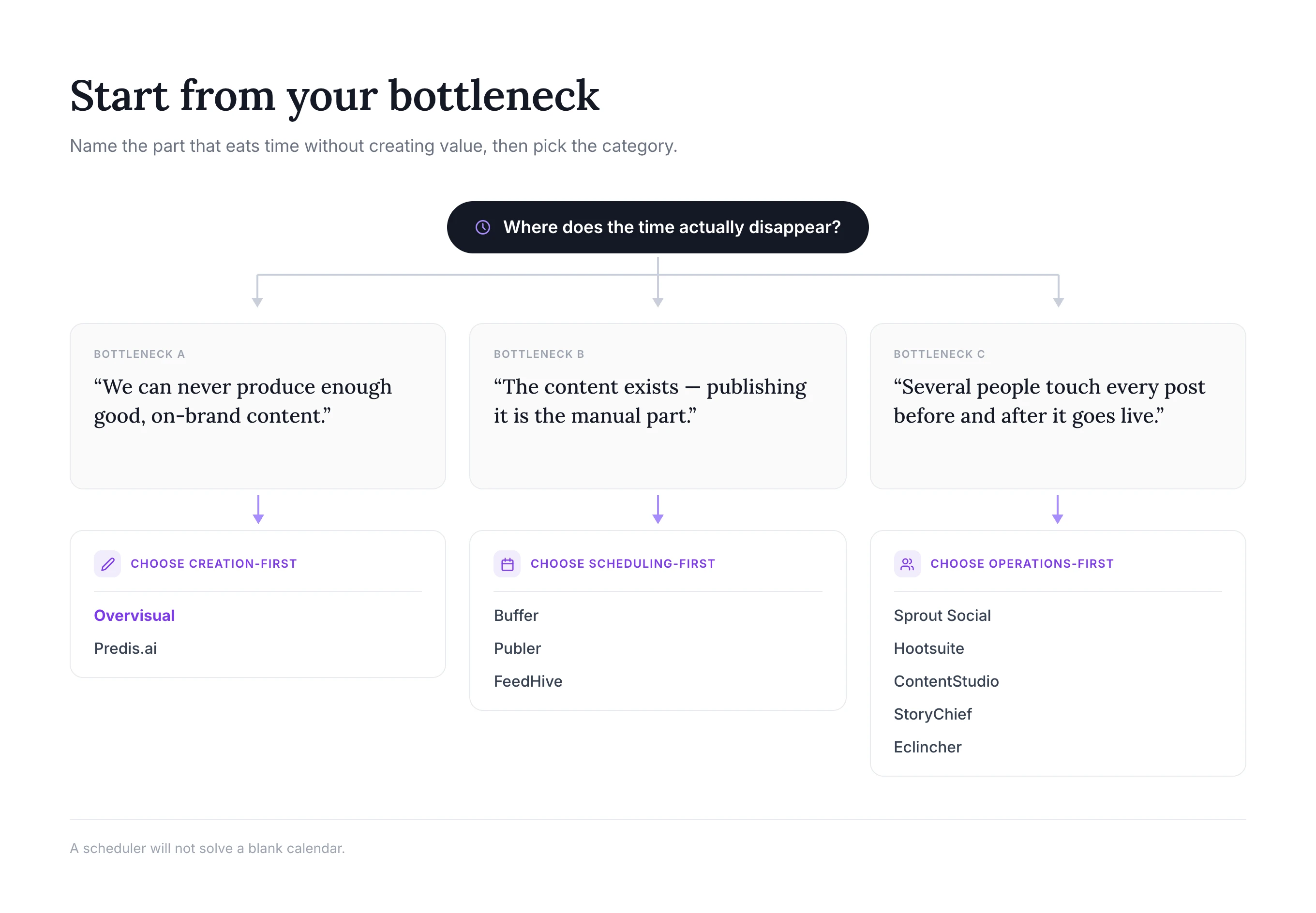
Vali sisuloomekeskne tööriist, kui sa ei suuda järjepidevalt postitada
Kasuta Overvisuali või Predis.ai-d, kui raskeim osa on ideede muutmine valmis brändimaterjalideks. Overvisual on suunatud pidevale orgaanilisele sisuplaanile koos muudetavate postituste, lugude ja karussellidega. Predis.ai on eriti tugev suuremahulise visuaalse, video- ja reklaamikreatiivide loomise jaoks.
Ajastaja üksi ei lahenda tühja sisukalendrit. See muudab olemasoleva sisuvaru lihtsalt kergemini avaldatavaks.
Vali ajastamiskeskne tööriist, kui sinu sisu on juba olemas
Kasuta Bufferit, Publerit või FeedHive'i, kui sinu meeskond toodab juba tekste ja loomingulisi materjale. Buffer rõhutab lihtsust, Publer soodsat hulgiautomatiseerimist ja taaskasutust ning FeedHive AI kirjutamist ja sisuloojasõbralikke töövooge.
Need tooted on sageli kõige ökonoomsem algus väikesele meeskonnale, kellel on töökindel sisuprotsess.
Vali töökeskne tööriist, kui sotsiaalmeedias osaleb mitu inimest
Kasuta Sprout Socialit, Hootsuite'i, ContentStudiot, StoryChiefi või Eclincherit, kui sotsiaalmeedia töö läbib strateege, kirjutajaid, disainereid, kinnitajaid, kogukonnahaldureid või kliente.
Valik sõltub siis domineerivast töövoost:
- Sprout Social analüütika, kuulamise, suhtluse ja ettevõtte struktuuri jaoks
- Hootsuite laia, väljakujunenud haldusplatvormi jaoks
- ContentStudio sisu leidmise, agentuuride tööruumide ja aruandluse jaoks
- StoryChief seotud toimetuslike ja sotsiaalkampaaniate jaoks
- Eclincher postkasti halduse, jälgimise ja agentuuri tegevuse jaoks
Funktsioonid, mis AI-põhistes sotsiaalmeedia haldustööriistades kõige olulisemad on
Pikk funktsioonide loend võib tähelepanu kõrvale juhtida võimetelt, mis määravad, kas tööriist tegelikult säästab aega. Keskendu järgmisele.
Brändi seaded
AI sisu muutub vähem kasulikuks, kui iga postitus kõlab üldsõnaliselt. Otsi korduvkasutatavat brändihäält, tootekonteksti, sihtrühma infot, värve, fonte, malle ja redigeerimisvahendeid. Süsteem peaks muutma brändi järjepidevuse lihtsamaks, lukustamata sind muutmatu väljundi külge.
Täielikud sisuformaadid
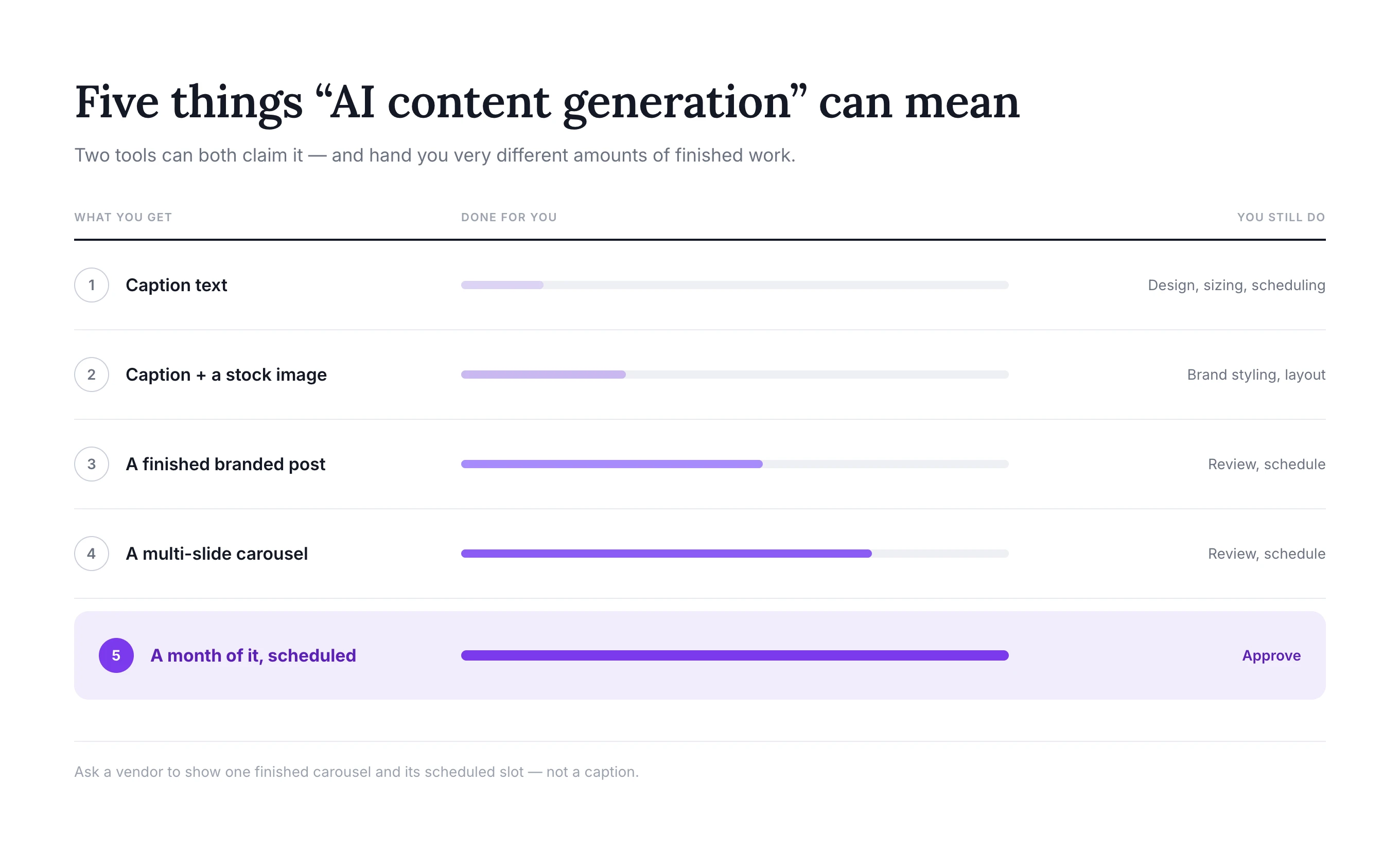
Kontrolli, kas „AI sisuloome” tähendab teksti, stock-fotot, valmis staatilist postitust, mitmeslaidilist karusselli või lühivideot. Need on väga erinevad tulemid.
Ettevõte, mis toetub Instagrami karussellidele, peaks kontrollima ka formaadinõudeid. Overvisuali tasuta Instagrami karusselli suuruse juhend katab kehtivad mõõtmed ja praktilised paigutusarvestused.
Platvormide tugi
Ära eelda, et iga tööriist toetab iga postitusetüüpi igas võrgustikus. Kinnita tugi täpsete formaatide jaoks, mida kasutad: Instagrami reelid ja karussellid, TikToki videod, LinkedIni dokumendid, Threadsi postitused, YouTube Shorts, esimesed kommentaarid, tootesildid või Google Business Profile'i uuendused.
Platvormide API-d ja õigused muutuvad, seega on kehtiv dokumentatsioon olulisem kui vana võrdlusartikkel.
Kinnitus- ja redigeerimistöövoog
AI peaks kiirendama ülevaatust, mitte seda eemaldama. Parim töövoog laseb inimesel muuta sissejuhatust, parandada tooteinfot, asendada pilti, kohandada ajastust ja kinnitada lõplik postitus.
Agentuurid peaksid otsima ka eraldi tööruume, kommentaare, kinnituslinke, rolle ja selget viisi, kuidas vältida sisu avaldamist vale kliendi kontole.
Sinu ettevõtte arenguetapile sobiv analüütika
Väikeettevõte vajab tavaliselt selgeid vastuseid: millised postitused toimisid kõige paremini? Millised formaadid toovad klikke või vastuseid? Millal peaksime uuesti avaldama?
Ettevõte võib vajada kanaliteülest aruandlust, konkurentide võrdlusi, sentimendianalüüsi, vastamisaja mõõdikuid, silte, eksporte ja töölaudu eri sidusrühmadele. Analüütika eest maksmine, mida sa kunagi ei kasuta, ei paranda sinu strateegiat.
Hinnastus, mis arvestab sinu ettevõtte kasvuga
Modelleeri tulevane arve, mitte ainult odavaim pakett. Arvuta kulu pärast järgmiste lisamist:
- Iga sotsiaalprofiil ja bränd
- Iga meeskonnaliige või kliendi kinnitaja
- AI krediidid, mida sinu kuumaht nõuab
- Analüütika, kuulamise, postkasti ja kinnituste lisad
- Aastane versus igakuine arveldus
$5 kanali kohta maksev tööriist võib kolme konto puhul olla väga odav ja paarikümne kontoga agentuurile üllatavalt kallis. Kallim fikseeritud hinnaga pakett võib suuremas mahus muutuda soodsamaks valikuks.
AI sotsiaalmeedia halduse töövoog: praktiline näide
Hea tööriist peaks muutma igakuise protsessi lühemaks ja korratavamaks. Realistlik töövoog näeb välja selline:
- Sea eesmärk. Otsusta, kas kuu keskendub teadlikkusele, toote tutvustamisele, müügivihjete hankimisele, kogukonna kaasamisele või lansseerimisele.
- Määra sisusambad. Loo tasakaalustatud segu õpetlikust, isiklikust, kaasahaaravast, reklaamivast ja tõenditel põhinevast sisust.
- Loo ideid. Kasuta ettevõtte konteksti, klientide küsimusi, tooteinfot, trende ja varasemaid edukaid postitusi, mitte juhuslikke sisendeid.
- Loo kanalispetsiifilist sisu. Kohanda sissejuhatus, pikkus, formaat ja üleskutse igale võrgustikule.
- Rakenda brändi stiili. Kasuta järjepidevaid fonte, värve, pildimaailma, paigutusi ja tooni.
- Vaata kõik üle. Kontrolli fakte, väiteid, linke, visuaalset hierarhiat, juurdepääsetavust ja seda, kas postitus kõlab inimlikult.
- Ajasta postitused kalendrisse. Tasakaalusta formaate ja teemasid, selle asemel et avaldada sarnaseid postitusi järjestikustel päevadel.
- Suhtle pärast avaldamist. Vasta kasulikele kommentaaridele ja küsimustele, kuni postitus on aktiivne.
- Vaata tulemused üle. Tuvasta mustrid, mida tasub korrata, ja nõrk sisu, mida tasub muuta.
- Vii õppetunnid järgmisesse kuusse. AI muutub kasulikumaks, kui töövoog säilitab päris brändi- ja tulemuskonteksti.
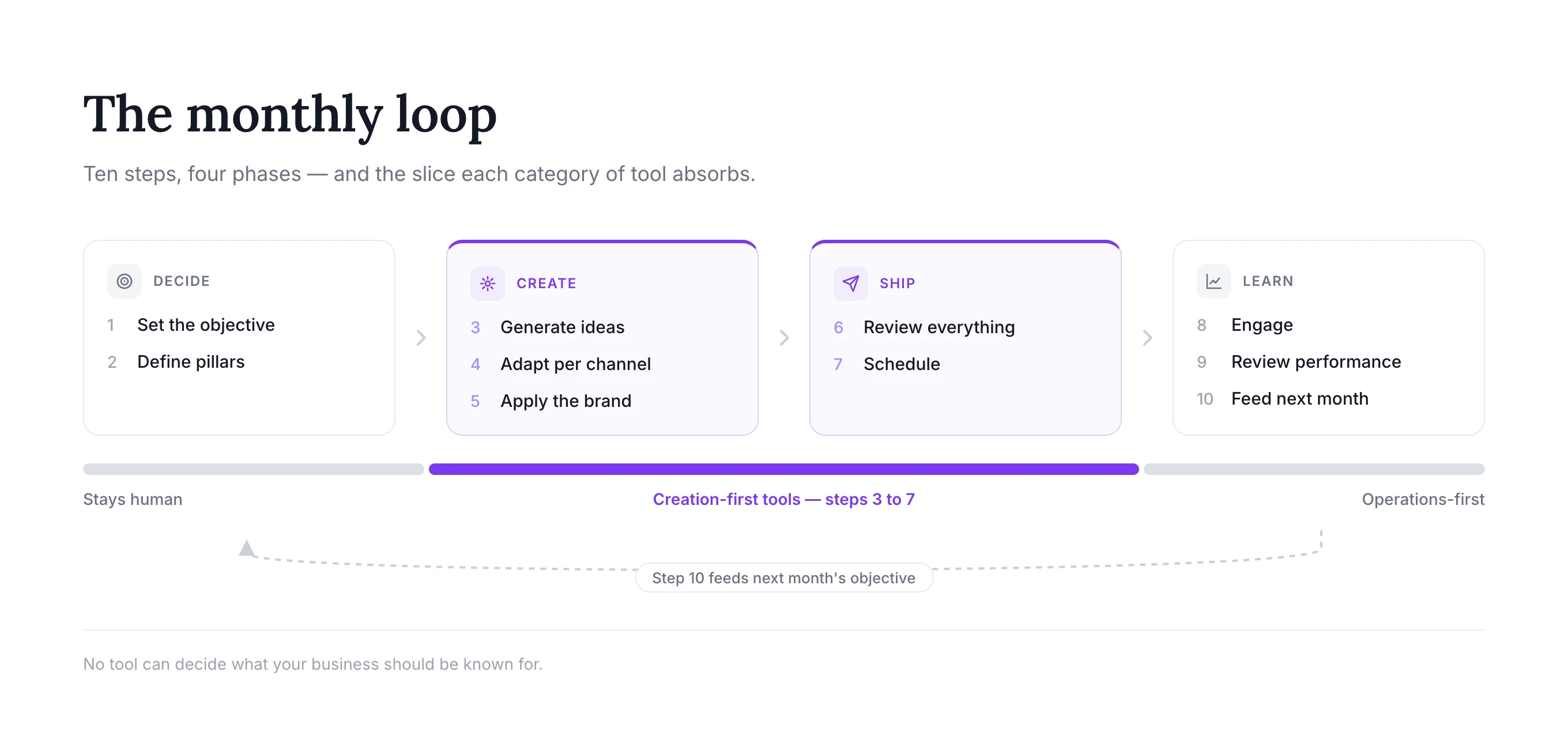
Overvisual on loodud ühendama sammud kolm kuni seitse ühes kohas. Teised platvormid võivad olla tugevamad sammudes kaheksa ja üheksa. Õige tööriistakomplekt sõltub sellest, milline osa võtab sinu ettevõttes kõige rohkem aega.
Levinud vead AI kasutamisel sotsiaalmeedias
Üldsõnaliste esmaste mustandite avaldamine
Esimene väljund on lähtepunkt, mitte automaatne lõplik postitus. Eemalda tühjad fraasid, etteaimatavad sissejuhatused, liigsed emotikonid, väljamõeldud faktid ja üleskutsed, mis ei sobi sihtrühmale.
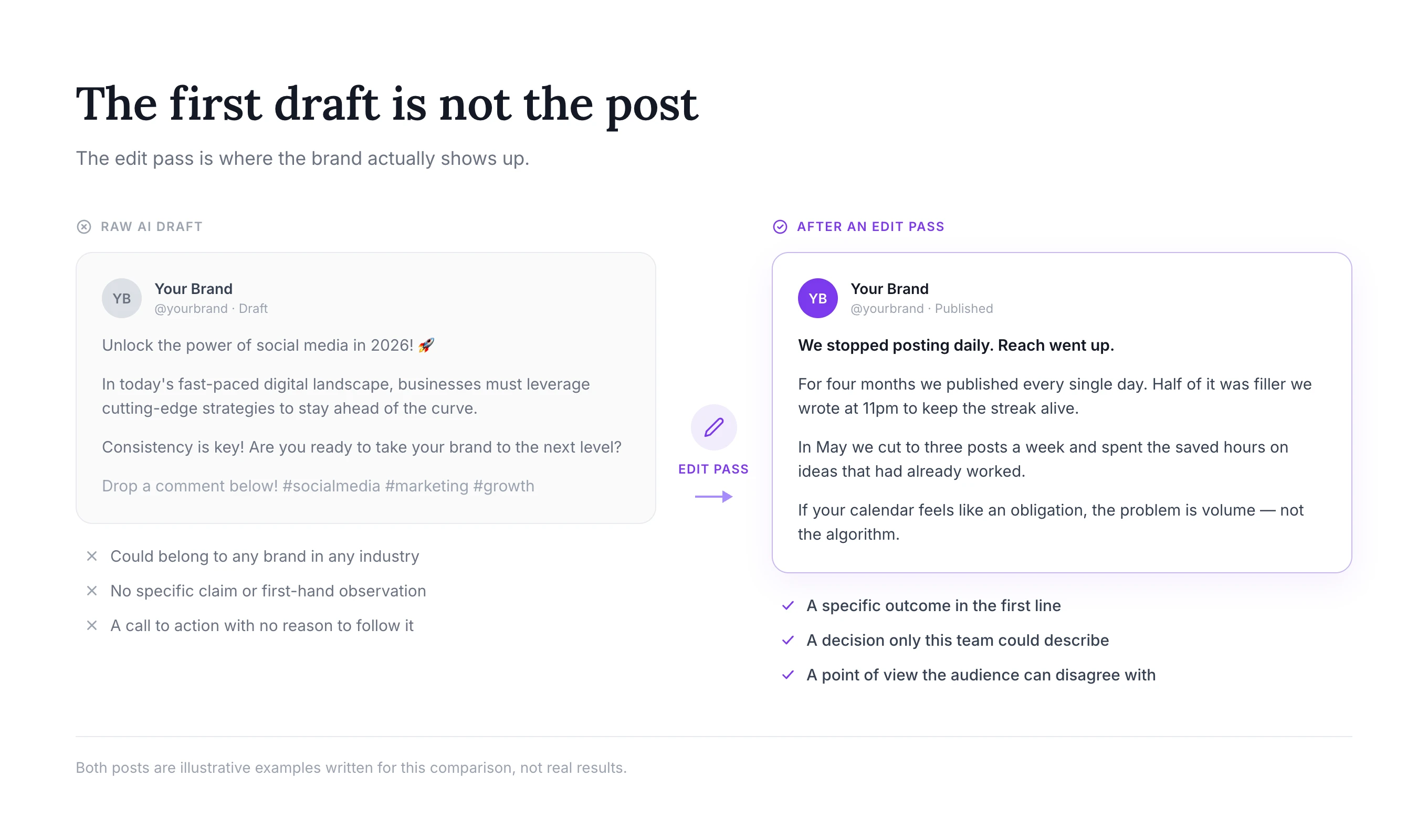
Automatiseerimine ilma seisukohata
AI võib tugevat ideed laiendada, kuid ei suuda toota tõelist kogemust. Lisa klientide tähelepanekuid, asutaja lugusid, tooteteadmisi, originaalnäiteid ja selge arvamus.
Sama postituse kasutamine kõikjal
Ristpostitamine säästab aega, kuid identne teostus võib anda kehvema tulemuse. LinkedIni dokumendikarussell, Instagrami karussell ja TikToki lugu võivad jagada sama ideed, kasutades samas erinevaid sissejuhatusi ja tempot.
Väljundi, mitte ärilise väärtuse mõõtmine
30 postituse avaldamine ei ole automaatselt parem kui 12 kasuliku postituse avaldamine. Jälgi tulemusi, mis on sinu ettevõtte jaoks olulised: kvalifitseeritud külastused, salvestused, vastused, müügivihjed, broneeritud kõned, tootelehe tegevus või korduv kaasatus.
Inimliku järelevalve eemaldamine
AI võib funktsioone valesti esitada, kasutada vale pilti, jätta kultuurikonteksti tähele panemata või esitada enesekindlalt tõenditeta väite. Hoia kinnitamine töövoos, eriti reguleeritud tööstusharudes, klientidega suhtlemisel ja reklaamväidete puhul.
Autentsuse eiramine
Sihtrühmad tunnevad korduvaid AI mustreid kiiresti ära. 2025. aasta kontrollitud eksperiment generatiivse AI kohta sotsiaalmeedias leidis, et mõned AI sekkumised suurendasid osalust, vähendades samal ajal tajutavat kvaliteeti ja autentsust. Õppetund ei ole AI-d vältida; see on kasutada seda toimetaja, tootmisassistendi ja töövoo kiirendajana, säilitades samal ajal inimlikku otsustusvõimet ja konkreetset kogemust.
Korduma kippuvad küsimused
Millised on 2026. aasta 10 parimat AI-põhist sotsiaalmeedia haldustööriista?
Selle juhendi 10 parimat AI-põhist sotsiaalmeedia haldustööriista on Overvisual, Buffer, Sprout Social, Hootsuite, Predis.ai, ContentStudio, Publer, FeedHive, StoryChief ja Eclincher. Tugevaim valik sõltub ülesandest: Overvisual on parim brändipõhise orgaanilise sisu loomiseks ja avaldamiseks, Buffer lihtsaks ajastamiseks, Sprout Social ettevõtte analüütikaks ja kuulamiseks ning Eclincher agentuuri postkasti haldamiseks ja jälgimiseks.
Mis on parim AI-põhine sotsiaalmeediahaldur väikeettevõttele?
Väikeettevõte, kellel on raskusi sisu loomisega, peaks kaaluma Overvisuali, sest see ühendab ideed, brändipõhise visuaalide loomise, ajastamise ja avaldamise. Ettevõte, kes juba loob sisu ja vajab ainult ajastamist, võib eelistada Bufferit või Publerit. Parim valik sõltub sellest, kas loomine või levitamine on suurem kitsaskoht.
Kas AI saab sotsiaalmeediat täielikult hallata?
AI saab automatiseerida suure osa planeerimisest, mustandite koostamisest, visuaalide loomisest, ajastamisest, avaldamisest, aruandlusest ja sõnumite sorteerimisest. See ei tohiks täielikult asendada inimlikku ülevaatust, brändi otsustusvõimet, kliendi empaatiat ega strateegilisi otsuseid. Kõige turvalisem ja tõhusam töövoog jätab kinnitused ja tundlikud vestlused inimese kontrolli alla.
Mis vahe on AI sisugeneraatoril ja AI sotsiaalmeedia haldustööriistal?
AI sisugeneraator loob teksti, pilte või videoid. AI sotsiaalmeedia haldustööriist korraldab lisaks kalendreid, ühendab sotsiaalmeedia kontosid, ajastab või avaldab postitusi, jälgib tulemusi ning võib toetada suhtlust või kinnitusi. Buffer on peamiselt haldus- ja ajastamisplatvorm, samas kui Overvisual ja Predis.ai ühendavad sisuloome suurema osa haldustöövoost.
Kas AI sotsiaalmeedia tööriistade eest tasub maksta?
Nende eest tasub maksta, kui säästetud aeg või suurenenud järjepidevus ületab tellimuse maksumuse. Arvuta, mitu tundi sinu meeskond kulutab ideede loomisele, kirjutamisele, disainile, kinnitustele, postitamisele ja aruandlusele. Seejärel testi, kas tööriist eemaldab sellest töökoormusest märkimisväärse osa ilma kvaliteeti langetamata.
Milline AI tööriist on parim Instagrami sisu jaoks?
Overvisual on tugev valik brändipõhiste Instagrami postituste, lugude ja karusselli jaoks koos planeerimise ja ajastamisega. Predis.ai on tugev AI-ga loodud piltide, videote ja reklaamivariantide jaoks. Later on teine populaarne visuaalse planeerimise platvorm, samas kui Buffer ja Publer on kasulikud, kui loomingulised materjalid on juba olemas.
Milline tööriist on parim agentuuridele?
Vastus sõltub teenusest, mida agentuur müüb. Overvisual aitab agentuuridel toota brändipõhist sisu mitmele kliendile. ContentStudio ja StoryChief toetavad tööruume ja kinnitusi. Eclincher on tugev postkasti halduses ja jälgimises. Sprout Social ja Hootsuite sobivad suurematele agentuuridele, kes vajavad põhjalikumat aruandlust, kuulamist, õigusi ja klienditegevust.
Kas AI-ga loodud sisu kahjustab kaasatust?
AI abi ise ei taga kõrgemat ega madalamat kaasatust. Üldsõnaline, korduv või ebatäpne sisu võib kahjustada sihtrühma usaldust, samas kui hästi redigeeritud AI-toega sisu võib aidata brändil järjepidevalt avaldada ja rohkem ideid testida. Kvaliteet, asjakohasus, originaalsus, ajastus ja sihtrühmale sobivus määravad siiski tulemuse.
Mitu sotsiaalmeedia tööriista ettevõte vajab?
Paljud väikeettevõtted saavad hakkama ühe kõik-ühes platvormiga. Teised kasutavad fokuseeritud komplekti: AI kirjutaja, disainitööriist, ajastaja ja analüütika. Vähem tööriistu tähendab tavaliselt vähem kopeerimist, eksportimist ja kontode haldamist, kuid spetsialiseeritud komplekt võib pakkuda põhjalikumaid võimalusi. Alusta väikseimast süsteemist, mis katab sinu tegeliku töövoo.
Lõplik otsus
Ühte parimat platvormi igale meeskonnale ei ole, sest AI-põhised sotsiaalmeedia haldustööriistad katavad nüüd mitut erinevat kategooriat.
Vali Overvisual, kui soovid, et AI aitaks luua plaani, teksti, brändipõhiseid visuaale ja avaldamiskalendri — mitte ainult soovitada tekste. Vali Buffer, Publer või FeedHive, kui sul on sisu juba olemas ja soovid lihtsamat ajastamise ja automatiseerimise töövoogu. Vali Sprout Social, Hootsuite või Eclincher, kui analüütika, kuulamine, suhtlus, juhtimine ja meeskonna tegevus on kõige olulisemad. Vali ContentStudio või StoryChief, kui sotsiaalmeedia on seotud suurema sisu- ja kinnitusprotsessiga. Vali Predis.ai suuremahulise visuaalse ja reklaamisisu loomiseks.
Parim ostuotsus algab ühest küsimusest: milline osa sotsiaalmeedia haldusest kulutab korduvalt aega, ilma et see piisavalt väärtust looks? Vali tööriist, mis selle kitsaskoha kõrvaldab, jättes kvaliteedi ja brändiga seotud otsused sinu meeskonna kontrolli alla.
Oma laiema sisustrateegia parandamiseks tutvu Overvisuali sotsiaalmeedia blogiga, õpi kuidas Instagramis kasvada või vaata praktilisi viise Instagrami lugude kaasatuse parandamiseks.

Loo tehisintellekti abil minutitega terve kuu jagu oma brändile sobivat sotsiaalmeedia sisu.
Proovi 3 päeva hinnaga 1 €

