


Satura rādītājs
Buffer joprojām ir viens no vieglāk saprotamajiem sociālo mediju plānotājiem. Jūs pievienojat kanālu, ievietojat ierakstu rindā un ļaujat platformai to publicēt izvēlētajā laikā. Satura veidotājiem un mazajiem uzņēmumiem, kuriem saturs jau ir gatavs, šī vienkāršība joprojām ir vērtīga.
Taču plānošana ir tikai viena sociālo mediju pārvaldības daļa. Daudzas komandas tagad vairāk laika pavada, lemjot, ko publicēt, veidojot zīmola vizuāļus, saskaņojot apstiprinājumus, atbildot uz ziņām, pārvaldot vairākus klientus un skaidrojot rezultātus, nekā pievienojot ierakstus kalendāram. Tāpēc cilvēki, kas meklē Buffer alternatīvas, parasti nemeklē nedaudz atšķirīgu plānotāju. Viņi meklē rīku, kas novērš konkrētu šķērsli, ko Buffer pilnībā neatrisina.
Šajā ceļvedī ar šādu skatupunktu salīdzinātas septiņas iespējas. Nevis atkārtojot vispārīgus funkciju sarakstus, katra sadaļa atbild uz četriem praktiskiem jautājumiem: kāpēc kāds varētu pāriet uz citu rīku, ko alternatīva dara labāk, kur Buffer joprojām ir stiprāka izvēle un kam patiešām vajadzētu veikt pāreju.
Redakcijas piezīme: Overvisual ir mūsu produkts, tāpēc tā darbplūsmu pazīstam dziļāk nekā citas šajā sarakstā iekļautās platformas. Esam skaidri norādījuši, kur tas ir visspēcīgākais, kur labāk der cits rīks un kam to izvēlēties nevajadzētu.
Galvenie secinājumi
- Labākā alternatīva ir atkarīga no šķēršļa, nevis no funkciju skaita — satura radīšana, apstiprināšana, iesūtnes apjoms, kontu skaits vai atskaites katra norāda uz citu rīku.
- Overvisual (no €39 mēnesī) ir uz saturu orientēta izvēle: tas ģenerē zīmola ierakstus, stāstus un karuseļus, pirms tie nonāk kalendārā.
- Planable (no $33 par darbvidi mēnesī, maksājot par gadu) ir paredzēts apstiprināšanas ķēdēm; SocialPilot (no $25,50 mēnesī, maksājot par gadu) — aģentūru kontu apjomam par paredzamu cenu.
- Agorapulse un Sprout Social vispirms ir iesaistes platformas — izvēlieties tās, ja komentāri, ziņas un atskaites ir svarīgākas par publicēšanu.
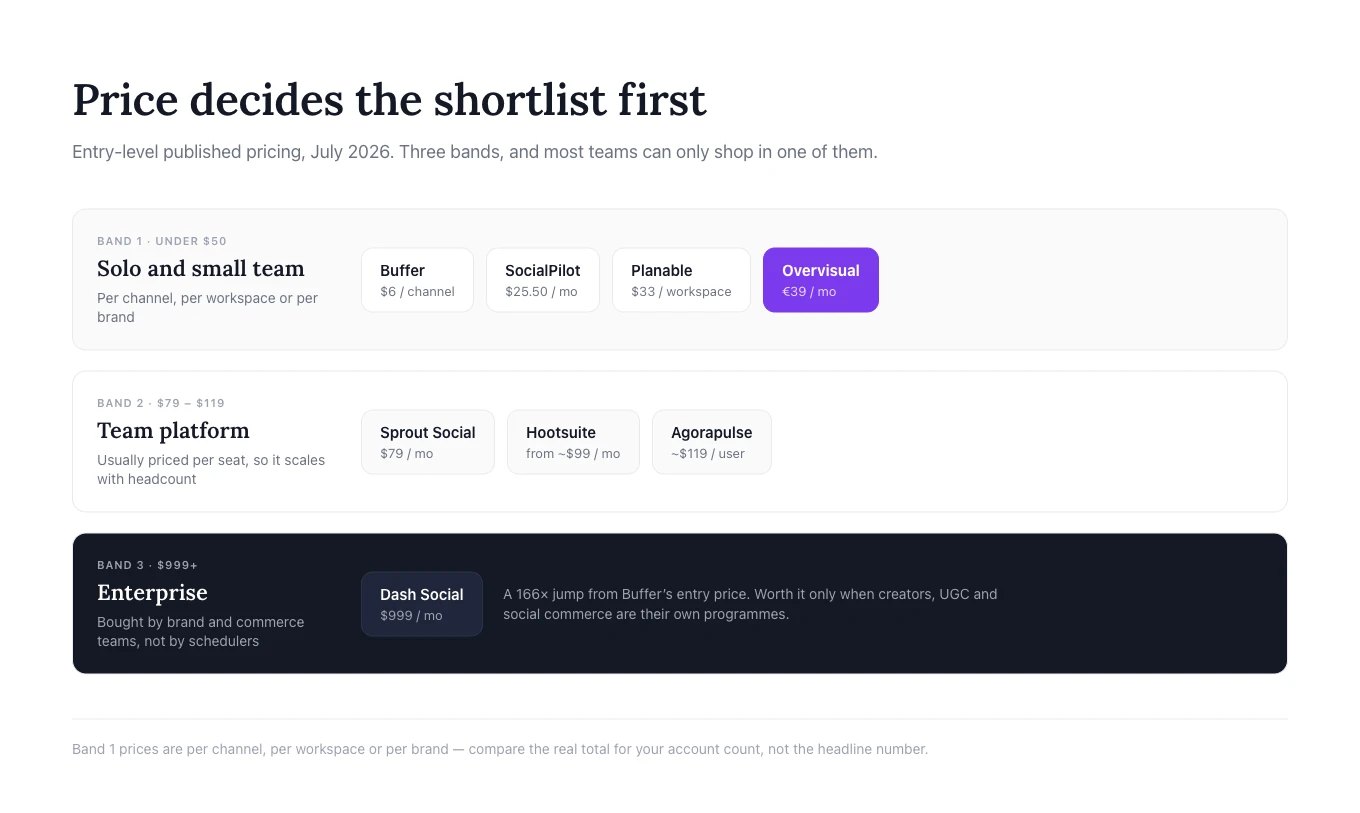
- Hootsuite un Dash Social ir konsolidācijas un uzņēmumu līmeņa risinājumi ar cenām no aptuveni $99 mēnesī un $999 mēnesī attiecīgi.
- Palikšana pie Buffer ir pilnībā pamatota izvēle. Ja publicēšana ir vienīgais uzdevums, pāreja pievieno izmaksas un apmācību, neatrisinot nevienu problēmu.
Buffer alternatīvas: ātrās izvēles ceļvedis
| Rīks | Pārejiet, ja jums vajag | Priekšrocība pret Buffer | Palieciet pie Buffer, ja | Sākuma cena* |
|---|---|---|---|---|
| Overvisual | MI, kas veido zīmola saturu, ne tikai publicē | Ģenerēšana, dizains, zīmola komplekti, plānošana | Ierakstu tekstus un vizuāļus jau sagatavojat | €39 /mēn. |
| Dash Social | Satura veidotāju, UGC un sociālās komercijas dziļums | Zīmolam pielāgots MI un komercijas dati | Vēlaties vienkāršu, lētu publicēšanu | $999 /mēn. |
| Planable | Klientu atsauksmes un vairāku soļu apstiprināšana | Pārskatīšana un apstiprināšana notiek ap ierakstu | Viena persona veido un apstiprina | $33 /darbvide |
| Hootsuite | Iesūtne, monitorings un pārvaldība vienā komplektā | Aptver lielāku daļu ikdienas darba | Vēlaties vieglu, lētu rīku | ~$99 /mēn. |
| Sprout Social | Klientu apkalpošana un atskaites vadībai | Iesaiste plus biznesa līmeņa ieskats | Galvenokārt plānojat dažus kanālus | $79 /mēn. |
| SocialPilot | Daudz kontu un atskaites ar jūsu zīmola noformējumu | Vairāk profilu par paredzamu cenu | Pārvaldāt tikai dažus kanālus | $25,50 /mēn. |
| Agorapulse | Vienota iesūtne un ROI atskaites | Spēcīgāka kontrole pēc publicēšanas | Publicēšana ir viss jūsu darbs | ~$119 /lietotājs |
*Cenas pārbaudītas oficiālajās produktu lapās 2026. gada jūlijā. Plāni, valūtas, norēķinu noteikumi, profilu limiti un papildinājumi bieži mainās, tāpēc pirms pirkuma pārbaudiet galīgo cenu.
Kāpēc uzņēmumi meklē Buffer alternatīvas
Buffer nav vājš produkts. Tā bezmaksas plāns pašlaik atbalsta līdz trim kanāliem ar desmit ieplānotiem ierakstiem katrā kanālā, savukārt maksas plāni sākas no $6 par kanālu mēnesī un ietver neierobežotu ieplānoto ierakstu skaitu, ievērojot godīgas izmantošanas limitu. Atbilstošos plānos ir pieejama arī analītika, MI asistents, iesaistes funkcijas un komandas rīki.
Satura veidotājiem un mazajiem uzņēmumiem, kuriem saturs jau ir gatavs, šāda fokusēta darbplūsma var būt tieši tā, kas vajadzīgs. Vajadzība pēc alternatīvas parasti rodas tad, kad darbs ap rindu kļūst grūtāks par pašu rindu.
Jums vajag palīdzību satura radīšanā
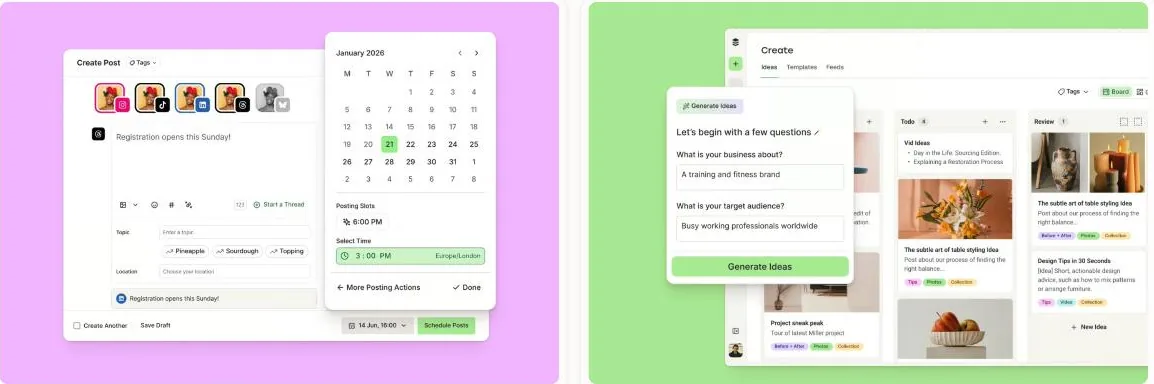
Daudzi uzņēmumi joprojām pēta tēmas vienā vietā, raksta ierakstu tekstus citā, vizuāļus veido atsevišķi, bet Buffer izmanto tikai pēdējam plānošanas solim. Uz saturu orientēta alternatīva ir noderīgāka, ja īstais šķērslis ir pietiekama zīmola ierakstu, stāstu un karuseļu apjoma izveide, lai vispār aizpildītu kalendāru.
Jūsu apstiprināšanas process ir kļuvis juceklīgs
Rinda ir vienkārša, kad kontu pārvalda viena persona. Aģentūrām un lielākām komandām vajag komentārus, versiju kontroli, klientu piekļuvi un vairākus apstiprināšanas posmus. Šādā gadījumā uz sadarbību orientēta platforma novērš vairāk sarežģījumu nekā jebkurš cits plānotājs.
Sociālie mediji ir kļuvuši par klientu apkalpošanas kanālu
Tiklīdz komentāri, ziņas, atsauksmes, uzdevumu piešķiršana, moderēšana un atbildēšanas laiki kļūst svarīgi, spēcīgāka vienota iesūtne ir vērtīgāka par publicēšanas kalendāru.
Jūs pārvaldāt daudzus zīmolus vai jums vajag dziļākas atskaites
Aģentūras un uzņēmumi ar vairākām atrašanās vietām bieži dod priekšroku plāniem, kas apvieno kontus, lietotājus, klientu apstiprinājumus un atskaites ar jūsu zīmola noformējumu. Uzņēmumu līmeņa komandām var būt vajadzīga arī sociālo mediju sarunu analīze, konkurentu dati, pielāgoti informācijas paneļi vai atskaites, kas sasaista sociālo aktivitāti ar plašākiem biznesa rezultātiem.
Pirms pārejas nosakiet trīs uzdevumus, kas jūsu pašreizējā procesā aizņem visvairāk laika. Salīdziniet rīkus pēc šiem uzdevumiem, nevis pēc garākā funkciju saraksta.
Kad vajadzētu palikt pie Buffer
Salīdzinošam rakstam ir viegli uzskatīt pāreju par automātisku uzlabojumu. Tā tas nav. Pāreja uz lielāku platformu var radīt nevajadzīgas izmaksas, apmācību un sarežģītību.
Palieciet pie Buffer, ja jūsu pašreizējā darbplūsma darbojas un galvenā prasība ir uzticama publicēšana. Buffer joprojām ir piemērots, ja:
- saturu pārvalda viena persona;
- zīmols izmanto tikai dažus sociālo mediju kanālus;
- ieraksti ir uzrakstīti un noformēti, pirms nonāk plānotājā;
- klientu apstiprinājumi nav nepieciešami;
- komentārus un tiešās ziņas apstrādā tieši katrā tīklā;
- padziļināta sarunu analīze un klientu apkalpošanas maršrutēšana nav vajadzīga;
- komanda augstāk vērtē lietošanas ērtumu nekā funkciju plašumu.
Lielāks rīks nav labāks, ja lielākā daļa tā funkciju paliek neizmantota. Mērķis nav aizstāt Buffer ar platformu, kurai ir garākais funkciju saraksts. Mērķis ir noteikt punktu, kur darbs palēninās, un izvēlēties rīku, kas veidots ap šo problēmu.
1. Overvisual: izvēlieties to, ja satura radīšana ir šķērslis
Vislabāk piemērots: aizņemtiem dibinātājiem, mazām mārketinga komandām, satura veidotājiem un aģentūrām, kurām nepieciešama palīdzība zīmola sociālo mediju satura izveidē pirms tā ieplānošanas.
Overvisual ir MI sociālo mediju pārvaldnieks, kas plāno, veido, ieplāno un publicē saturu. Galvenā atšķirība no Buffer ir vieta, kur darbplūsma sākas.
Buffer darbojas vislabāk, kad jums jau ir ideja, ieraksta teksts un vizuāls materiāls. Overvisual ir izstrādāts, lai palīdzētu radīt šos materiālus. Tas var ģenerēt saturu, balstoties uz zīmolu vai nišu, pārvērst idejas ierakstos, stāstos un karuseļos, piemērot saglabātās zīmola krāsas un fontus, veidot dizaina variācijas un pārvietot apstiprināto saturu publicēšanas kalendārā.
Kāpēc pāriet no Buffer uz Overvisual?
Pārejiet, kad jūsu komandai atkārtoti neizdodas publicēt, jo satura veidošana aizņem pārāk ilgu laiku. Problēma var būt tēmu atrašana, ierakstu tekstu uzrakstīšana visam mēnesim, vizuālo formātu izveide vai visa satura saglabāšana zīmola stilā.
Overvisual apvieno darbplūsmu vienā sistēmā:
- Analizē zīmolu, nišu vai satura virzienu.
- Ģenerē satura plānu un ierakstu idejas.
- Veido ierakstu tekstus un zīmola vizuāļus.
- Rediģē izkārtojumu, tekstu, krāsas, attēlus vai veidni.
- Ieplāno un publicē apstiprināto rezultātu.
Platforma atbalsta pielāgotus zīmola komplektus, vairāk nekā 200 veidņu variāciju, ierakstus, stāstus un karuseļa slaidus. Tās ar MI atbalstīta izvietošana palīdz nepārklāt sejas vai svarīgus objektus. Vizuālu piemēru skatiet Overvisual karuseļa darbplūsmā.

Kur Overvisual ir stiprāks par Buffer
Overvisual ir stiprāks, ja vēlaties, lai platforma izveidotu lielāku galīgā satura daļu. Tas samazina nepieciešamību pārslēgties starp tērzēšanas robotu, dizaina lietotni, plānošanas dokumentu un plānotāju.
Tas ir īpaši piemērots dibinātājiem, kuri nezina, ko publicēt, mārketinga speciālistiem, kas veido regulārus karuseļus, aģentūrām, kas veido saturu vairākiem zīmoliem, un komandām, kurām vajag vairākas kampaņas variācijas vai valodas.
Kur Buffer ir stiprāks
Buffer ir labāks, ja saturs jau pastāv un jums galvenokārt vajadzīga tīra, lēta publicēšanas rinda. Tam ir nobriedusi saskarne, pieejams bezmaksas plāns un potenciāli zemākas izmaksas dažiem kanāliem.
Overvisual nav paredzēts arī uzņēmumu līmeņa sarunu analīzes, sarežģītas klientu apkalpošanas maršrutēšanas vai liela mēroga reputācijas monitoringa aizstāšanai.
Cenas un slēdziens
Overvisual cenas sākas no €39 mēnesī. Plāni atšķiras galvenokārt pēc ikmēneša vizuāļu kredītiem un atbalstīto zīmolu skaita.
Izvēlieties Overvisual Buffer vietā, ja: vēlaties, lai MI izveido pilnīgu zīmola sociālo mediju saturu, nevis tikai ieplāno citur izveidotus materiālus.
Palieciet pie Buffer, ja: jūsu satura veidošanas process jau ir efektīvs un publicēšana ir vienīgais īstais šķērslis.
2. Dash Social: izvēlieties to uzņēmumu līmeņa vizuālā satura analītikai
Vislabāk piemērots: iedibinātiem skaistumkopšanas, modes, mazumtirdzniecības, dzīvesveida, viesmīlības un patērētāju zīmoliem ar plašām satura veidotāju, UGC, vizuālās analītikas un sociālās komercijas programmām.
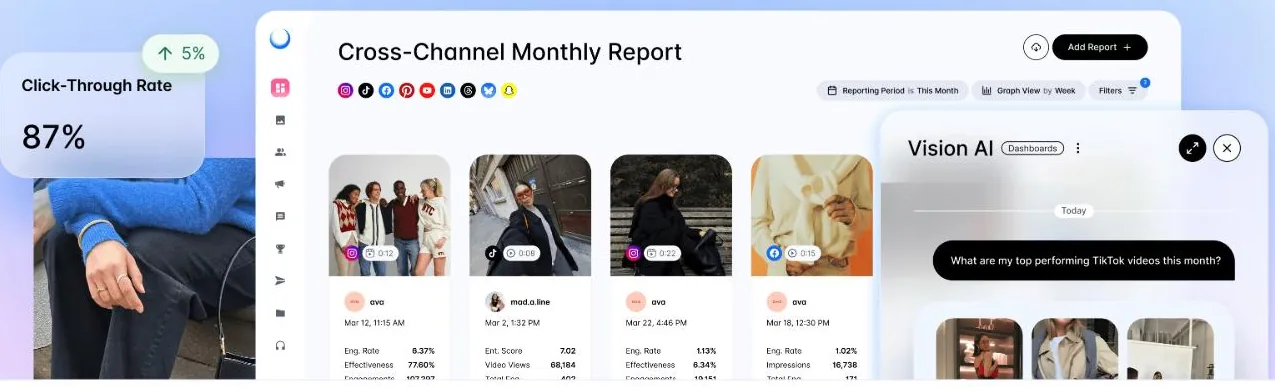
Dash Social ir uzņēmumu līmeņa sociālo mediju pārvaldības platforma, ko darbina zīmolam pielāgots MI. Tā apvieno plānošanu un publicēšanu ar satura mērīšanu, satura veidotāju pārvaldību, kopienas darbplūsmām, UGC, prognozējošu ieskatu un komercijas rīkiem.
Tas nav tiešs lēts Buffer aizstājējs. Tas ir cita veida pirkums organizācijām, kas sociālos medijus uzskata par nozīmīgu zīmola un ieņēmumu kanālu.
Kāpēc pāriet no Buffer uz Dash Social?
Pārejiet, kad komanda ir izaugusi no publicēšanas rādītājiem un tai jāsaprot visa vizuālā satura ekosistēma. Lielam patērētāju zīmolam var būt jāzina:
- kuri vizuālie koncepti visticamāk darbosies labi;
- kā salīdzināms paša zīmola un satura veidotāju saturs;
- kuri satura veidotāji sniedz būtiskus rezultātus;
- kā UGC var atkārtoti izmantot kampaņās un komercijas pieredzēs;
- kā sociālā aktivitāte ietekmē apmeklējumus un pārdošanu;
- kā zīmols salīdzinās ar konkurentiem.
Buffer var izplatīt saturu, bet Dash Social ir veidots, lai palīdzētu uzņēmumu komandām pārvaldīt un mērīt sistēmu ap to.
Kur Dash Social ir stiprāks par Buffer
Dash Social ir stiprāks konkrētam zīmolam pielāgotā analīzē, satura veidotāju pārvaldībā, UGC un sociālajā komercijā. Tas palīdz komandām pāriet no jautājuma „vai šis ieraksts guva iesaisti?” uz plašākiem jautājumiem par radošo materiālu veiktspēju, kampaņu ietekmi un uz saturu balstītu konversiju.
Saskaņā ar tā informāciju par cenām plānos ir iekļauti arī neierobežoti lietotāji. Tas ir noderīgi organizācijām, kurās sociālajos medijos iesaistītas vairākas funkcijas, lai gan platformas kopējā cena joprojām ir daudz augstāka nekā Buffer.
Skaidrākie lietošanas gadījumi ir:
- formālas influenceru vai satura veidotāju programmas pārvaldība;
- lietotāju radīta satura pārvaldība ar saņemtām izmantošanas atļaujām;
- vizuālo tendenču mērīšana lielā satura bibliotēkā;
- sociālo ierakstu sasaiste ar galerijām ar iepirkšanās iespējām un link-in-bio pieredzēm;
- lielas zīmola komandas koordinēšana ap veiktspējas datiem.
Kur Buffer ir stiprāks
Buffer ir daudz vieglāk pamatot satura veidotājiem, vietējiem uzņēmumiem un mazām mārketinga komandām. Tam ir caurskatāms zemas cenas ieejas punkts, bezmaksas plāns un mazāka apguves slodze.
Uzņēmums, kas vēlas tikai ieplānot saturu un pārskatīt pamata analītiku, izmantotu niecīgu daļu no Dash Social. Šādā gadījumā uzņēmumu līmeņa platforma pievieno izdevumus, neatrisinot reālu šķērsli.
Cenas un slēdziens
Dash Social cenas sākas no $999 mēnesī. Atkarībā no pakotnes var pievienot Creator Management, Premium Analytics un Social Listening.
Izvēlieties Dash Social Buffer vietā, ja: sociālie mediji ir nozīmīgs komerciāls kanāls un jums vajadzīgs uzņēmumu līmeņa vizuālā satura analītika, satura veidotāju pārvaldība, UGC un komercijas darbplūsmas.
Palieciet pie Buffer, ja: meklējat vienkāršu publicēšanu, nevis visaptverošu uzņēmuma pārvaldības sistēmu.
3. Planable: izvēlieties to, ja apstiprināšana visu palēnina
Vislabāk piemērots: aģentūrām, uzņēmumiem ar vairākām atrašanās vietām, izkliedētām komandām un zīmoliem, kur saturu pirms publicēšanas pārskata vairākas personas.
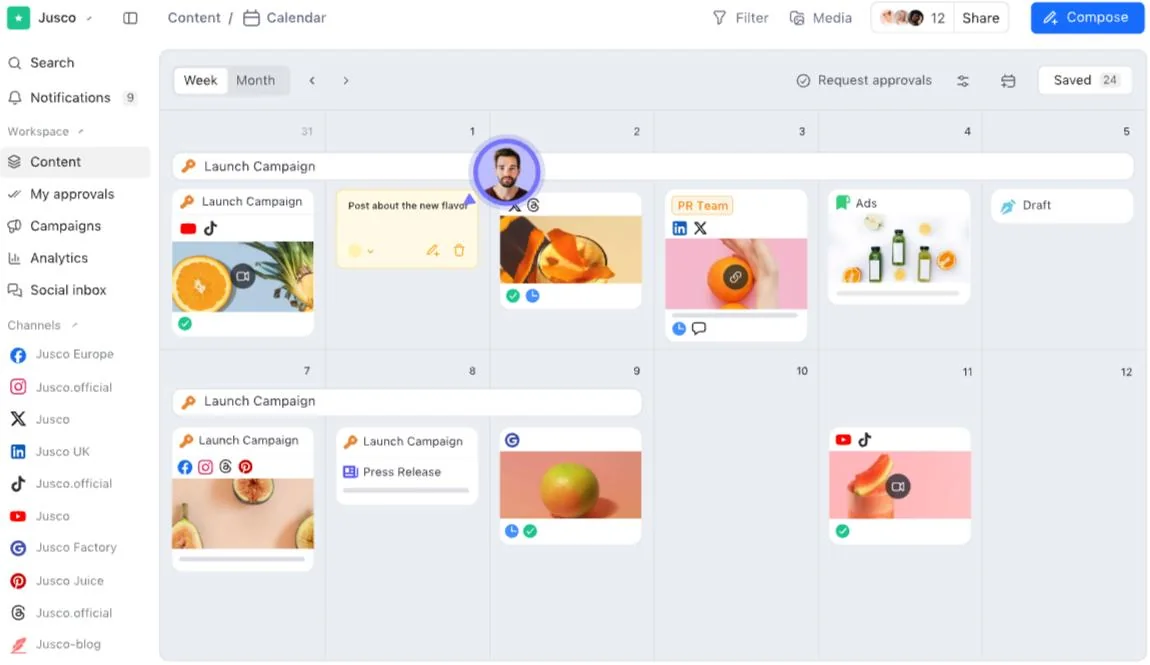
Planable ir uz sadarbību orientēta sociālo mediju pārvaldības programmatūra. Tā ļauj komandām kopīgās darbvidēs veidot, apspriest, priekšskatīt, apstiprināt, publicēt, iesaistīties un analizēt saturu.
Produkta spēcīgākā atšķirība no Buffer nav MI ģenerēšana vai uzņēmumu līmeņa sarunu analīze. Tā ir pārskatīšanas pieredze.
Kāpēc pāriet no Buffer uz Planable?
Pārejiet, kad īstā problēma nav ieraksta izveide vai ieplānošana, bet tā apstiprināšana. Daudzas komandas joprojām pārvalda atsauksmes, izmantojot e-pastu, tērzēšanu, dokumentus, ekrānuzņēmumus un izklājlapas. Tas rada paredzamas problēmas:
- komentāri attiecas uz novecojušu versiju;
- iekšējās atsauksmes nejauši tiek parādītas klientam;
- neviens nezina, vai galīgais ieraksta teksts ir apstiprināts;
- saturs paliek nepublicēts, kamēr cilvēki gaida lēmumu;
- vietējās komandas veic nekonsekventus labojumus;
- plānotājā ir cita versija nekā apstiprināšanas dokumentā.
Planable centralizē šo sarunu ap pašu ierakstu.
Kur Planable ir stiprāks par Buffer
Planable piedāvā plūsmas, režģa, kalendāra un saraksta skatus. Komandas locekļi un klienti var komentēt tieši blakus saturam, ieteikt izmaiņas un apstiprināt galīgo versiju. Klientiem, zīmoliem, atrašanās vietām vai nodaļām var izveidot atsevišķas darbvides.
Maksas plāni ietver neierobežotu lietotāju skaitu, kas ir svarīgi aģentūrām, kuras vēlas iesaistīt klientu ieinteresētās puses, nepērkot pilnu publicēšanas vietu katram pārskatītājam. Augstāki līmeņi atbalsta vairāk apstiprināšanas konfigurāciju, tostarp daudzlīmeņu apstiprināšanas procesus.
Planable ir stiprāks, ja:
- aģentūrai vajadzīgs klienta apstiprinājums;
- ierakstus pārskata vairākas nodaļas;
- nepieciešams juridiskais vai atbilstības solis;
- vietējās filiāles pielāgo centrālās kampaņas;
- svarīgs ir Instagram režģa konteksts;
- apstiprināšanas vēsturei jābūt redzamai.
Kur Buffer ir stiprāks
Buffer joprojām ir piemērotāks individuāliem lietotājiem un mazām komandām bez formālas apstiprināšanas ķēdes. Tā saskarne ir vieglāka, un cenas ir ekonomiskākas, ja jāpievieno tikai daži kanāli.
Planable cenas ir balstītas uz darbvidēm, tāpēc aģentūrām izmaksas jāaprēķina visiem klientiem kopā. Analītikas un sociālās iesūtnes prasības var ietekmēt arī galīgo pakotni. Komandai, kas galvenokārt meklē ar MI ģenerētus zīmola vizuāļus, joprojām būs vajadzīgs atsevišķs satura veidošanas rīks.
Cenas un slēdziens
Planable cenas sākas no $33 par darbvidi mēnesī, maksājot par gadu. Plāns Pro ir norādīts par $49 par darbvidi mēnesī, un tas paplašina limitus un apstiprināšanas iespējas.
Izvēlieties Planable Buffer vietā, ja: atsauksmes, klientu pārskatīšana un apstiprināšanas posmi aizkavē publicēšanu vairāk nekā satura radīšana.
Palieciet pie Buffer, ja: viena persona patstāvīgi veido, apstiprina un ieplāno saturu.
4. Hootsuite: izvēlieties to, ja vajag plašāku darba komplektu
Vislabāk piemērots: mārketinga un klientu apkalpošanas komandām, kas vēlas publicēšanu, monitoringu, iesūtnes pārvaldību, atskaites, apstiprināšanu un pārvaldību nobriedušā platformā.
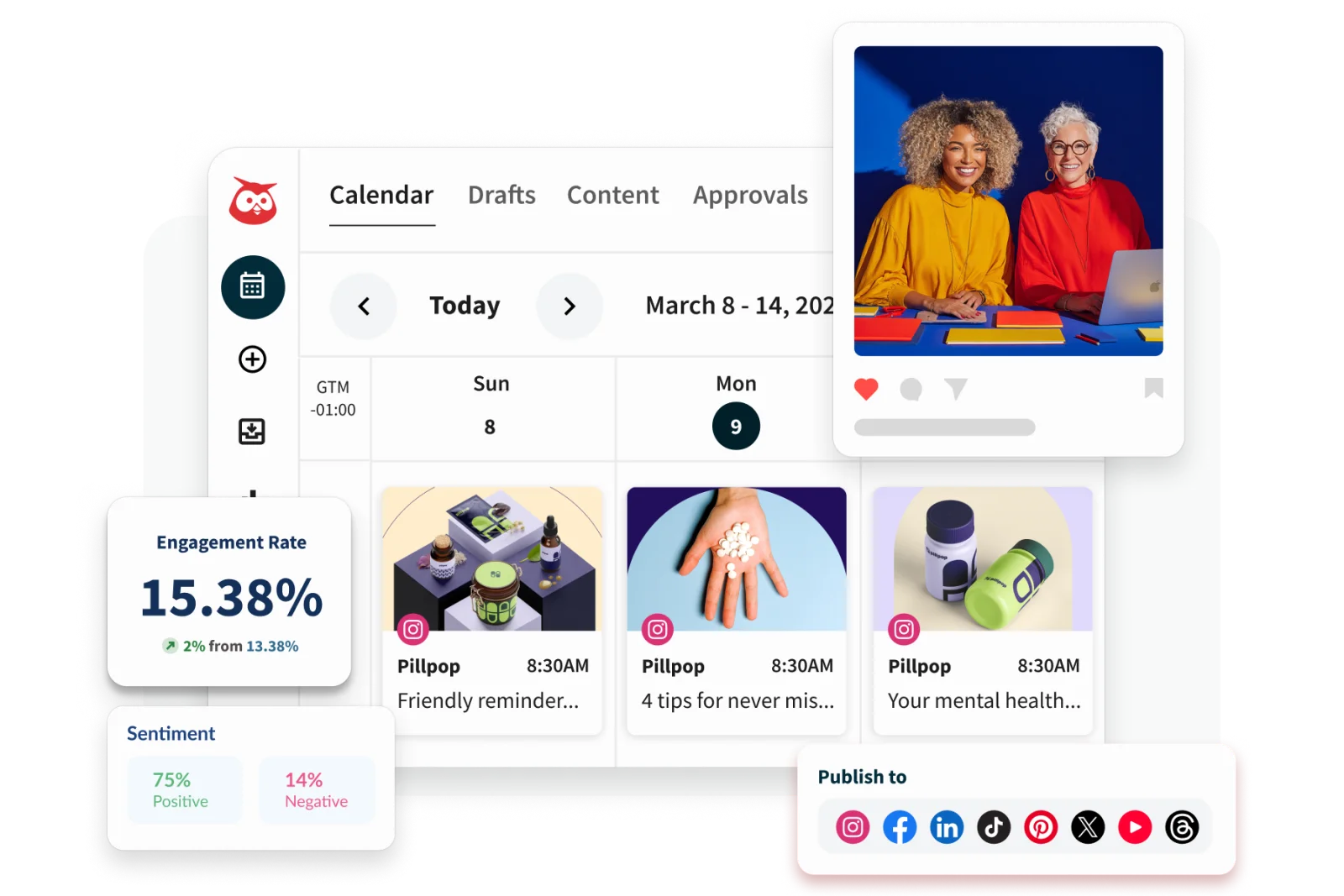
Hootsuite ir izaudzis tālu pāri plānošanai. Tā komplektā ir publicēšana, ar MI atbalstīta satura veidošana, vienota iesūtne, monitorings, analītika, sarunu analīze, komandas darbplūsmas un uzņēmumu līmeņa kontrole.
Komandai, kas ir uzkrājusi vairākus atsevišķus sociālo mediju rīkus, Hootsuite var kalpot kā konsolidācijas iespēja.
Kāpēc pāriet no Buffer uz Hootsuite?
Pārejiet, kad darbā ar sociālajiem medijiem iesaistītas vairākas nodaļas un publicēšanas kalendārs ir tikai viena darbības daļa. Augošā uzņēmumā mārketings var plānot kampaņas, klientu atbalsts — atbildēt uz ziņām, komunikācija — uzraudzīt zīmola pieminēšanu, bet vadība — pieprasīt veiktspējas atskaites.
Buffer joprojām var aptvert daļu šīs darbplūsmas, taču Hootsuite nodrošina plašāku koordināciju un pārvaldību.
Kur Hootsuite ir stiprāks par Buffer
Hootsuite ir stiprāks monitoringā, iesūtnes pārvaldībā, darbplūsmu automatizācijā, apstiprināšanā, pielāgotās atskaitēs un uzņēmumu līmeņa administrēšanā. Augstāki plāni atbalsta satura uzdevumu piešķiršanu, ziņu maršrutēšanu, uzlabotu sarunu analīzi un drošības prasības.
Tas ir noderīgi, ja uzņēmumam jāspēj:
- piešķirt ziņas pareizajai personai;
- uzraudzīt sarunas par zīmolu vai konkurentiem;
- koordinēt publicēšanu lielākā komandā;
- uzturēt apstiprināšanas un atļauju kontroli;
- veidot pielāgotas atskaites vairākām ieinteresētajām pusēm;
- pārvaldīt mijiedarbību ar klientiem no tās pašas sistēmas, ko izmanto publicēšanai.
Hootsuite var aizstāt arī šaurāku rīku kopumu, kas augstāko cenu var padarīt vieglāk pamatojamu komandām, kuras jau maksā par atsevišķiem iesūtnes, monitoringa un atskaišu produktiem.
Kur Buffer ir stiprāks
Buffer ir vieglāk apgūt, un tas ir daudz lētāks nelielam kanālu skaitam. Satura veidotājs vai mazs uzņēmums var sākt ar bezmaksas plānu vai maksāt par pievienoto kanālu, nepārejot uz uzņēmumu līmeņa darbplūsmām.
Hootsuite šķiet smagnējs, ja komandai galvenokārt vajadzīgs kalendārs. Tā cenas par lietotāju var arī strauji pieaugt, jo vairāk kolēģu vajag piekļuvi. Pirms pārejas aprēķiniet izmaksas, ņemot vērā vajadzīgās vietas, un noskaidrojiet, kuras Hootsuite funkcijas patiešām aizstās esošo programmatūru.
Cenas un slēdziens
Hootsuite publiskie 2026. gada materiāli rāda plānus, kas sākas aptuveni no $99 mēnesī, bet augstākas pakotnes pievieno plašāku automatizāciju, analītiku, sadarbību un pārvaldību. Cenas un kontu limiti atšķiras pēc pakotnes un norēķinu reģiona, tāpēc pašreizējo piedāvājumu apstipriniet oficiālajā plānu lapā.
Izvēlieties Hootsuite Buffer vietā, ja: jums vajadzīgs plašs sociālo mediju darba komplekts, nevis viegls plānotājs.
Palieciet pie Buffer, ja: publicēšana ir galvenais uzdevums un komandai nav vajadzīgas sarežģītas iesūtnes, monitoringa vai pārvaldības darbplūsmas.
5. Sprout Social: izvēlieties to klientu apkalpošanai un sociālo mediju datu analīzei
Vislabāk piemērots: organizācijām, kas izmanto sociālos medijus klientu apkalpošanai, reputācijas pārvaldībai, analītikai, izpētei un vairākām nodaļām noderīgiem biznesa secinājumiem.
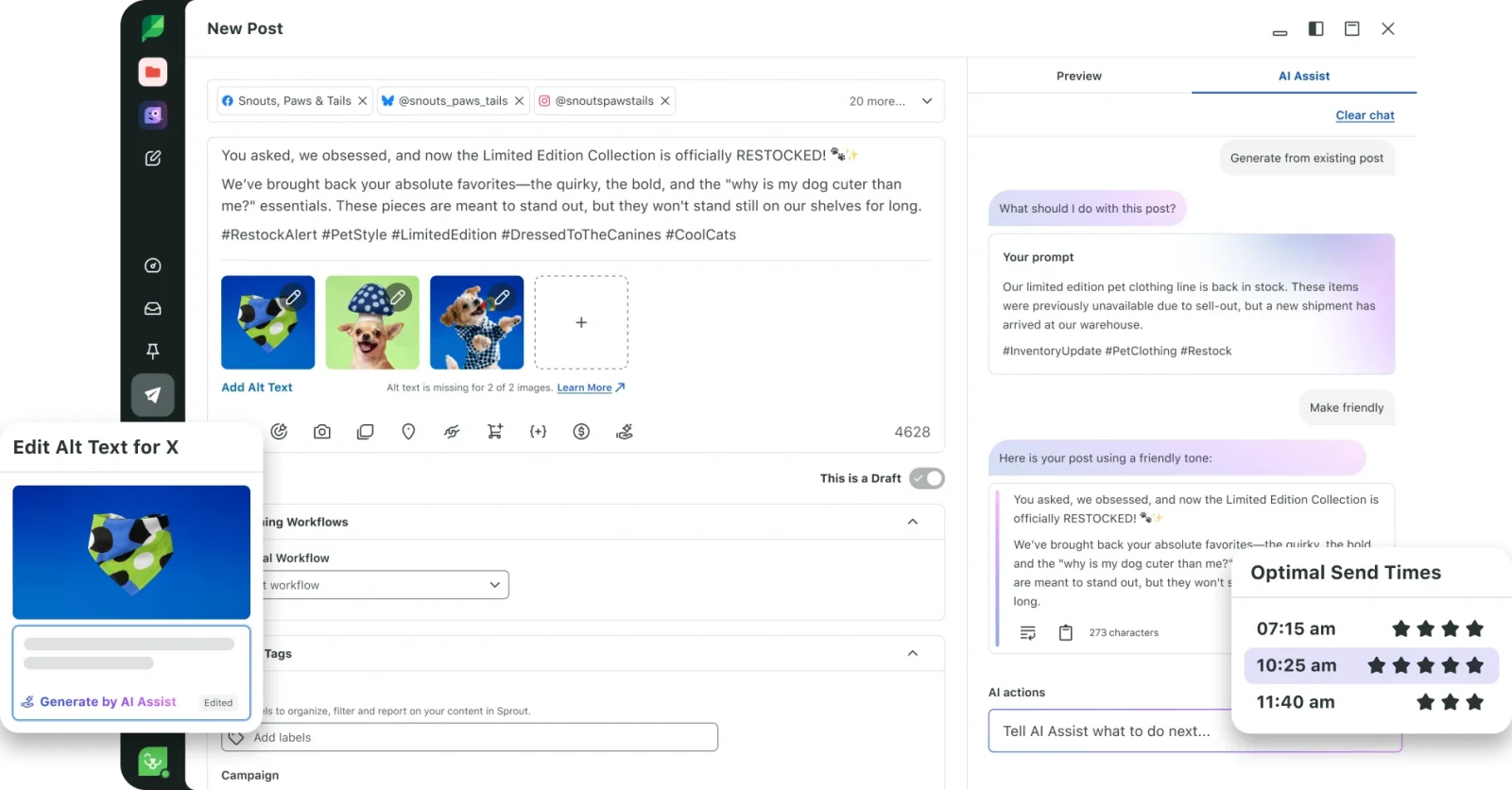
Sprout Social pozicionē sociālos datus kā biznesa analītiku. Tā platforma apvieno publicēšanu ar iesaisti, klientu apkalpošanu, analītiku, sociālo mediju sarunu analīzi, konkurentu ieskatu un komandas darbplūsmām.
Atšķirība no Buffer kļūst skaidra, kad no sociālajiem medijiem sagaida vairāk nekā tikai satura kalendāra informēšanu.
Kāpēc pāriet no Buffer uz Sprout Social?
Pārejiet, kad organizācijai jāsaprot sarunas un jārīkojas pēc tām sistemātiski: klientu apkalpošanas komandai, kas mēra atbildes rādītājus, zīmola komandai, kas uzrauga noskaņojumu, produktu komandai, kas mācās no klientu atsauksmēm, vai vadībai, kas pieprasa konsekventas atskaites dažādos tirgos.
Šādās vidēs sociālā iesūtne un analīzes iespējas ir svarīgāki par rindas pārvaldību.
Kur Sprout Social ir stiprāks par Buffer
Sprout Social ir stiprāks iesaistes darbplūsmās, klientu apkalpošanā, sarunu analīzē, analītikā un dažādām nodaļām paredzētās atskaitēs. Tā rīki palīdz komandām maršrutēt darbu, izsekot atbilžu aktivitātei, analizēt tendences un sasaistīt sociālos datus ar plašākiem biznesa lēmumiem.
Platforma ir piemērota, ja sociālo mediju komandām jāspēj:
- pārvaldīt lielu ienākošo ziņu apjomu;
- piešķirt un izsekot mijiedarbību ar klientiem;
- uzraudzīt izmaiņas sarunās par zīmolu vai kampaņām;
- salīdzināt konkurentus un tirgus tēmas;
- veidot atkārtojamas atskaites vadībai;
- dalīties ar sociālo ieskatu ar klientu apkalpošanas, produktu vai vadības komandām.
Sprout atbalsta arī MI atbalstītu ierakstu tekstu izveidi un publicēšanu, taču tā spēcīgākais iemesls Buffer aizstāšanai nav pamata satura ģenerēšana. Tas ir iesaistes un analītikas sistēmas dziļums.
Kur Buffer ir stiprāks
Buffer ir ievērojami pieejamāks indivīdiem un mazām komandām. Tas piedāvā vienkāršāku pieredzi, bezmaksas sākuma punktu un zemas cenas par kanālu.
Sprout Social diez vai sniegs labu vērtību, ja uzņēmums publicē dažas reizes nedēļā un saņem maz komentāru un ziņu. Platforma ir lietderīgāka, ja īpaša komanda konsekventi izmantos tās atskaišu, klientu apkalpošanas un analītikas funkcijas.
Cenas un slēdziens
Sprout Social cenas pašlaik sākas no $79 mēnesī. Kopējās izmaksas ir atkarīgas no plāna, vietu skaita un vajadzīgajām papildu iespējām.
Izvēlieties Sprout Social Buffer vietā, ja: sociālās sarunas, klientu apkalpošana, analītika un padziļināti secinājumi ir uzņēmumam stratēģiski svarīgi.
Palieciet pie Buffer, ja: jums galvenokārt vajadzīga vienkārša plānošana un nav komandas, kas veltīta iesaistei vai atskaitēm.
6. SocialPilot: izvēlieties to aģentūras mērogam par zemāku cenu
Vislabāk piemērots: aģentūrām, konsultantiem, uzņēmumiem ar vairākām atrašanās vietām un komandām, kas pārvalda daudz profilu, vienlaikus sekojot programmatūras izmaksām.
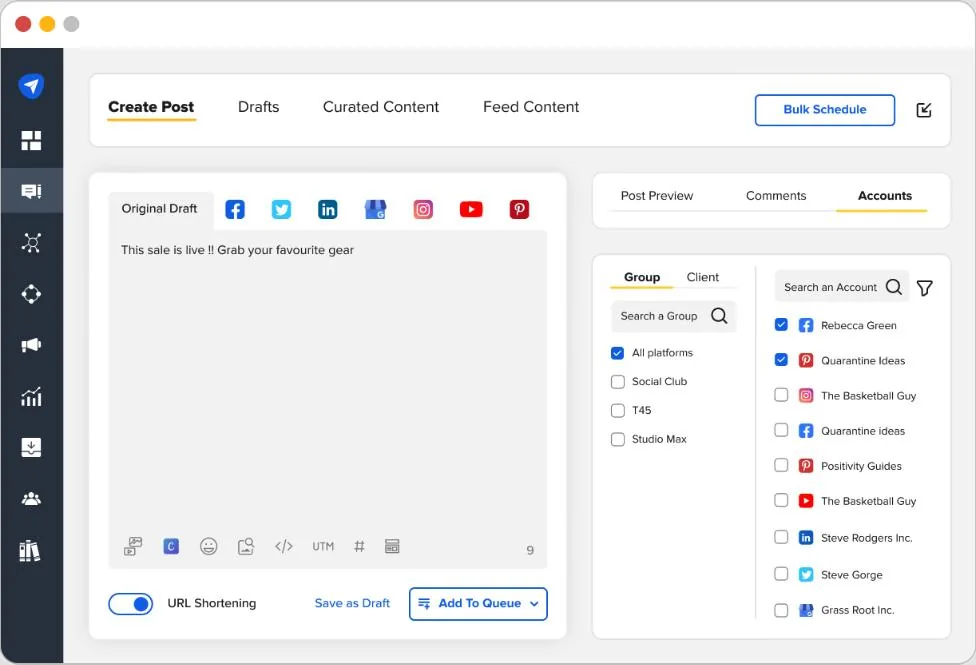
SocialPilot apvieno publicēšanu, masveida plānošanu, apstiprināšanu, analītiku, sociālo iesūtni, MI atbalstu, atsauksmju pārvaldību un aģentūru funkcijas. Tā spēcīgākā pozīcija pret Buffer ir komplektēšana: plānos ir iekļauts vairāk kontu, lietotāju, apstiprinājumu un white-label iespēju par paredzamu līmeņa cenu.
Kāpēc pāriet no Buffer uz SocialPilot?
Pārejiet, kad kontu un klientu skaits aug straujāk nekā darbplūsma. Buffer cenas par kanālu ir pievilcīgas nelielā mērogā, taču aģentūrai var būt vajadzīgs arī:
- klientu apstiprinājumi;
- vairāki komandas locekļi;
- masveida plānošana;
- atskaites ar jūsu zīmola noformējumu;
- atsevišķa klientu pārvaldība;
- sociālā iesūtne;
- atsauksmju pārvaldība;
- adaptācijas un kontu migrācijas atbalsts.
SocialPilot sagrupē šīs iespējas plānos, kas paredzēti profesionāļiem, mazo un vidējo uzņēmumu komandām, augošām aģentūrām un organizācijām ar vairākām atrašanās vietām.
Kur SocialPilot ir stiprāks par Buffer
SocialPilot ir stiprāks apjomam un aģentūru darbībai. Tā plāns Premium ietver 25 sociālos kontus, sešus lietotājus, masveida plānošanu, uzlabotu analītiku, klientu apstiprinājumus un atskaites ar jūsu zīmola noformējumu. Plāns Ultimate paplašinās līdz 50 kontiem un neierobežotiem lietotājiem, pievienojot drošības, adaptācijas un kontu pārvaldības funkcijas.
Platforma ir pievilcīga, ja komandai jāpārvalda daudz kontu, nemaksājot atsevišķi par katru nelielu piekļuves pieaugumu. Masveida plānošana ir noderīga arī aģentūrām, kas sagatavo lielas satura partijas.
Papildu lietošanas gadījumi ir:
- zīmolotu veiktspējas atskaišu kopīgošana ar klientiem;
- atsauksmju pārvaldība līdzās sociālajai mijiedarbībai;
- satura apstiprināšana iekšēji un ārēji;
- vairāku atrašanās vietu adaptācija;
- piekļuves nodrošināšana vairākiem kolēģiem bez uzņēmumu līmeņa cenām par vietu.
Kur Buffer ir stiprāks
Buffer var palikt lētāks un vienkāršāks satura veidotājam vai mazam uzņēmumam, kas pārvalda tikai dažus kanālus. Tā cenas par kanālu nozīmē, ka lietotājiem nav jāpērk lielāka kontu pakete, pirms tā ir vajadzīga.
Buffer fokusētā saskarne arī šķiet mazāk sarežģīta ikdienas darbā. SocialPilot kļūst vērtīgāks, pieaugot kontu apjomam, komandas lielumam un aģentūras prasībām.
Cenas un slēdziens
SocialPilot cenas sākas no $25,50 mēnesī, maksājot par gadu, par septiņiem kontiem un vienu lietotāju. Standard pašlaik ir $42,50 mēnesī, maksājot par gadu, Premium — $85, bet Ultimate — $170, ar atšķirībām kontu, lietotāju, apstiprinājumu, analītikas, MI kredītu un aģentūru funkciju ziņā.
Izvēlieties SocialPilot Buffer vietā, ja: pārvaldāt daudz sociālo profilu vai klientu un jums vajadzīgas aģentūru darbplūsmas, nepārejot uz uzņēmumu līmeņa cenām.
Palieciet pie Buffer, ja: jums ir tikai daži kanāli un vēlaties pēc iespējas vienkāršāku publicēšanas iestatījumu.
7. Agorapulse: izvēlieties to, ja svarīgākā ir iesaistes pārvaldība
Vislabāk piemērots: mārketinga un kopienas komandām, kurām vajadzīga strukturēta iesūtne, moderēšana, sociālo mediju sarunu analīze, atskaites un labāka redzamība par sociālo mediju rezultātiem.
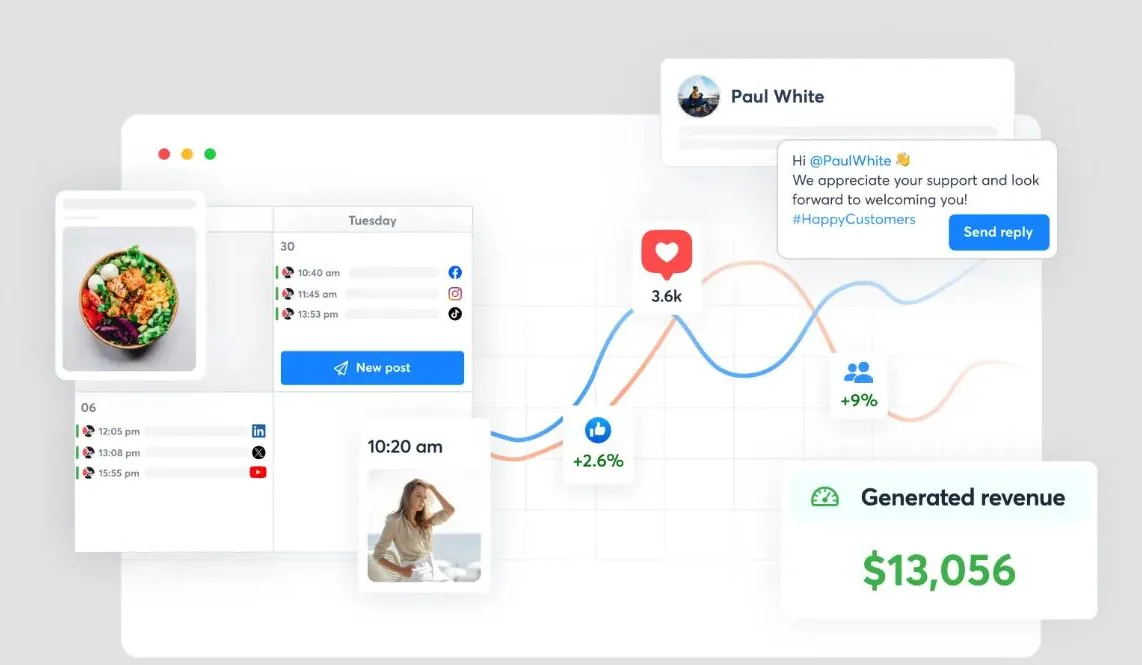
Agorapulse apvieno publicēšanu ar vienotu sociālo iesūtni, sarunu analīzi, atskaitēm, sadarbību un uz ROI orientētām darbplūsmām.
Tā ir praktiska alternatīva, ja saturs tiek veiksmīgi publicēts, bet komanda zaudē kontroli pār sarunām un atskaitēm, kas tām seko.
Kāpēc pāriet no Buffer uz Agorapulse?
Pārejiet, kad ienākošā aktivitāte ir kļuvusi par būtisku ikdienas pienākumu. Zīmols var saņemt ziņas, komentārus, pieminējumus, atsauksmes un atbildes uz kampaņām vairākos profilos. To apstrāde tieši katrā tīklā apgrūtina atbildības piešķiršanu, izsekošanu, uz ko ir atbildēts, un konsekventa servisa uzturēšanu.
Agorapulse centralizē šo mijiedarbību un sniedz komandām skaidrāku pārskatīšanas un atbildēšanas procesu.
Kur Agorapulse ir stiprāks par Buffer
Agorapulse ir stiprāks iesūtnes organizēšanā, moderēšanā, komandas uzdevumu piešķiršanā, sarunu analīzē un detalizētās atskaitēs. Tas ir paredzēts, lai palīdzētu komandām pārvaldīt sociālo mijiedarbību, nevis tikai publicēt saturu.
Platforma ir noderīga:
- komentāru un ziņu apvienošanai;
- sarunu piešķiršanai konkrētiem komandas locekļiem;
- moderēšanas noteikumu piemērošanai;
- atbilžu aktivitātes izsekošanai;
- izvēlētu zīmola un konkurentu atslēgvārdu uzraudzībai;
- klientu vai vadības atskaišu veidošanai;
- sociālās aktivitātes sasaistei ar vietnes vai kampaņu rezultātiem, ja iestatījumi to atbalsta.
Aģentūrām publicēšanas, iesūtnes, sadarbības un atskaišu kombinācija samazina atsevišķo sistēmu skaitu, ko izmanto ikdienas klientu pārvaldībai.
Kur Buffer ir stiprāks
Buffer joprojām ir izdevīgāka izvēle, ja ienākošā iesaiste ir ierobežota un komandai galvenokārt vajadzīga publicēšana. Tā bezmaksas un zemas cenas plāni ir pieejamāki, un tā saskarne ir vienkāršāka vieglai darbplūsmai.
Agorapulse cenas parasti ir par lietotāju, tāpēc izmaksas pieaug, jo vairāk cilvēku piedalās. Komandām arī jāpārbauda, kuri profili, atskaišu iespējas un sarunu analīzes funkcijas ir iekļautas izvēlētajā pakotnē.
Cenas un slēdziens
Agorapulse cenas pašlaik rāda maksas plānus, kas sākas aptuveni no $119 par lietotāju mēnesī, maksājot par gadu, bet augstāki līmeņi pievieno iespējas un limitus.
Izvēlieties Agorapulse Buffer vietā, ja: komentāru, ziņu, moderēšanas, sarunu analīzes un atskaišu pārvaldība tagad ir tikpat svarīga kā publicēšana.
Palieciet pie Buffer, ja: mijiedarbību ar auditoriju var pārvaldīt vietējās sociālo mediju lietotnēs un publicēšanas rinda joprojām ir galvenā prasība.
Labākās Buffer alternatīvas pēc pārejas iemesla
Pareizā atbilde kļūst skaidrāka, ja sākat ar iemeslu, kāpēc Buffer vairs neder.
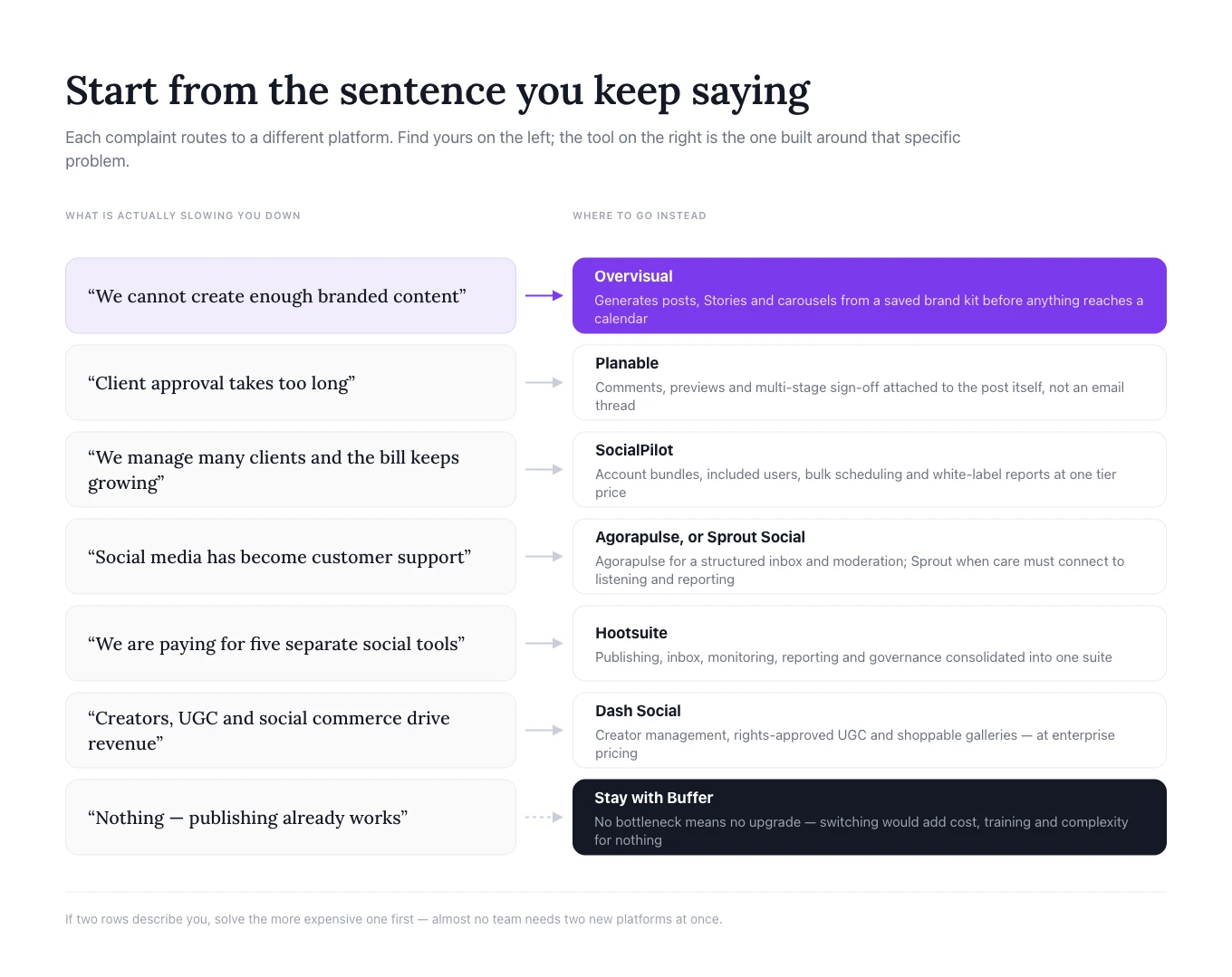
„Mēs nevaram radīt pietiekami daudz zīmola satura”
Izvēlieties Overvisual. Tas risina darbu pirms plānošanas, ģenerējot idejas, ierakstu tekstus, ierakstus, stāstus un karuseļus ap saglabātu zīmola identitāti.
Papildu norādījumus par konsekventas publicēšanas sistēmas veidošanu skatiet mūsu rakstā kā augt Instagram.
„Klienta apstiprināšana aizņem pārāk ilgu laiku”
Izvēlieties Planable. Tā darbvides, vizuālie priekšskatījumi, komentāri un apstiprināšanas posmi ir paredzēti tieši šim šķērslim.
„Mēs pārvaldām daudz klientu un mums vajag labākas cenas lielā mērogā”
Izvēlieties SocialPilot. Tā kontu pakotnes, iekļautie lietotāji, masveida plānošana, apstiprināšana un atskaites ar jūsu zīmola noformējumu ir īpaši būtiskas aģentūrām.
„Sociālie mediji ir daļa no klientu atbalsta”
Izvēlieties Agorapulse strukturētai iesūtnei un praktiskai iesaistes pārvaldībai vai Sprout Social, ja klientu apkalpošanai jāsaslēdzas ar padziļinātu analīzi un visas organizācijas atskaitēm.
„Mēs vēlamies vienu plašu uzņēmumu līmeņa platformu”
Izvēlieties Hootsuite, ja mērķis ir konsolidēt publicēšanu, monitoringu, iesūtni, analītiku, darbplūsmas un pārvaldību.
„Satura veidotāji, UGC un sociālā komercija virza mūsu izaugsmi”
Izvēlieties Dash Social, ja organizācija var pamatot uzņēmumu līmeņa cenu un tai vajadzīgs zīmolam pielāgots vizuālā satura analītika, satura veidotāju pārvaldība un komercijas iespējas.
„Mums vajag tikai uzticamu plānošanu”
Palieciet pie Buffer. Pāreja pievienotu izmaksas un sarežģītību, neatrisinot reālu problēmu.
Kā pāriet no Buffer, netraucējot publicēšanu
Izturieties pret šo pāreju kā pret darbplūsmas migrāciju, nevis vienkāršu pierakstīšanās maiņu. Pretējā gadījumā komandas rada dublētus ierakstus, palaiž garām apstiprinājumus vai zaudē kontekstu esošajām atskaitēm.
1. Dokumentējiet pašreizējo iestatījumu
Sarakstiet katru pievienoto kanālu, rindu, komandas locekli, apstiprināšanas soli, atkārtotu kampaņu, izsekošanas konvenciju un atskaiti. Iekļaujiet darbu, kas notiek ārpus Buffer, piemēram, dizaina failus, īsos aprakstus un klientu apstiprinājumus.
2. Definējiet, ko jaunajai platformai jāaizstāj
Uzrakstiet precīzu rezultātu, ko gaidāt no pārejas: ātrāku zīmola satura veidošanu, mazāk apstiprināšanas kavējumu, vienu kopīgu iesūtni, zemākas izmaksas daudziem klientu profiliem, sociālo mediju sarunu analīzi vai labākas atskaites. Tas kļūst par standartu migrācijas novērtēšanai.
3. Vispirms pārbaudiet vienu zīmolu
Pievienojiet zemāka riska kontu un pārbaudiet atļaujas, ierakstu formatējumu, saites, pieminējumus, laika joslas, apstiprināšanu, iesūtnes sinhronizāciju, analītiku un piekļuvi mobilajā ierīcē. Pirms visu kontu pārvietošanas publicējiet vairākus reālus ierakstus.
4. Pārbūvējiet darbplūsmu ap jauno rīku
Nekopējiet veco procesu bez pārdomām. Definējiet zīmola komplektus Overvisual, pārvietojiet klientu atsauksmes uz Planable, konfigurējiet apstiprināšanu SocialPilot, piešķiriet iesūtnes atbildību Agorapulse vai Sprout Social, vai izveidojiet monitoringu un atļaujas Hootsuite. Mūsu teksta izvietošanas darbplūsma ir viens piemērs solim, kas pilnībā izzūd, tiklīdz rīks to pārņem.
5. Saglabājiet atskaites punktu un pabeidziet pāreju
Pirms pamest Buffer, fiksējiet nesenos sasniedzamības, iesaistes, klikšķu, publicēšanas biežuma un atbilžu rādītājus. Veiciet īsu, skaidri nodalītu pārklāšanās periodu, pārliecinoties, ka tie paši ieraksti nav ieplānoti abās sistēmās. Atceliet Buffer tikai pēc tam, kad publicēšana, atļaujas, apstiprinājumi, iesūtnes un atskaites ir pārbaudītas.
Biežāk uzdotie jautājumi
Kura ir labākā Buffer alternatīva 2026. gadā?
Tas ir atkarīgs no pārejas iemesla. Overvisual ir vislabākais, ja šķērslis ir zīmola satura veidošana; Planable — apstiprināšanai; SocialPilot — aģentūru mērogam; Agorapulse — iesūtnes pārvaldībai; Sprout Social — klientu apkalpošanai un datu analīzei; Hootsuite — plašam komplektam; bet Dash Social — uzņēmumu līmeņa satura veidotāju, UGC un komercijas darbplūsmām.
Vai Buffer 2026. gadā joprojām ir vērts izmantot?
Jā. Buffer joprojām ir spēcīga izvēle satura veidotājiem un mazām komandām, kam galvenokārt vajadzīga vienkārša plānošana, pamata analītika un pieejamas cenas par kanālu. Pāreja ir lietderīga tikai tad, ja citā darbplūsmas daļā ir izveidojies būtisks šķērslis.
Kura Buffer alternatīva patiešām izveido saturu?
Overvisual ir uz satura veidošanu visvairāk orientētā iespēja šeit. Tas var plānot tēmas un ģenerēt zīmola ierakstus, stāstus un karuseļus pirms to ieplānošanas. Vairākas citas platformas nodrošina MI rakstīšanas palīdzību, taču vairāk koncentrējas uz publicēšanu, iesaisti vai analītiku.
Kura Buffer alternatīva ir vislabākā aģentūrām?
Planable ir spēcīgs klientu atsauksmēm un apstiprināšanai. SocialPilot ir pievilcīgs daudziem kontiem, iekļautiem lietotājiem un atskaitēm ar jūsu zīmola noformējumu. Agorapulse ir noderīgs, ja aģentūra pārvalda arī kopienas iesaisti un atskaites.
Vai Hootsuite ir labāks par Buffer?
Hootsuite ir plašāks, nevis universāli labāks. Tas piemērots komandām, kam vajadzīgs monitorings, iesūtnes pārvaldība, sadarbība, analītika un pārvaldība. Buffer var būt labāks lietotājiem, kas dod priekšroku vienkāršībai un zemākai cenai.
Vai ieplānotos Buffer ierakstus var pārnest automātiski?
Nav universāla pārneses procesa katrai alternatīvai. Komandām bieži nākotnes ieplānotie ieraksti jāpārbūvē manuāli vai jāizmanto jaunās platformas masveida augšupielādes un migrācijas atbalsts. Pirms pārejas noskaidrojiet pieejamo procesu pie pakalpojumu sniedzēja.
Vai rīku maiņa uzlabos iesaisti?
Ne automātiski. Programmatūra uzlabo konsekvenci, ātrumu, atbilžu pārvaldību un piekļuvi ieskatam. Iesaiste joprojām ir atkarīga no auditorijas izpratnes, radošo materiālu kvalitātes, pozicionēšanas, piedāvājumiem un pastāvīgas mijiedarbības.
Secinājumi
Labākās Buffer alternatīvas nav vienkārši rīki ar vairāk plānošanas funkciju. Katra šajā ceļvedī iekļautā iespēja atspoguļo citu iemeslu, kāpēc pamest Buffer.
Izvēlieties Overvisual, kad satura veidošana un zīmola dizains neļauj publicēt konsekventi. Izvēlieties Planable, kad atsauksmes un apstiprināšana rada kavējumus. Izvēlieties SocialPilot, kad aģentūrai vajag daudz kontu un spēcīgākas klientu funkcijas par pārvaldāmu cenu. Izvēlieties Agorapulse, kad iesūtne un atskaites ir tikpat svarīgas kā kalendārs. Izvēlieties Sprout Social, kad sociālie dati atbalsta klientu apkalpošanu un biznesa analītiku. Izvēlieties Hootsuite, kad lielākai komandai vajadzīgs plašs ikdienas pārvaldības rīku komplekts. Izvēlieties Dash Social, kad uz vizuālo saturu orientētam uzņēmumu zīmolam vajadzīgas satura veidotāju, UGC, prognozējošas un komercijas darbplūsmas.
Un palieciet pie Buffer, kad problēma jau ir atrisināta. Tā fokusētā pieeja joprojām ir vērtīga lietotājiem, kas saturu veido citur un vēlas vienkāršu, uzticamu publicēšanas sistēmu.
Pareizs lēmums sākas ar vienu jautājumu: kura jūsu pašreizējās sociālo mediju darbplūsmas daļa aizņem visvairāk laika vai rada vislielāko risku? Izvēlieties platformu, kas veidota ap šo problēmu, nevis to, kurai ir garākais funkciju saraksts.

Ar MI palīdzību dažu minūšu laikā izveidojiet saturu sociālajiem tīkliem visam mēnesim sava zīmola stilā.
Izmēģini 3 dienas par 1 €

