


Most social media calendars fail in the same place. They are built once, in a spreadsheet, in a burst of January optimism — and by week three they describe a plan nobody is following any more. A dynamic content calendar for real-time social media marketing solves that by treating the calendar as a living system rather than a document: a majority of posts planned in batches, a deliberate gap left for whatever the week actually brings, and automation handling the parts that do not need a human.
This guide covers the six-step build, how much of the month to fill, what to look for in the tooling, and the mistakes that quietly turn a dynamic calendar back into a static one.
Editorial disclosure: Overvisual is our product, so we know its workflow more deeply than the other platforms mentioned here. We have described the category honestly, including the cases where a simpler scheduler or a spreadsheet is the better call.
Key takeaways
- A dynamic content calendar combines batch-planned evergreen content with a reserved block of unscheduled slots, so reacting to a trend does not mean cancelling something else.
- Batch planning two to four weeks at a time removes repeated daily planning decisions and makes review easier.
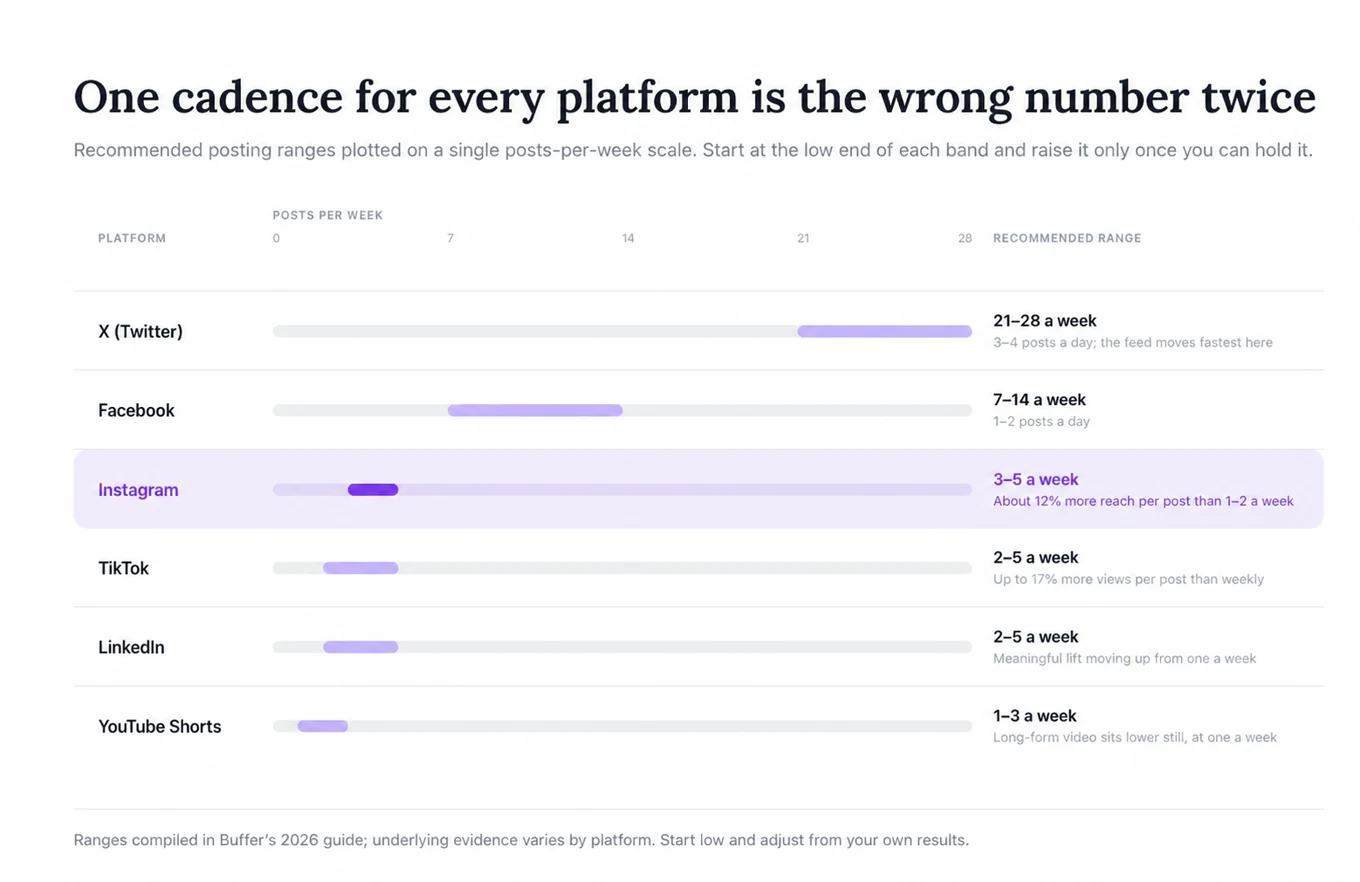
- Cadence is per platform, not one number for everything: Buffer's data puts Instagram at 3–5 posts a week and X at 3–4 a day.
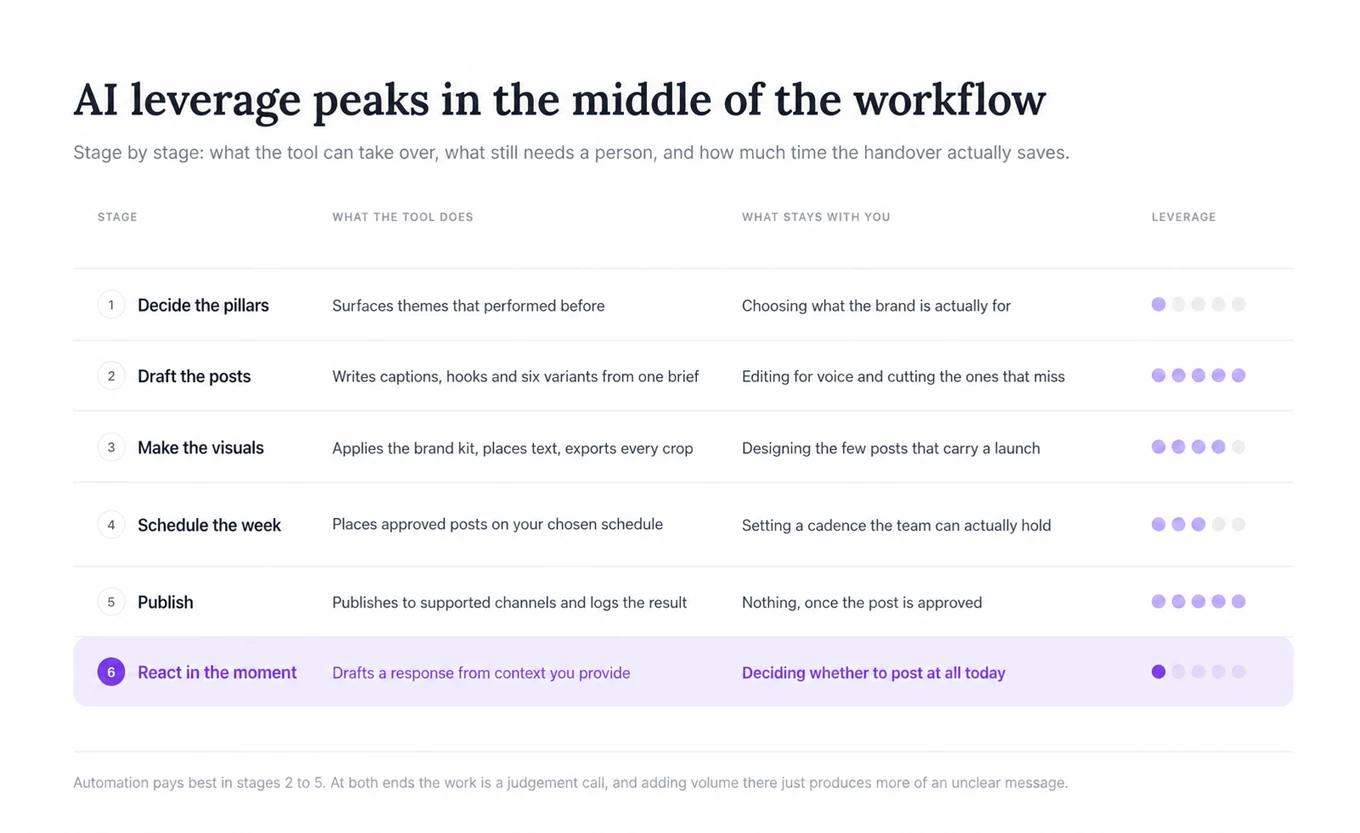
- AI is most useful for the mechanical middle of the process — drafting variants, resizing and adapting copy — and least useful for judgement calls about tone and timing.
- The features that matter are real-time editability, approval workflows, time zone handling and per-post performance tracking. Everything else is convenience.
- Treat 20% as a starting reserve, not a universal rule. Adjust it to your approval speed, industry and results.
What a dynamic content calendar actually is in 2026
A static calendar records decisions. A dynamic one holds decisions loosely enough that they can change without the whole plan collapsing.
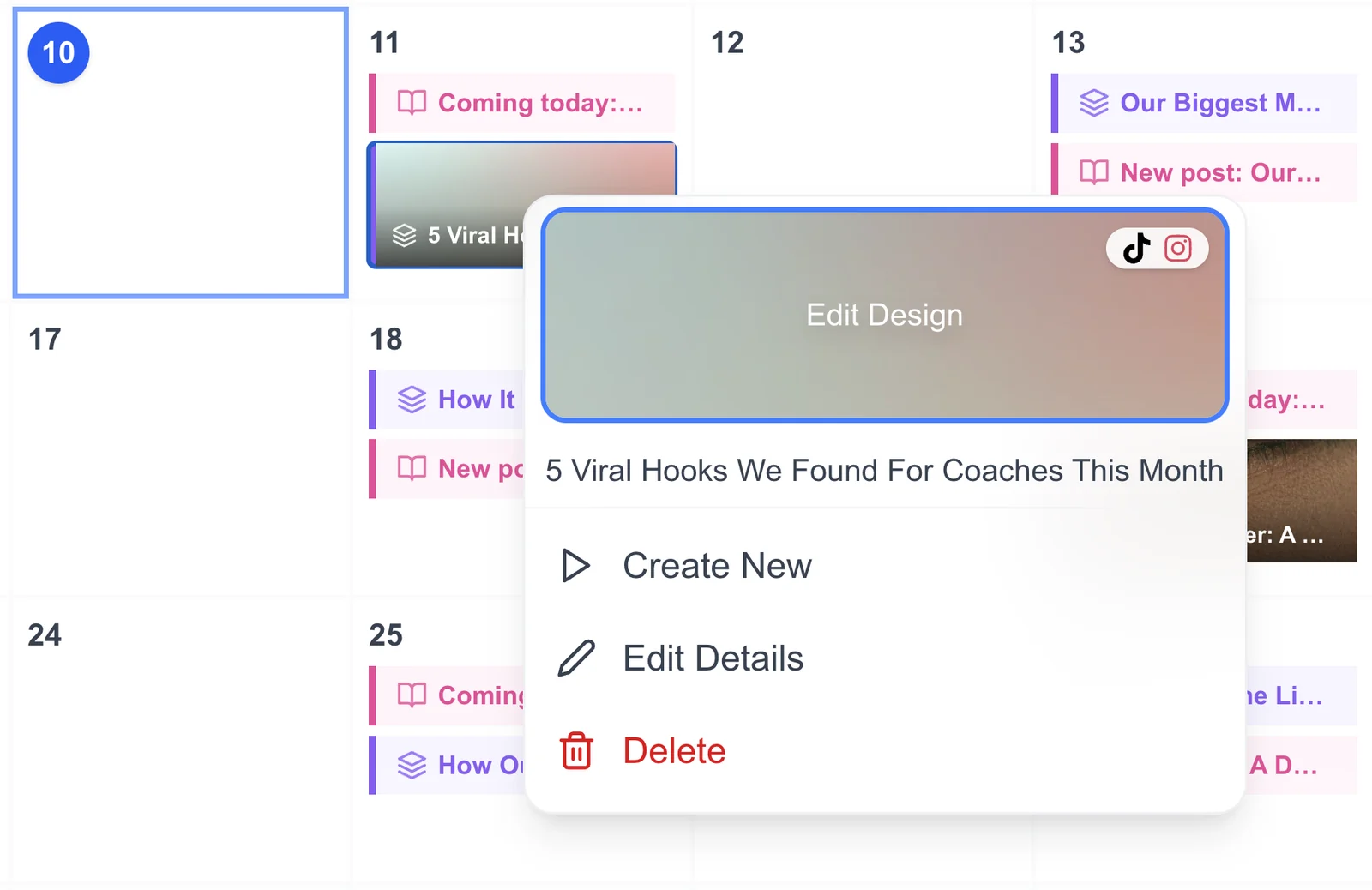
Concretely, that means three things. The calendar is the source of truth rather than a plan that lives alongside the real work in a chat thread. Posts carry state — drafted, approved, scheduled, published, paused — so anyone can see what is safe to change. And a portion of the schedule is intentionally unfilled, so a topical post can go out on Thursday without something else being bumped.
The reason this matters more in 2026 than it did five years ago is that the gap between "we should say something about this" and "the moment has passed" has collapsed. A plan locked in three weeks ago has no mechanism for a timely response. Hootsuite's 2026 social trends research highlights the rise of rapid-response content and "fastvertising": teams need a planning process that can absorb a change of subject mid-week.
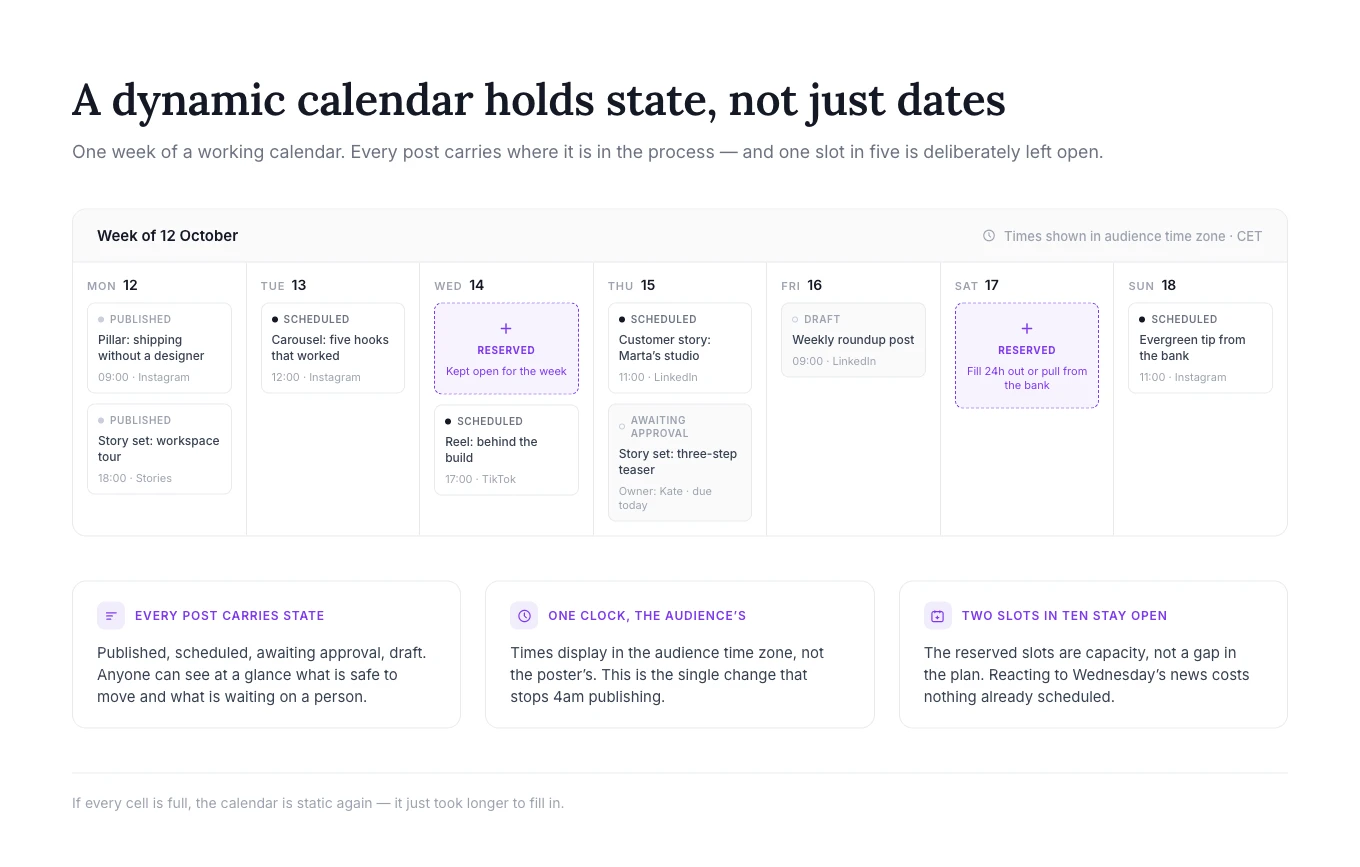
From static spreadsheet to living system
Spreadsheets are not the enemy — plenty of small teams run perfectly good calendars in one, including approval status and basic performance columns. Their limitation is enforcement and automation: a sheet cannot prevent an unapproved post from moving forward, publish it, or sync results without extra tooling. Those gaps are usually filled by a person copying information between systems, and that copying is where consistency starts to break.
The move to a dynamic system is mostly a move of state into one place. Once the calendar knows a post's status, its channel, its target time zone and its results, real-time adjustment stops being a fire drill and becomes an edit.
Where the calendar fits in the wider marketing plan
A content calendar that only knows about social posts will drift from the rest of the business. Tie each post to something — a campaign, a launch, a seasonal moment, a content pillar — and two useful things happen: gaps become visible (three weeks with nothing supporting the launch), and reporting can answer questions leadership actually asks.
This is also where the calendar earns its keep against paid media. Organic and paid schedules that are planned separately tend to collide, running the same message twice in a week or leaving a launch week with no organic support at all.
How to Build a Dynamic Content Calendar for Real-Time Social Media Marketing in 2026
The build is six steps. They are ordered deliberately — skipping to scheduling before pillars exist is the most common reason a calendar reverts to ad hoc posting within a month.
| Step | Action | Why it matters | Practical tip |
|---|---|---|---|
| 1 | Define 3–5 content pillars | Gives every slot a reason to exist | Name them as audience problems, not content types |
| 2 | Batch-plan 2–4 weeks ahead | Removes the daily "what do we post" decision | Draft in one sitting, approve in another |
| 3 | Set cadence per platform | Posting frequency that works on X buries an Instagram feed | Start at the low end and raise it once you can sustain it |
| 4 | Schedule with time zones and approvals | Prevents 3am posts and off-brand slips | Set the approver before you need one, not during a crisis |
| 5 | Reserve capacity for real time | Makes reacting possible without cancelling | Start near 20%, then adjust to your operating reality |
| 6 | Review performance and update the plan | Turns results into a better next batch | Record one keep, iterate or stop decision per review |
Step 1 — Define three to five content pillars
Pillars are the recurring themes every post belongs to. Three to five is the working range: fewer and the feed feels repetitive, more and nobody remembers them.
The framing that works best is a pillar per audience problem rather than per format. "Educational posts" is a format and tells a writer nothing. "How small teams ship content without a designer" is a problem, and a month of posts falls out of it easily. Write the pillars down somewhere the calendar can reference, and tag each planned post with one — the tagging is what later shows you that 60% of the month went to product news.
Step 2 — Batch-plan two to four weeks at a time
Batching works because it separates two modes of thinking that interfere with each other. Deciding what to say is strategic and benefits from seeing the whole month at once. Producing the asset is executional. Doing both at 9am for that day's post gets you the worst version of each.
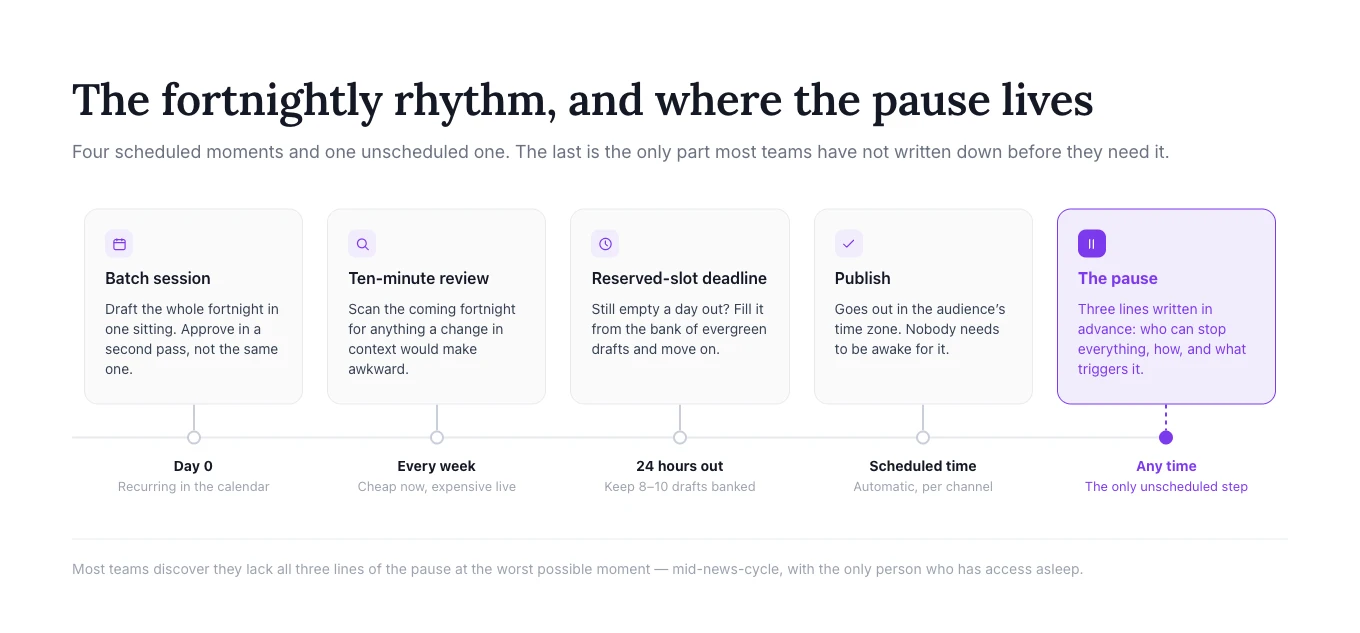
A realistic batch session: pick the pillar mix for the period, draft headlines for every slot, then produce in a second pass. The time saved depends on team size and review complexity, but the immediate gain is simple: you make the recurring decisions once instead of reopening them every day. Small-business programmes teach the same batching pattern — the Long Beach SBDC runs a workshop specifically on assembling a 2026 calendar this way.
This is also the step where an AI social media manager changes the economics. Generating a month of on-brand drafts takes minutes rather than a day, and the human work shifts to editing and approving — which is faster, and frankly more pleasant, than staring at an empty content brief.
Step 3 — Set cadence per platform, not one number for all
A single posting frequency across every channel is the most common calendar mistake, and it is easy to fix with published data. Buffer's 2026 posting frequency guide compiles platform-specific recommendations from several analyses. Its Instagram and TikTok sections draw on Buffer datasets of more than 100,000 accounts; other platform ranges in the guide cite separate studies:
- Instagram: 3–5 posts a week — accounts at that rate saw roughly 12% more reach per post than those posting once or twice.
- TikTok: 2–5 posts a week, worth up to 17% more views per post versus weekly.
- X (Twitter): 3–4 posts a day.
- LinkedIn: 2–5 posts a week.
- Facebook: 1–2 posts a day.
- YouTube Shorts: 1–3 videos a week.
Pick the low end of each range first. A cadence you can hold for six months beats an ambitious one abandoned in week five, and the consistency itself is what compounds.
Step 4 — Schedule with time zones and approvals in mind
Two things break at scale: time and permission.
Time zones matter the moment an audience spans more than one region. Scheduling in the poster's local time is how a European brand ends up publishing to a US audience at 4am. Set the calendar's display time zone to the audience's, not the team's. For send times themselves, Sprout Social's ongoing best-times-to-post research is a reasonable starting point — but treat it as a hypothesis to test against your own analytics rather than a rule.
Permission matters as soon as more than one person can publish. An approval step does not need to be heavy; it needs to exist and to have a named owner with a deadline. The failure mode is not a bad post slipping through — it is a good post sitting unapproved for four days until the moment is gone. Define what does not need approval too: replies, reshares of your own content, and anything inside a pre-approved template.
Step 5 — Reserve capacity for real-time content
This is the step that makes the calendar dynamic, and the one most often skipped, because an empty slot looks like a planning failure.
It is not. It is capacity. For a typical brand, reserving roughly one in five slots is a useful starting heuristic, not a benchmark. Label those slots so they do not quietly get backfilled with evergreen content. When something happens — a trend, a competitor announcement, a customer story worth sharing — there is somewhere to put it that costs nothing.
Tune the reserve to how quickly your team can act. A stable editorial programme may need only 10%; a brand close to news, culture or live events may need 25–30%; a regulated team may also stay near 5–10% and rely on pre-approved response templates. Review the percentage after two cycles instead of defending the initial number.
Two practical rules for those slots. Set a deadline: if a reactive slot is unfilled 24 hours out, fill it from a standing bank of evergreen drafts. And keep the bank stocked — 8 to 10 finished, undated posts is enough to make the rule painless.
Step 6 — Close the performance feedback loop
A calendar becomes more useful when yesterday's results change tomorrow's plan. At the end of each week or fortnight, review performance by goal and format — not just total likes — and record one decision for the next batch: keep, iterate or stop.
Keep the loop deliberately small. Choose the metric that matches the post's goal, compare it with your recent baseline, note what probably influenced the result, and convert that observation into a concrete change. For example: keep the tutorial carousel format, iterate the opening slide, or stop using broad product announcements without a customer problem in the hook. A ten-minute review that changes the next batch is more valuable than a dashboard nobody acts on.
Download the two-week content calendar template
Use our ready-made Excel sheet as your starting point. It includes fields for audience time, platform, status, ownership, approval, campaign, format, goal, reserved capacity and the published result. Add one row per post, keep the status vocabulary fixed, and leave reserved rows without a topic until the deadline.
Free template
Download the Dynamic Content Calendar
Get a ready-to-use Excel template for planning posts, approvals, reserved slots and performance reviews.
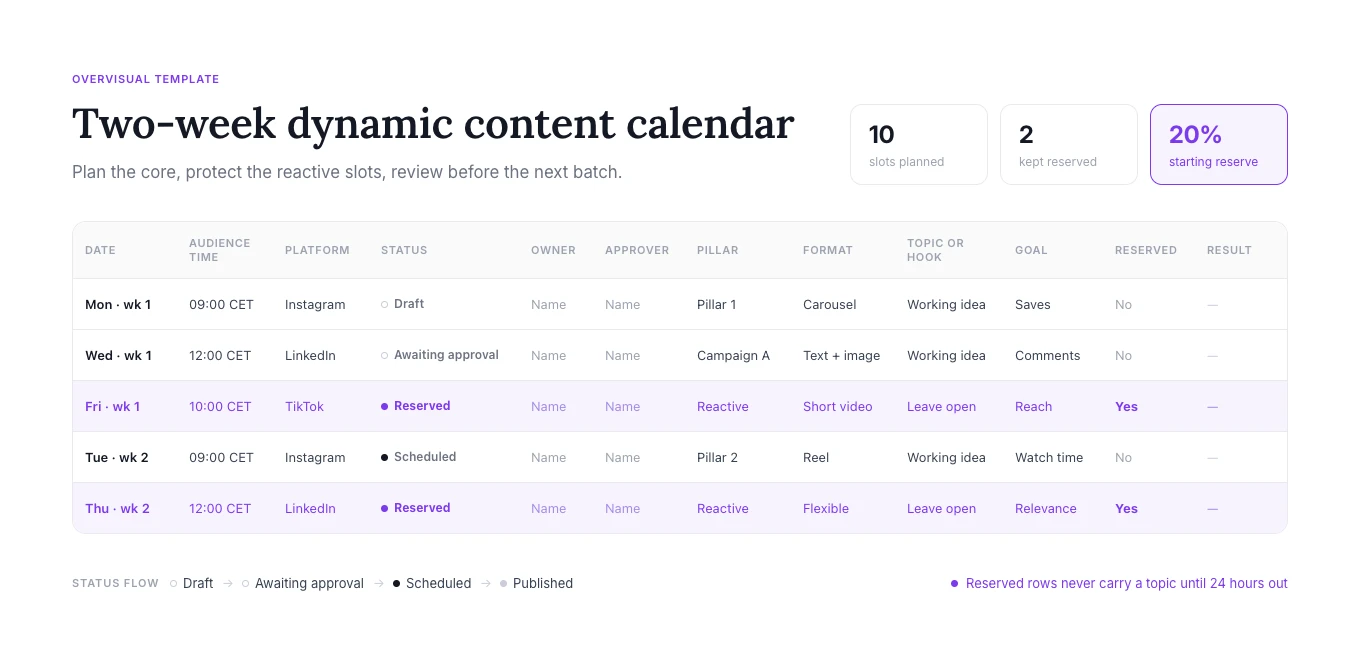
Recommended statuses: Idea → Draft → Awaiting approval → Approved → Scheduled → Published, with Paused available at any stage. After publishing, add the URL, the goal-aligned result and a keep/iterate/stop decision before the next batch session.
AI-driven tools that make the calendar dynamic
AI is genuinely load-bearing here, but not evenly across the workflow. It is best at the mechanical middle: turning a brief into caption variants, adapting copy for different channels and helping produce reusable visual variants. It is weakest exactly where the calendar most needs judgement — deciding whether to post at all during a bad news cycle, or whether a joke lands.
Our own AI social media manager sits in the first category: it generates, schedules and publishes a month of posts, and the human work becomes review. That trade is worth making when the bottleneck is production volume. It is worth not making when the bottleneck is that nobody has decided what the brand is saying this quarter — automation will simply produce more of an unclear message.
What AI actually improves
Three measurable things, in our experience and in the wider category:
- Throughput. More finished posts per hour of human time, which is what makes a five-a-week Instagram cadence realistic for a one-person team.
- Consistency. A shared brand kit and reusable instructions give different contributors the same starting constraints.
- Coverage of repetitive production. Caption variants, hashtag options and platform-specific crops get done without rebuilding each post from scratch.
What it does not improve on its own is relevance. That still comes from knowing the audience, which is why the pillars step comes first. If you are weighing up which scheduler to build this on, our roundup of emerging social media management tools covers how the category now splits between publishing and production.
Collaboration and workflow automation
Once more than two people touch the calendar, the tooling question becomes a workflow question. The useful primitives are narrow: assign a post to a person, comment in place rather than in a separate thread, require an approval before a post can move to scheduled, and notify on state change.
What to avoid is a workflow with more steps than the team has patience for. A three-stage approval on a daily posting cadence will be bypassed within a fortnight — usually by someone posting directly from their phone, which is precisely the outcome the workflow existed to prevent.
Getting format variety without more work
Variety is a cadence problem in disguise. Posting five times a week is only sustainable if the five posts do not each require original production.
Repurposing one idea across formats
The efficient unit is not the post, it is the idea. One decent idea becomes a carousel, three story frames, a short video script and a text post — and because each lands on a different surface, the repetition reads as consistency rather than laziness.
Practically: draft the idea once in long form, then cut it down per format rather than writing each from scratch. Carousels are the highest-leverage format for this because they hold the most argument per post; we go deeper on the mechanics in our carousel use case, and the same source material feeds Instagram and TikTok stories.
Visual production at calendar speed
The visual step is where most calendars slip, because it is the one step that cannot be done in a text editor. Two things keep it moving: a small set of templates that already match the brand, and automatic text placement so nothing has to be nudged by hand for every crop.
The honest caveat is that templated visuals have a ceiling. A launch, a founder story, or anything that needs to feel considered still deserves bespoke design. The calendar's job is to make the routine 80% cheap enough that there is budget left for the other 20%.
Features to look for in a dynamic content calendar
Judge tools against what a dynamic calendar actually requires, not the feature list:
| Capability | Why it matters | What "good" looks like |
|---|---|---|
| Real-time editing | Reacting must not require rebuilding the week | Edit or pause a scheduled post in a couple of clicks |
| Approval workflow | Quality control that people will actually use | One named approver, optional, with a deadline |
| Time zone handling | Global audiences, local sending | Calendar displays in audience time zone |
| Multi-platform scheduling | One plan, not five | Per-platform variants of the same post |
| Performance in context | Learning loop closes | Yesterday's results visible next to tomorrow's plan |
| Flexible views | Different questions need different shapes | Month, week and list views of the same data |
Two features that sound essential and mostly are not: AI trend prediction, which tends to surface trends after they peak, and elaborate custom dashboards, which get built once and opened twice. If you are comparing options, our tools directory and the top AI social media manager roundup cover the practical differences, and pricing is worth checking against seat count before committing.
Real-time adjustments and crisis handling
A dynamic calendar needs an off switch as much as a publish button.
The minimum viable crisis protocol is three lines written before you need them: who can pause all scheduled posts, how they do it, and what triggers a pause. Most teams discover they lack all three at the worst possible moment — during a news event when the person with access is asleep.
Beyond the pause, the useful habit is a weekly ten-minute review of the coming fortnight, asking one question: is anything scheduled that a change in context would make awkward? Promotional posts scheduled near known-sensitive dates, jokes that have aged, competitor comparisons published the week they announce layoffs. Catching those in a calm review is cheap; catching them live is not.
What this looks like in practice
The following examples are illustrative operating models, not measured Overvisual customer case studies.
A small team
A two-person brand running Instagram and TikTok batches every second Monday. They draft twelve posts across four pillars, approve them the same afternoon, and leave three slots open per fortnight. Their reactive slots mostly get used for customer photos and replies to trends — the things that were previously "we should post that" and then never got posted.
The measurable change is rarely a viral post. It is that the account stops going quiet for eleven days when work gets busy.
A multi-region team
A larger team running four regions coordinates a shared master calendar with regional variants, each in its own time zone, each with a local approver. Organic and paid sit in the same view so a launch does not get double-covered. Their reactive allocation is smaller — closer to 10% — because approval chains make fast reaction harder, and they compensate with a pre-approved template bank for common reactive scenarios.
Teams running client work face a version of the same problem; we wrote about the agency setup in our agency guide.
Common mistakes when building a dynamic calendar
- Filling every slot. A full calendar is a static calendar wearing a different name.
- Planning further than you can produce. A three-month plan you cannot execute is a document, not a schedule.
- One cadence for every platform. See the frequency data above.
- Tagging nothing. Without pillar or campaign tags you cannot answer why the month looked the way it did.
- Approval theatre. Steps nobody respects get bypassed, and the bypass becomes the process.
- Automating before deciding. Generating a month of content in minutes is only an advantage if the content is meant to say something specific.
Frequently asked questions
How far ahead should I plan a social media content calendar?
Two to four weeks for most teams. Further out, plans go stale faster than they save time; closer in, you are back to daily decisions. Keep a rougher month-plus view for campaigns and launches, but only commit posts within the two-to-four-week window.
How much of the calendar should stay unplanned?
Start around 20%, then adjust after two planning cycles. Teams close to news or live events may need 25–30%; stable or compliance-heavy teams may need only 5–10% and can lean on pre-approved templates instead.
Does AI actually save time in social media planning?
It can, especially in production. Drafting, resizing and variant generation reduce repetitive work, but the actual saving depends on volume, review standards and how much editing each draft needs. AI saves much less time on strategy, and none on deciding whether a given post is a good idea today.
What should a dynamic content calendar include at minimum?
Post state, channel, scheduled time in the audience's time zone, an owner, a pillar or campaign tag, and the asset itself. Everything beyond that is useful but optional.
How do I stop a dynamic calendar from drifting back into ad hoc posting?
Two habits: the fortnightly batch session, held as an actual recurring meeting, and a standing bank of evergreen drafts so an empty slot never forces improvisation. Drift almost always starts with one missed batch session.
Where to start
If you are rebuilding a calendar this month, do the steps in order and resist the urge to start with the tool. Pillars first, then a single two-week batch, cadence per platform, approvals, reserved capacity, and finally the performance review. One full cycle is enough to see whether the rhythm holds — and if it does, the tooling question becomes much easier to answer, because you will know exactly which part of the process is slow.